
Introduction
This manual provides detailed instructions for the operation and maintenance of your new USARMT Sceptre KR008Y008 replacement remote control. This remote is designed to be compatible with a range of Sceptre television models, ensuring seamless control of your entertainment system. Please read this manual thoroughly before use to ensure proper functionality and to maximize your viewing experience.
Product Overview
The USARMT Sceptre KR008Y008 remote control is a direct replacement for original Sceptre TV remotes, offering full functionality for compatible models. It is pre-programmed and ready to use with no additional setup required for the listed Sceptre TV models.
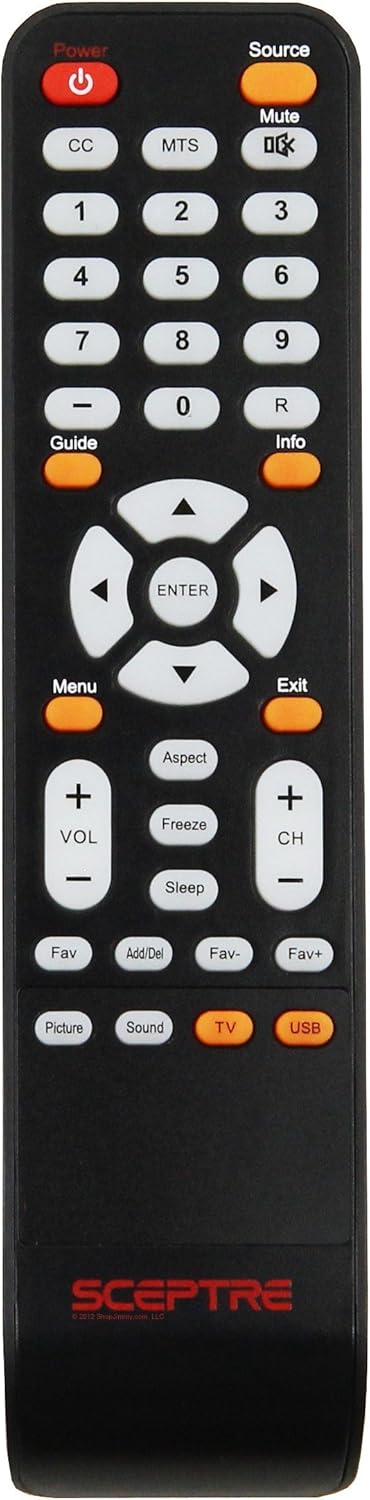
Image: Front view of the USARMT Sceptre KR008Y008 remote control, displaying all buttons and their labels.
Button Functions
Familiarize yourself with the functions of each button on your remote control:
| Button | Function |
|---|---|
| Power | Turns the TV on or off. |
| Source | Selects the input source (e.g., HDMI, AV, Component). |
| Mute | Mutes or unmutes the TV audio. |
| CC | Activates or deactivates Closed Captions. |
| MTS | Selects the Multi-channel Television Sound (MTS) mode. |
| 0-9 | Directly enters channel numbers. |
| - (Dash) | Used for entering sub-channels (e.g., 7-1). |
| R | Recall button, returns to the previously viewed channel. |
| Guide | Displays the Electronic Program Guide (EPG). |
| Info | Displays current program information. |
| Menu | Accesses the TV's main menu. |
| Directional Pad (Up/Down/Left/Right) | Navigates through menus and options. |
| ENTER | Confirms selections in menus. |
| Exit | Exits the current menu or screen. |
| Aspect | Changes the screen aspect ratio (e.g., 16:9, 4:3). |
| Freeze | Freezes the current image on the screen. |
| Sleep | Sets the TV to turn off automatically after a set period. |
| VOL + / - | Adjusts the volume level up or down. |
| CH + / - | Changes channels up or down. |
| Fav | Accesses favorite channels list. |
| Add/Del | Adds or deletes channels from the favorite list. |
| Fav- / Fav+ | Navigates through favorite channels. |
| Picture | Accesses picture settings. |
| Sound | Accesses sound settings. |
| TV | Switches to TV mode. |
| USB | Switches to USB input mode. |
Setup
Battery Installation
- Open the battery compartment cover on the back of the remote control.
- Insert two (2) AAA batteries, ensuring the positive (+) and negative (-) terminals align correctly with the markings inside the compartment.
- Close the battery compartment cover securely.
The remote control is pre-programmed for compatible Sceptre TV models and should work immediately after battery installation.
Operating Instructions
Basic Operation
- Power On/Off: Press the Power button to turn your Sceptre TV on or off.
- Volume Control: Use the VOL + and VOL - buttons to adjust the sound level.
- Channel Surfing: Use the CH + and CH - buttons to change channels sequentially.
- Direct Channel Entry: Use the number buttons (0-9) to directly enter a channel number.
Accessing Menus and Settings
- Press the Menu button to open the TV's main menu.
- Use the Directional Pad (Up, Down, Left, Right arrows) to navigate through menu options.
- Press the ENTER button to select an option or confirm a setting.
- Press the Exit button to close the menu and return to normal viewing.
Maintenance
To ensure the longevity and proper functioning of your remote control:
- Cleaning: Wipe the remote control with a soft, dry cloth. Do not use liquid cleaners or abrasive materials.
- Battery Replacement: Replace batteries when the remote's response becomes sluggish or stops working. Always replace both batteries at the same time.
- Storage: Store the remote in a cool, dry place away from direct sunlight and extreme temperatures.
- Avoid Drops: Protect the remote from physical impact, as this can damage internal components.
Troubleshooting
If you encounter issues with your remote control, refer to the following table:
| Problem | Possible Cause | Solution |
|---|---|---|
| Remote not working | Dead or incorrectly inserted batteries. | Replace batteries with new ones, ensuring correct polarity (+/-). |
| Remote not working | Obstruction between remote and TV's IR sensor. | Ensure a clear line of sight to the TV's infrared receiver. |
| Remote not working | Remote is too far from the TV. | Move closer to the TV. The effective range is typically up to 20 feet. |
| Some buttons not responding | Dirt or debris under the button. | Gently clean around the unresponsive button. |
| Remote works intermittently | Low battery power. | Replace batteries. |
Specifications
| Feature | Detail |
|---|---|
| Brand | USARMT |
| Model Number | KR008Y008 (Replacement) |
| Compatible Devices | Sceptre Televisions (E165BV-HD, E243BV-FHD, E243WV-FHD, E320BV-HD, E320GV-FHD, E325BV-HD, X320BV-HD, X322BV-HD, X405BV-FMD) |
| Connectivity Technology | Infrared (IR) |
| Controller Type | Button Control |
| Special Feature | Ergonomic design |
| Item Weight | 3.2 ounces |
| Date First Available | August 21, 2017 |
Warranty and Support
For any questions, technical support, or warranty inquiries regarding your USARMT Sceptre KR008Y008 remote control, please refer to the seller's contact information or the platform where the product was purchased. Keep your purchase receipt as proof of purchase for any warranty claims.