
Introduction
This manual provides comprehensive instructions for the setup, operation, and maintenance of your USARMT replacement remote control, model KR008Y008. This remote is designed to be compatible with various Sceptre LCD LED HD TV models, offering a direct replacement for your original Sceptre KR008Y008 remote.
Product Overview
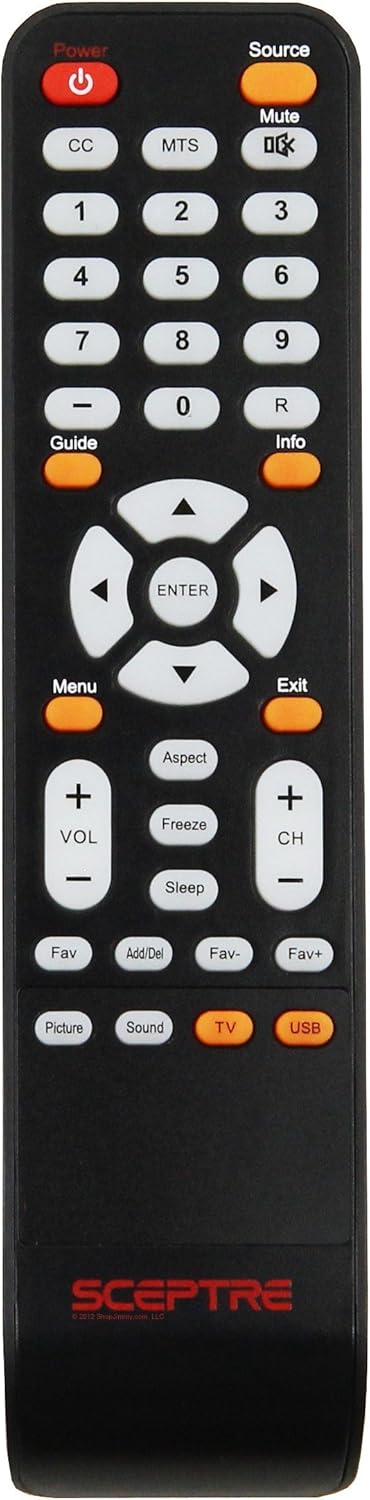
Image: Front view of the USARMT Replacement Remote Control, model KR008Y008. The remote is black with white and orange buttons, featuring the Sceptre logo at the bottom.
Key Features:
- Direct replacement for Sceptre KR008Y008 remote.
- No programming required; ready to use with compatible Sceptre TVs.
- Ergonomic design for comfortable handling.
Compatible Sceptre TV Models:
This remote is compatible with a wide range of Sceptre LCD LED HD TV models, including but not limited to:
- X322BV-HD, X325BV-FHDU, X325BV-FHD
- E328BV-HDH, X425BV-FHD3
- E165BD-HD, E195BV-SHD, E195BD-SHD
- E165BV-HD, E243BV-FHD, E243WV-FHD, E320BV-HD, E320GV-FHD, E325BV-HD, X320BV-HD, X405BV-FMD
For a complete list of compatible models, please refer to the product listing or contact the seller.
Setup
Battery Installation:
- Locate the battery compartment on the back of the remote control.
- Slide the battery compartment cover downwards or press the latch and lift to open.
- Insert two AAA batteries (not included), ensuring the positive (+) and negative (-) terminals align correctly with the markings inside the compartment.
- Replace the battery compartment cover, sliding it back into place until it clicks securely.
Note: Ensure batteries are inserted correctly. Incorrect insertion may prevent the remote from functioning or cause battery leakage.
Operating Instructions
This remote control is pre-programmed and requires no setup for compatible Sceptre TVs. Simply insert batteries and begin use.
Button Functions:
- Power (Red button): Turns the television on or off.
- Source (Orange button): Cycles through available input sources (e.g., HDMI 1, AV, Component, TV).
- Mute: Mutes or unmutes the television audio.
- CC (Closed Caption): Activates or deactivates closed captions for programs that support them.
- MTS (Multi-channel Television Sound): Selects audio modes such as Stereo, SAP (Secondary Audio Program), or Mono.
- Number Pad (0-9, -, R): Directly enters channel numbers. Use '-' for sub-channels (e.g., 7-1). 'R' may recall the previously viewed channel.
- Guide (Orange button): Displays the Electronic Program Guide (EPG) if available.
- Info (Orange button): Displays current program information.
- Navigation Arrows (Up, Down, Left, Right): Navigates through menus and options.
- ENTER: Confirms selections within menus.
- Menu (Orange button): Opens the main television menu for settings adjustments.
- Exit (Orange button): Exits the current menu or on-screen display.
- Aspect: Changes the screen aspect ratio (e.g., 16:9, 4:3, Zoom).
- Freeze: Pauses the current video frame on screen.
- Sleep: Sets a timer for the television to automatically turn off.
- VOL +/-: Increases or decreases the volume level.
- CH +/-: Changes the television channel up or down.
- Fav: Accesses your list of favorite channels.
- Add/Del: Adds or deletes channels from the favorite list.
- Fav- / Fav+: Navigates through your favorite channels.
- Picture: Directly accesses picture settings (e.g., brightness, contrast).
- Sound: Directly accesses sound settings (e.g., bass, treble, sound mode).
- TV (Orange button): Switches the input source to the TV tuner.
- USB (Orange button): Switches the input source to the USB media player.
Troubleshooting
- Remote not responding:
- Check battery orientation. Ensure positive (+) and negative (-) terminals are correctly aligned.
- Replace old batteries with new ones.
- Ensure there are no obstructions between the remote and the TV's infrared sensor.
- Confirm the remote is pointed directly at the TV.
- Some buttons not working:
- This remote is a direct replacement. If specific functions are not working, verify that your TV model originally supported those functions with the KR008Y008 remote.
- Clean the remote's surface and buttons to ensure no debris is interfering with button presses.
- Intermittent operation:
- Weak batteries can cause intermittent performance. Replace them.
- Strong ambient light (e.g., direct sunlight, fluorescent lights) can sometimes interfere with IR signals.
Specifications
| Model | KR008Y008 (Replacement) |
| Brand | USARMT |
| Compatible Devices | Sceptre LCD LED HD Televisions |
| Controller Type | Button Control |
| Special Feature | Ergonomic, Preprogrammed |
| Power Source | 2 x AAA Batteries (not included) |
Maintenance
- Cleaning: Use a soft, dry cloth to clean the remote control. Do not use liquid cleaners or abrasive materials.
- Battery Care: Remove batteries if the remote will not be used for an extended period to prevent leakage. Dispose of used batteries responsibly according to local regulations.
- Storage: Store the remote in a cool, dry place away from direct sunlight and extreme temperatures.
Warranty and Support
As a replacement product, specific warranty terms may vary. Please refer to the original purchase documentation or contact the seller directly for information regarding warranty coverage and customer support for your USARMT replacement remote control.