
iReliev Expandable Wireless Receiver Pods (ET-5050 Compatible)
iReliev TENS & EMS Expandable Wireless Receiver Pods
User Manual for ET-5050 TENS + EMS Unit Compatibility
1. Product Overview
The iReliev Expandable Wireless Receiver Pods are designed to enhance the functionality and coverage of your existing iReliev ET-5050 TENS + EMS System. These additional pods allow for expanded therapeutic application without the constraints of wires, providing a discreet and convenient pain relief solution.
Key Features:
- Expanded Coverage: Allows for additional treatment areas with your ET-5050 unit.
- Low Profile Design: Discreet and comfortable for use under clothing.
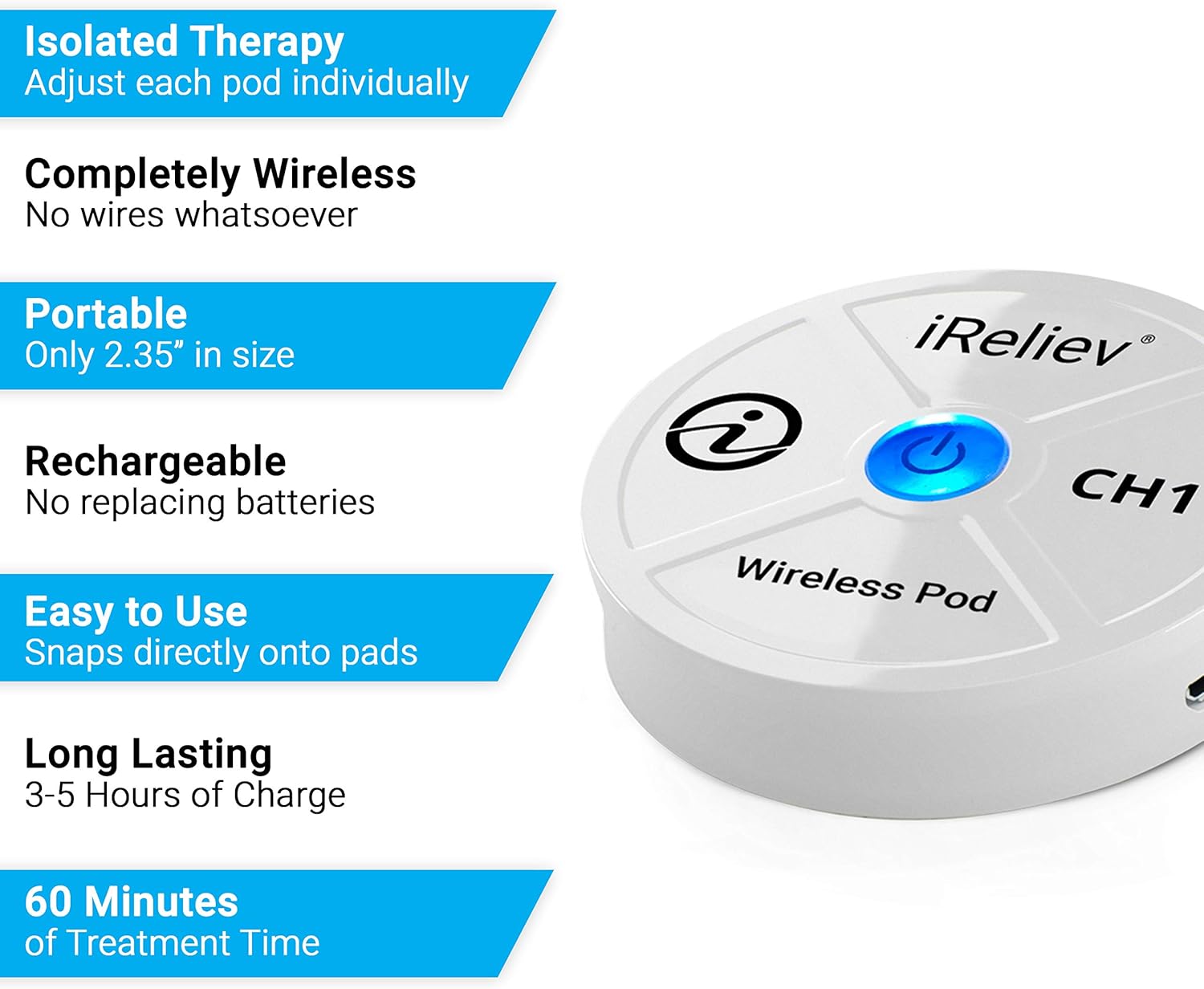
- Completely Wireless: Eliminates the need for cumbersome wires, connecting directly to electrode pads.
- Rechargeable: Built-in lithium polymer batteries provide 3-5 hours of active treatment time per charge.
- Easy to Use: Snaps directly onto compatible electrode pads.

2. Important Safety Information
Please read all warnings and directions before using this product. Failure to do so may result in injury or improper operation.
- Do not use this System if you have a cardiac pacemaker, implanted defibrillators, or any other implanted metallic or electronic device.
- Do not use this System if you have undiagnosed chronic pain.
- Do not use this system post-operatively or while recovering from surgery without consulting a medical professional.
- Always read labels, warnings, and directions before using this product.
For any questions or assistance with pairing your pods to the handheld device, please contact iReliev support at 855-723-2582.
3. Package Contents
Upon opening your package, please verify that all components are present:
- (2) iReliev Wireless Receiver Pods
- (1) Hard Carrying Case
- (Charging cable and electrode pads are typically included with the main ET-5050 unit or sold separately.)
4. Setup and Charging
4.1 Initial Charging
Before first use, fully charge both wireless receiver pods. Connect the provided charging cable (typically a micro-USB cable, not included with this accessory pack) to the charging port on each pod and plug it into a USB power source. The indicator light on the pod will show charging status (e.g., red for charging, blue/green for fully charged).
A full charge typically provides 3-5 hours of active treatment time.
4.2 Pairing with ET-5050 Hand Controller
These wireless receiver pods require the iReliev ET-5050 Hand Controller for operation. To pair the pods with your controller:
- Ensure both the ET-5050 Hand Controller and the wireless pods are sufficiently charged.
- Turn on the ET-5050 Hand Controller.
- Turn on each wireless receiver pod by pressing and holding the power button until the indicator light illuminates.
- Follow the pairing instructions in your ET-5050 Hand Controller's manual to connect the new pods. Typically, this involves selecting an available channel on the controller and initiating a search for new pods.
- Once paired, the indicator light on the pod will change, and the controller will display the connected channel.
If you experience difficulty pairing, refer to the troubleshooting section or contact iReliev support.
5. Operating Instructions
5.1 Attaching Electrode Pads
The wireless receiver pods snap directly onto compatible electrode pads. Ensure the pads are clean and adhere well to the skin for optimal conductivity.
- Remove the electrode pads from their protective liner.
- Align the snaps on the wireless receiver pod with the snaps on the electrode pad.
- Press firmly to secure the pod to the pad.
5.2 Application and Use
Once the pods are attached to the electrode pads and paired with your ET-5050 Hand Controller, you can apply them to the desired treatment area on your body. Ensure the skin is clean and dry for best adhesion.
- Place the electrode pads with attached pods onto the target muscle or pain area.
- Use your ET-5050 Hand Controller to select the desired therapy mode (TENS or EMS) and adjust intensity levels for each channel connected to a wireless pod.
- Begin treatment according to your prescribed therapy or the ET-5050 manual's guidelines.


6. Maintenance
6.1 Charging
Recharge the pods when the battery indicator on the pod or the ET-5050 Hand Controller shows low battery. Avoid completely draining the battery to prolong its lifespan.
6.2 Cleaning and Storage
- Wipe the wireless receiver pods with a soft, damp cloth. Do not submerge them in water or use harsh chemicals.
- Store the pods in the provided hard carrying case when not in use to protect them from dust and damage.
- Store electrode pads according to their specific instructions, typically by reattaching them to their protective liner and keeping them in a sealed bag to maintain adhesion.
- Keep the pods and pads in a cool, dry place, away from direct sunlight and extreme temperatures.
7. Troubleshooting
If you encounter issues with your iReliev Wireless Receiver Pods, please refer to the following common solutions:
| Problem | Possible Cause | Solution |
|---|---|---|
| Pod not turning on. | Low battery. | Charge the pod fully. |
| Pod not pairing with ET-5050. | Pod or controller not in pairing mode; interference; out of range. | Ensure both devices are on and in pairing mode. Move closer to the controller. Restart both devices. |
| Weak or no sensation. | Electrode pads not adhering well; low battery; incorrect intensity setting. | Replace old pads. Recharge pod. Increase intensity on ET-5050 controller. Ensure proper skin contact. |
| Battery life is shorter than expected. | Frequent high-intensity use; aging battery. | Battery life varies with intensity. Ensure full charges. If issues persist, contact support. |
For further assistance, please contact iReliev Customer Support at 855-723-2582.
8. Specifications
| Attribute | Detail |
|---|---|
| Model Compatibility | iReliev ET-5050 TENS + EMS Unit |
| Battery Type | Lithium Polymer (included) |
| Active Treatment Time | 3-5 hours per charge |
| Package Dimensions | 7.48 x 4.76 x 1.77 inches |
| Item Weight | 1.41 ounces |
| Manufacturer | iReliev |
| ASIN | B074ZR4YTK |
9. Warranty and Support
For information regarding product warranty, returns, or technical support, please refer to the documentation included with your original iReliev ET-5050 TENS + EMS Unit or visit the official iReliev website.
You may also contact iReliev Customer Support directly for assistance:
- Phone: 855-723-2582
- Website: Visit the iReliev Store on Amazon
Please have your product model and purchase date available when contacting support.
Ask a question about this manual
Ask about setup, troubleshooting, compatibility, parts, safety, or missing instructions. Manuals+ will review the question and use this page’s manual context to help answer it.