
Introduction
The AcuRite Smart Weather Station with Remote Monitoring (Model 01012M) provides hyper-local weather data directly from your backyard. This system allows you to access real-time information on temperature, humidity, wind speed and direction, rainfall, and barometric pressure. Stay informed to make better daily decisions and keep your home safe with customizable alerts. The system is compatible with Amazon Alexa for convenient voice access to your weather data.
Key Features:
- Alexa compatible: Use voice commands to inquire about your backyard weather.
- Share data with online communities like Weather Underground.
- Monitors rainfall & history, wind speed & direction, outdoor and indoor temperature & humidity.
- Provides future forecast based on barometric pressure.
Package Contents
Your AcuRite Smart Weather Station package includes the following components:
- AcuRite Access Hub
- Color Display for 5-in-1 Sensor Data
- PRO+ 5-in-1 Weather Sensor
- Mounting Bracket
- Debris Filter
- Mounting Hardware
- Instruction Manual
Setup Guide
1. Install the PRO+ 5-in-1 Weather Sensor:
The outdoor sensor measures various weather conditions. It requires 4 AA batteries (not included). For optimal performance, mount the sensor in an open area, away from obstructions, to ensure accurate wind and rain readings. Use the included mounting bracket and hardware.

Image: The AcuRite PRO+ 5-in-1 Weather Sensor, a white and black unit with wind cups and a weather vane, mounted on a pole in an outdoor setting.
2. Power the Color Display:
The indoor color display provides a clear overview of your weather data. Power it using the included corded electric adapter. It also supports backup batteries (4 AA batteries required, not included) to retain settings during power outages.
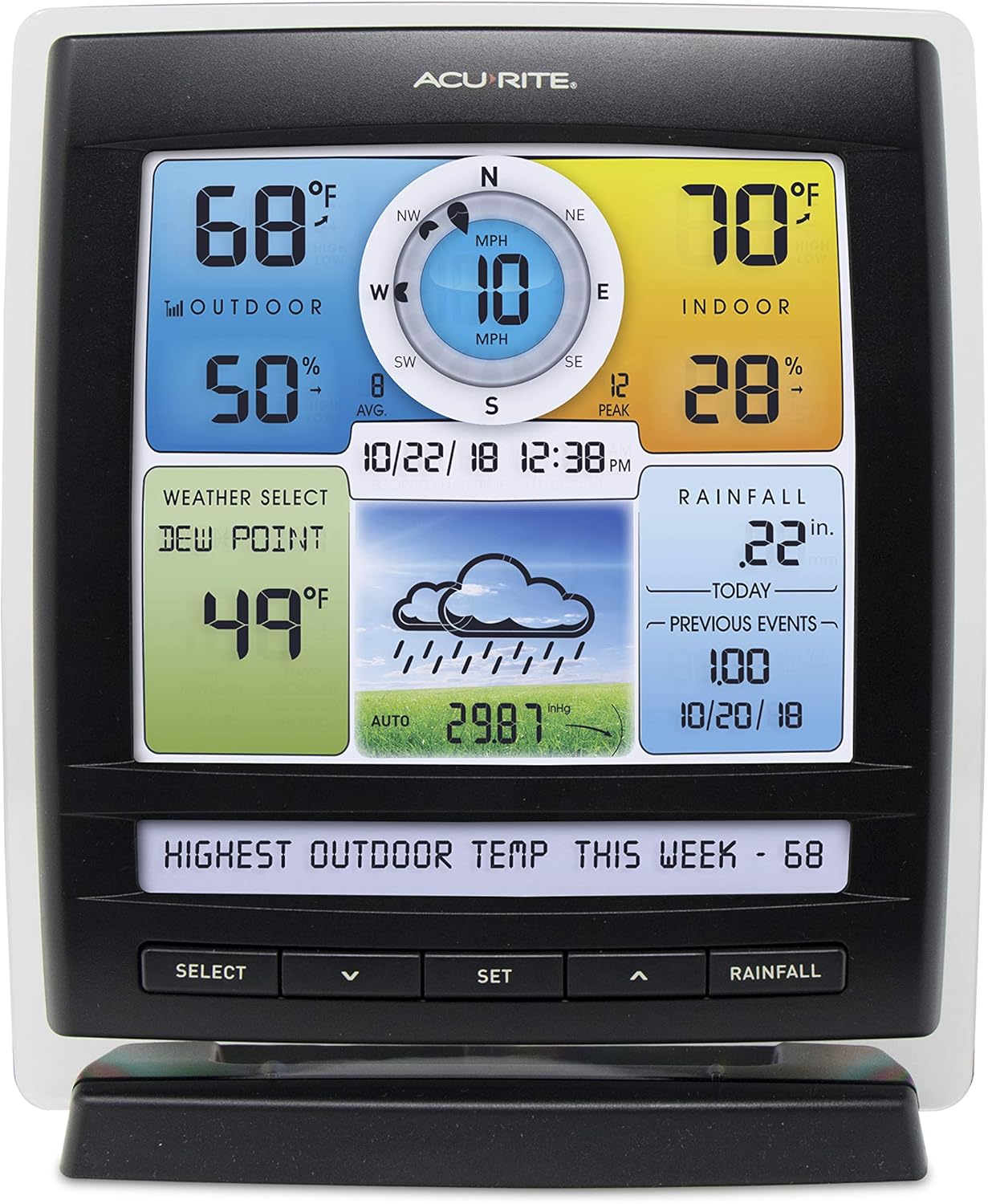
Image: A close-up of the AcuRite Color Display, showing various weather metrics like outdoor/indoor temperature, humidity, wind speed, rainfall, and a weather forecast icon.
3. Set up AcuRite Access Hub:
The AcuRite Access Hub connects your weather station to the internet, enabling remote monitoring and smart home compatibility. Plug the hub into a power outlet and connect it to your home router via an Ethernet cable (not included). Follow the on-screen instructions on the display or the My AcuRite app for pairing.

Image: The AcuRite Access Hub, a compact white cylindrical device with a blue indicator light, designed for internet connectivity.
4. Connect to My AcuRite App and Alexa:
Download the My AcuRite app on your iPhone or Android device. Follow the app's instructions to connect your weather station and enable remote monitoring. For Alexa compatibility, enable the "My AcuRite" skill in your Amazon Alexa app and link your account. You can then ask Alexa for your backyard weather updates.

Image: A smartphone screen showing the My AcuRite app interface with weather data, positioned next to the AcuRite Access hub, illustrating remote monitoring capabilities.
Setup Video:
Video: This video demonstrates the setup process for the AcuRite Iris Weather Station, showing how to assemble and install the outdoor sensor and connect it to the indoor display.
Operating Your Weather Station
Once set up, your AcuRite Smart Weather Station continuously monitors and displays current weather conditions. The color display provides an at-a-glance view of all essential data.
Understanding the Display:
- Outdoor Temperature & Humidity: Current readings from the 5-in-1 sensor.
- Indoor Temperature & Humidity: Readings from the display unit itself.
- Wind Speed & Direction: Real-time wind data, including average and peak speeds.
- Rainfall: Daily, weekly, monthly, and historical rainfall totals.
- Barometric Pressure: Helps predict future weather changes.
- Weather Forecast: An icon-based forecast generated from your local data.

Image: The AcuRite Color Display with callouts pointing to different sections, such as indoor/outdoor temperature, humidity, wind, rainfall, and forecast, demonstrating its comprehensive data presentation.
Remote Monitoring:
Through the My AcuRite app, you can view your weather station's data from anywhere with an internet connection. Set up custom alerts for specific conditions, such as high winds or low temperatures, to receive notifications on your mobile device.
Alexa Integration:
Simply say, "Alexa, ask My AcuRite about my backyard weather" to get instant updates on current conditions.
Maintenance
Battery Replacement:
The PRO+ 5-in-1 Weather Sensor requires 4 AA batteries. It is recommended to check and replace these batteries periodically, especially before winter, to ensure continuous operation. In cold climates, lithium batteries are recommended for better performance.
Cleaning the Rain Gauge:
Periodically check the rain gauge funnel on the outdoor sensor for debris (leaves, insects, etc.) that could obstruct accurate rainfall measurements. Clean as needed to maintain accuracy.
General Care:
Ensure the outdoor sensor is securely mounted and free from physical damage. Keep the indoor display clean with a soft, dry cloth. Avoid using abrasive cleaners.
Troubleshooting
- No Data on Display: Check batteries in the outdoor sensor and ensure the indoor display is powered. Verify wireless connection between the sensor and display.
- Inaccurate Readings: Ensure the outdoor sensor is mounted in an optimal location, away from heat sources or obstructions. Clean the rain gauge if rainfall readings are incorrect.
- Connectivity Issues: Ensure the AcuRite Access Hub is properly connected to your router and powered. Check your internet connection. Restart the hub and router if necessary.
- Alexa Not Responding: Verify the "My AcuRite" skill is enabled and linked in your Alexa app. Ensure your AcuRite Access Hub has an active internet connection.
For more detailed troubleshooting steps, please refer to the comprehensive instruction manual included in your package or visit the AcuRite support website.
Specifications
| Feature | Detail |
|---|---|
| Brand | AcuRite |
| Model Number | 01012M |
| Recommended Uses | Humidity, Pressure, Rainfall, Temperature, Wind Direction, Wind Speed |
| Power Source | Corded Electric (Display), 4 AA batteries (Sensor) |
| Material | Plastic |
| Connectivity Technology | Wireless |
| Temperature Accuracy | ±1 °C |
| Product Dimensions | 2.7 x 6.7 x 8.2 inches |
| Item Weight | 5.15 pounds |
Warranty Information
AcuRite products typically come with a limited one-year warranty. Please refer to the warranty section in the instruction manual included with your product for complete details regarding coverage, terms, and conditions. Retain your proof of purchase for warranty claims.
Support & Contact
For technical support, troubleshooting assistance, or to register your product, please visit the official AcuRite website:
You can also find FAQs, product manuals, and contact information for customer service on their website.


