
Uten Uten 750ml Ultrasonic Cleaner
Uten Sonic Ultrasonic Cleaner 750ml User Manual
Model: Uten 750ml Ultrasonic Cleaner
Introduction
This user manual provides essential information for the safe and effective operation of your Uten Sonic Ultrasonic Cleaner 750ml. Please read this manual thoroughly before first use and retain it for future reference.
The Uten Ultrasonic Cleaner utilizes ultrasonic waves to provide a powerful yet gentle cleaning action for a variety of items, including jewelry, eyeglasses, watches, and more.
Package Contents
Upon opening the package, please verify that all components are present and undamaged:
- 1 x Uten Sonic Ultrasonic Cleaner
- 1 x User Manual (this document)
- 1 x Cleaning Basket
- 1 x Watch Stand

Image: The Uten Sonic Ultrasonic Cleaner, showing the main unit, cleaning basket, and watch stand.
Setup
- Unpacking: Carefully remove the ultrasonic cleaner and all accessories from the packaging.
- Placement: Place the unit on a stable, flat, and dry surface, away from heat sources and direct sunlight. Ensure adequate ventilation around the unit.
- Power Connection: Connect the power cord to the unit and then plug it into a suitable AC power outlet (AC100-120V, 50Hz or AC220-240V, 50Hz, depending on your region).
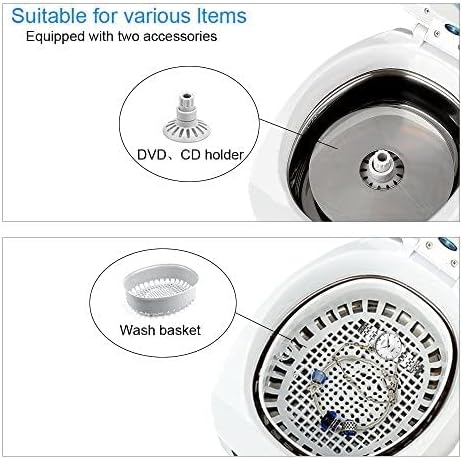
Image: Detailed view of the cleaner's tank, highlighting the DVD/CD holder and the wash basket, which are included accessories.
Operating Instructions
- Fill the Tank: Open the lid and fill the stainless steel tank with water. Do not exceed the "MAX" fill line. For enhanced cleaning, warm water is recommended.
- Add Detergent (Optional): For stubborn stains or improved cleaning effect, a small amount of professional detergent can be added to the water.
- Place Items: Place the items to be cleaned into the cleaning basket. If cleaning glasses that are too large for the basket, the basket can be removed, and the glasses placed directly into the stainless steel tank. For watches, use the provided watch stand.
- Close Lid: Close the lid securely.
- Start Cleaning: Press the "ON" button to start the cleaning cycle. The unit has a preset timer of 3 minutes and will auto power-off.
- After Cleaning: Once the cycle is complete, open the lid, carefully remove the cleaning basket or items, and rinse them under clean water. Dry the items thoroughly.
- Empty Tank: After each use, empty the water from the tank and wipe it clean.
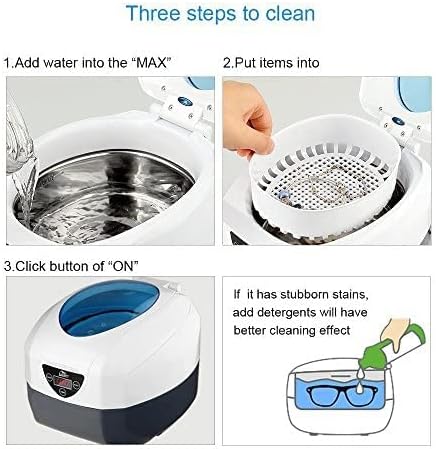
Image: Visual guide demonstrating the three main steps for cleaning: filling the tank with water, placing items in the basket, and pressing the 'ON' button to start the cleaning process.
Suitable Items for Cleaning
The Uten Sonic Ultrasonic Cleaner is suitable for a wide range of items and applications:
- Jewellery: Necklaces, Rings, Earrings, Bracelets.
- Glasses and Timepieces: Contact Lens accessories, Eyeglasses, Sunglasses, Waterproof Watches.
- Personal items: Electric Shaver Heads, Razor Blades, Dentures, Combs, Toothbrushes.
- Stationary Items: Printer-heads, Pen heads, Inject Cartridges, Seals.
- Lab tools: Instruments and fittings.
- Metal pieces: Ancient Coins, Badges, Valves, Machine Nozzles.
- Metal dishware: Forks, Knives, Spoons, Teacups.
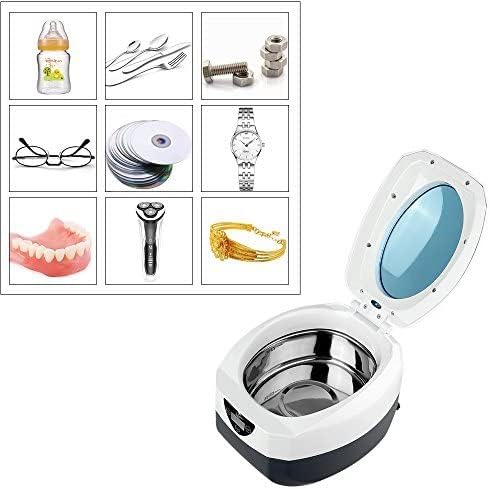
Image: A collage illustrating various items suitable for cleaning with the ultrasonic cleaner, including baby bottles, cutlery, small metal parts, eyeglasses, CDs, watches, dentures, electric shaver heads, and bracelets.
Cleaning Effectiveness

Image: Comparison images showing the 'Before' and 'After' state of eyeglasses, a watch, an electric shaver head, and a bracelet after being cleaned with the ultrasonic cleaner, demonstrating its effectiveness.
Maintenance
- Cleaning the Unit: After each use, unplug the unit and empty the water from the tank. Wipe the stainless steel tank and the exterior of the unit with a soft, damp cloth. Do not use abrasive cleaners or immerse the main unit in water.
- Storage: Store the ultrasonic cleaner in a cool, dry place when not in use.
- Avoid Damage: Ensure the cleaning basket and watch stand are used to prevent direct contact of items with the transducer, which can reduce cavitation and potentially damage the unit.
Troubleshooting
| Problem | Possible Cause | Solution |
|---|---|---|
| Unit does not turn on. | No power supply; loose connection. | Check if the power cord is securely plugged into the unit and the wall outlet. Ensure the outlet has power. |
| Poor cleaning results. | Insufficient water; no detergent; items too dirty; incorrect cleaning time. | Ensure water level is adequate. Add professional detergent for stubborn stains. Pre-rinse heavily soiled items. Run multiple cycles if necessary. |
| Unit stops unexpectedly. | Auto power-off timer activated. | This is normal operation. The unit is designed to auto power-off after 3 minutes. Restart if further cleaning is needed. |
Technical Specifications
| Feature | Detail |
|---|---|
| Cleaning Principle | Ultrasonic |
| Ultrasonic Frequency | 40 kHz |
| Power Consumption | 35 W |
| Tank Material | Stainless Steel SUS304 |
| Product Dimensions (L x W x H) | 200 x 140 x 130 mm (approx. 7.87 x 5.51 x 5.12 inches) |
| Tank Size (L x W x H) | 155 x 95 x 52 mm (approx. 6.10 x 3.74 x 2.05 inches) |
| Tank Capacity | 750 ml |
| Timer Setting | 3 minutes Auto Power-off |
| Power Supply | AC100-120V, 50Hz / AC220-240V, 50Hz |
| Mains Fuse | 3A |
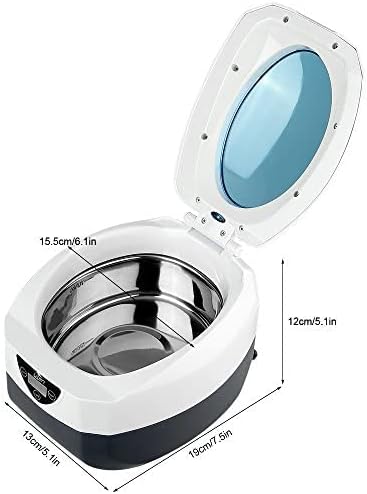
Image: Diagram showing the key dimensions of the Uten Sonic Ultrasonic Cleaner, including height, width, and tank depth.
Warranty and Support
Uten provides a full 1-year guarantee for this professional ultrasonic cleaner. For any questions, technical support, or warranty claims, please contact Uten customer service through the retailer where the product was purchased or visit the official Uten store online.
You can visit the Uten Store on Amazon for more information.
Ask a question about this manual
Ask about setup, troubleshooting, compatibility, parts, safety, or missing instructions. Manuals+ will review the question and use this page’s manual context to help answer it.