
FOVAL BC01B-1
FOVAL Automatic 12V 1000mA Smart Battery Charger and Maintainer User Manual
Model: BC01B-1
Introduction
Thank you for choosing the FOVAL Automatic 12V 1000mA Smart Battery Charger and Maintainer. This device is designed to efficiently charge and maintain 12V lead-acid batteries, including SLA, VRLA, GEL CELL, AGM, and WET types. It functions as a battery maintainer, trickle charger, float charger, and battery desulfator, employing a 4-step charging program to ensure optimal battery health and longevity.
Please read this manual thoroughly before using the charger to ensure safe and correct operation.
Important Safety Information
Always observe the following safety precautions when operating the charger:
- Risk of Explosive Gases: Working in the vicinity of a lead-acid battery is dangerous. Batteries generate explosive gases during normal operation. Ensure adequate ventilation.
- Eye Protection: Always wear eye protection and protective clothing when working with batteries.
- Avoid Sparks: Never smoke or allow a spark or flame in the vicinity of the battery or engine.
- Electrical Shock Hazard: Do not expose the charger to rain or wet conditions. Do not operate the charger if it has received a sharp blow, been dropped, or otherwise damaged.
- Reverse Polarity Protection: The charger includes built-in reverse polarity protection. However, always ensure correct connection to battery terminals (positive to positive, negative to negative).
- Overcharge Protection: The smart charging technology prevents overcharging, even if left connected for extended periods.
- Temperature: Avoid charging batteries in extremely hot or cold environments. The charger has over-temperature protection.
- Children: Keep the charger and battery out of reach of children.

Image: The FOVAL Automatic Battery Charger features ETL Safety Certification and 8 smart protections, including short circuit, overload, over discharge, reverse connection, overcharge, low voltage, over-temperature, and high voltage protection.
Package Contents
Verify that all items are present in your package:
- FOVAL Automatic 12V 1000mA Smart Battery Charger (Model BC01B-1)
- DC Output Cable with Alligator Clips
- DC Output Cable with Ring Terminals
- AC Power Cable

Image: The FOVAL Automatic Battery Charger unit shown with both the alligator clip and ring terminal connector options.

Image: Diagram illustrating the cable lengths for the AC power cable (54 inches), DC output cable (27 inches), and the total length of the charger unit (3.9 inches long, 2.4 inches wide, 1.25 inches high).
Setup Instructions
Follow these steps to connect your FOVAL battery charger:
- Prepare the Battery: Ensure the battery terminals are clean and free of corrosion. If the battery is in a vehicle, ensure the vehicle's ignition is off and all accessories are disconnected.
- Select DC Output Cable: Choose either the alligator clip cable or the ring terminal cable based on your battery's connection type.

Image: Comparison of alligator clamp and ring terminal connections for different battery types.
- Connect DC Output Cable to Charger: Connect the chosen DC output cable to the charger's DC output port. Ensure the connection is secure.

Image: Step 1 shows how to connect the DC output cable to the charger unit.
- Connect to Battery:
- For RED positive (+) clip to the positive battery terminal. Connect the BLACK negative (-) clip to the negative battery terminal.
- For RED positive (+) ring terminal to the positive battery post. Secure the BLACK negative (-) ring terminal to the negative battery post.
Important: Ensure correct polarity. The charger has reverse polarity protection, but correct connection is always recommended.
Image: Step 2 demonstrates connecting either the alligator clips or ring terminals to the battery posts.
- Connect to Power Outlet: Plug the AC power cable into a standard 120V AC wall outlet.
Image: Step 3 shows plugging the charger's AC power cable into a wall outlet.
Operating Instructions
The FOVAL charger operates automatically once connected. No manual settings are required.
Charging Process
The charger utilizes a 4-step smart charging program:
- Initialization: The charger analyzes the battery's condition.
- Bulk Charge: Charges the battery at a constant current until it reaches approximately 80% capacity.
- Absorption Mode: Charges at a constant voltage, gradually reducing current to prevent overcharging and ensure a full charge.
- Float Mode (Maintenance): Once fully charged, the charger automatically switches to a low-current maintenance voltage to keep the battery at optimal charge without overcharging. This mode is ideal for long-term connection.

Image: Graph illustrating the automatic 3-stage smart charging process: Constant Current (Bulk Charge), Constant Voltage (Absorption), and Float Charge (Maintenance).
LED Indicators
The charger features intuitive LED indicators to provide visual feedback on its status:
- Green LED (Power): Illuminates when the charger is connected to an AC power source.
- Green with Red LED (Charging): Indicates that the battery is currently being charged.
- Green with Yellow LED (Fully Charged): Indicates that the battery has reached full charge and the charger is in float (maintenance) mode.
- Twinkle / Error Light: Indicates a fault or error condition. Refer to the Troubleshooting section.

Image: Close-up of the charger's LED indicators: Twinkle/Error, Charge Complete, Light/Charging, and Power.
Compatibility
This charger is suitable for 12V lead-acid batteries with capacities ranging from 2Ah to 120Ah. It is compatible with various vehicles and equipment, including but not limited to:
- Cars
- Motorcycles
- Lawn Mowers
- ATVs, UTVs
- Tractors
- Trucks, SUVs
- RVs, Boats, PWCs, Jet Skis
- Snowmobiles
- Golf Carts
- Children's Electric Toys
Note: This charger is not compatible with lithium batteries. It can only repair slightly damaged batteries, not completely dead ones.
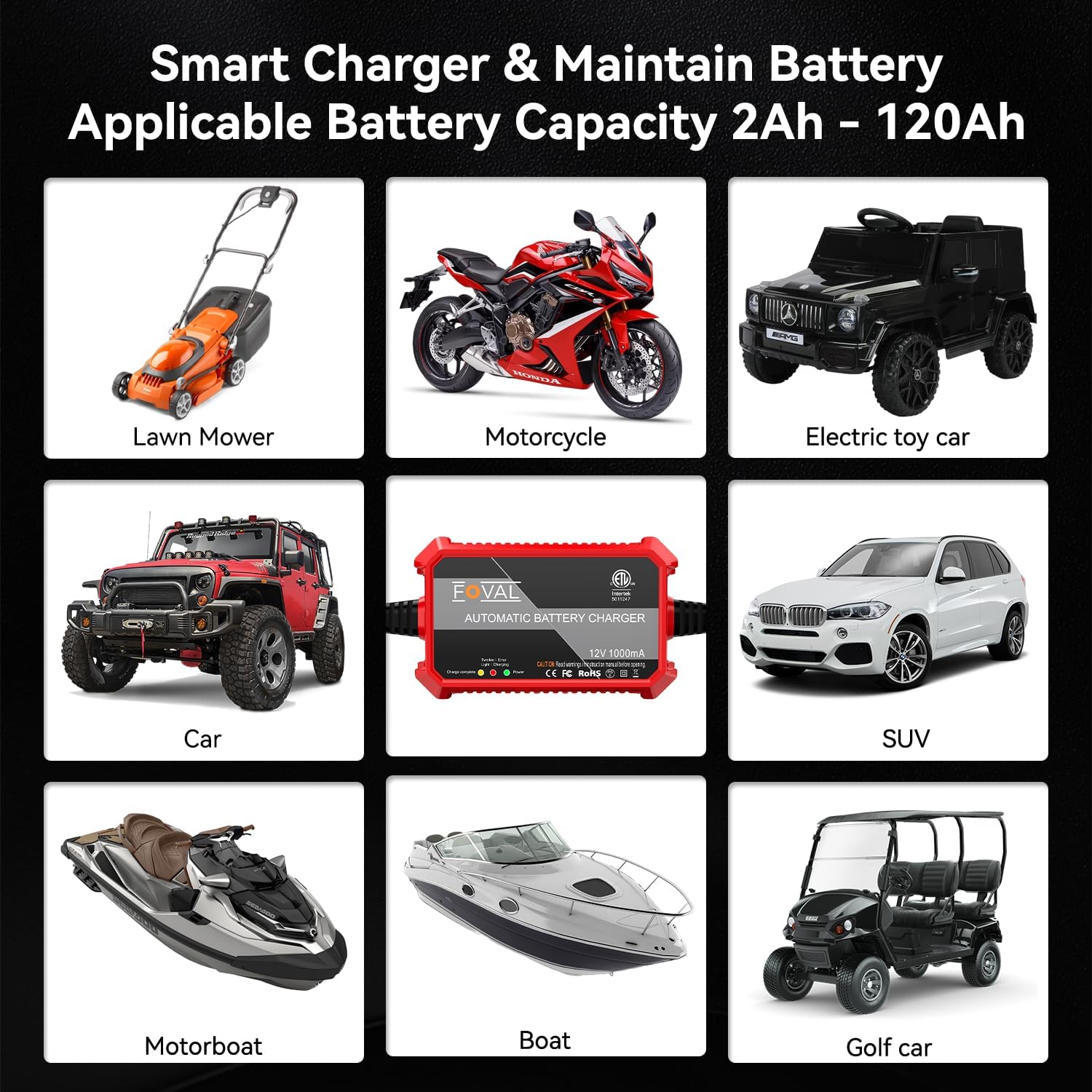
Image: Visual examples of vehicles and equipment compatible with the FOVAL Automatic Battery Charger, including lawn mowers, motorcycles, electric toy cars, cars, SUVs, motorboats, boats, and golf cars.
Maintenance
Proper maintenance ensures the longevity of your charger and batteries:
- Charger Care: Keep the charger clean and dry. Wipe with a soft, dry cloth. Do not use harsh chemicals or abrasives.
- Cable Inspection: Regularly inspect the AC and DC cables for any signs of damage, fraying, or exposed wires. Replace if damaged.
- Storage: Store the charger in a cool, dry place when not in use.
- Battery Terminals: Ensure battery terminals are clean and free of corrosion for optimal connection.
- Long-Term Connection: The charger is designed for long-term maintenance charging (float mode) to keep batteries fully charged during periods of inactivity.
Troubleshooting
| Problem | Possible Cause | Solution |
|---|---|---|
| Charger not turning on (No Power LED) | No AC power; faulty outlet; damaged AC cable. | Check AC power connection. Test outlet with another device. Inspect AC cable for damage. |
| Twinkle / Error Light is on | Reverse polarity connection; short circuit; battery voltage too low; damaged battery. | Disconnect and reconnect battery ensuring correct polarity. Check for short circuits. If battery voltage is extremely low, it may be beyond repair. |
| Battery not charging (Green with Red LED not on) | Poor connection to battery; battery already fully charged; battery fault. | Ensure secure connection to battery terminals. Check LED indicators for "Fully Charged" status. Test battery condition. |
| Charger feels hot | Normal operation during bulk charging; poor ventilation; excessive ambient temperature. | Ensure adequate ventilation around the charger. If excessively hot, disconnect and allow to cool. Avoid charging in direct sunlight or enclosed spaces. |
Specifications
| Feature | Detail |
|---|---|
| Model Number | BC01B-1 |
| Output Voltage | 12V DC |
| Output Current | 1000mA (1A) |
| Battery Type Compatibility | 12V SLA / VRLA / GEL CELL / AGM / WET Lead-Acid Batteries |
| Battery Capacity Range | 2Ah - 120Ah |
| Charging Program | 4-Step Automatic (Initialization, Bulk Charge, Absorption Mode, Float Mode) |
| Protections | Reverse Polarity, Over-Current, Overload, Over-Voltage, Short Circuit, Over-Temperature, Overcharge, Low-Voltage |
| Dimensions (L x W x H) | 3.9 x 2.4 x 1.25 inches (10 x 6.1 x 3.2 cm) |
| Weight | 10.6 ounces (300 grams) |
| Certifications | ETL Listed, CE, FCC, RoHS |
Image: Diagram showing the dimensions of the FOVAL Automatic Battery Charger: 3.90 inches length, 2.40 inches width, and 1.25 inches height. Net weight is 0.65 lbs (295g).
Warranty and Customer Support
FOVAL provides an 18-month warranty for this product. For any questions, concerns, or support needs, please contact FOVAL customer service. We are committed to ensuring your satisfaction.
For further assistance, you may refer to the official User Guide PDF available at: FOVAL User Guide (PDF)
Related documentsBC01B-1

Ask a question about this manual
Ask about setup, troubleshooting, compatibility, parts, safety, or missing instructions. Manuals+ will review the question and use this page’s manual context to help answer it.