1. Introduction
This manual provides essential information for the proper installation, operation, and maintenance of the Easyricambi Micronova N100 PN100_A01 Thermoregulating Control Board. This control board is specifically designed for use with air pellet stoves, offering comprehensive management of stove functions.
The Micronova N100 PN100_A01 is engineered for flexibility and reliability, capable of handling various stove operations through its dedicated inputs and outputs. It can also serve as a replacement for existing heat control cards in many pellet stoves on the market.
2. Safety Information
Important: Installation and maintenance of this control board should only be performed by qualified personnel or a certified technician. Incorrect installation can lead to electrical shock, fire, or damage to the appliance.
- Always disconnect the main power supply to the pellet stove before attempting any installation, wiring, or maintenance procedures.
- Ensure all wiring connections comply with local electrical codes and the stove manufacturer's specifications.
- Do not operate the control board if it appears damaged or if any components are missing.
- Keep the control board dry and free from dust and debris.
3. Product Overview
The Micronova N100 PN100_A01 is a sophisticated thermoregulating control board housed in a protective casing, designed to manage the operational parameters of air pellet stoves. It features multiple connection points for various stove components, including sensors, displays, and actuators.

Figure 3.1: Front view of the Micronova N100 PN100_A01 control board, showing the main branding and connection labels.
The board's robust software allows for flexible control of connected devices, making it a versatile solution for new installations or as a replacement part. It supports both user-level adjustments and advanced installer-level configurations.
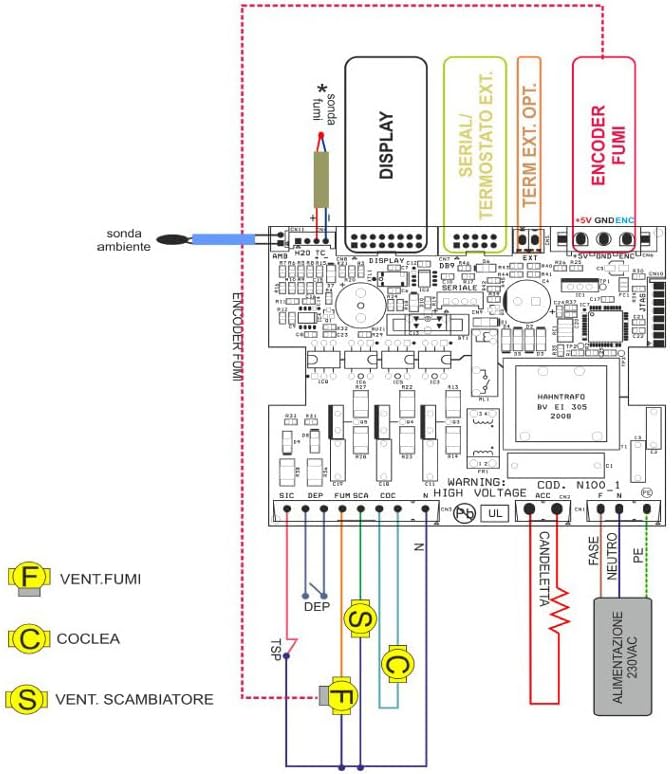
Figure 3.2: Close-up view of the various connectors on the Micronova N100 control board, indicating input/output ports for different stove components.
4. Installation (Setup)
The Micronova N100 PN100_A01 control board is designed for straightforward mounting within compatible pipe air pellet stoves. It typically comes pre-programmed with basic operational parameters, facilitating initial setup.

Figure 4.1: The control board is supplied pre-programmed with basic parameters, simplifying the initial installation process.
For optimal performance and safety, it is highly recommended that installation and initial configuration of advanced parameters be carried out by a qualified technician. Accessing certain advanced settings may require a security password.
4.1. Wiring Diagram
Refer to the following diagram for correct wiring connections. Ensure all connections are secure and match the corresponding terminals on your pellet stove.

Figure 4.2: Detailed wiring diagram for the Micronova N100 control board, illustrating connections for various components such as ambient probe, display, serial port, external thermostat, smoke encoder, smoke fan (VENT.FUMI), auger (COCLEA), and heat exchanger fan (VENT.SCAMBIATORE).
Note: The diagram indicates connections for ambient probe, display, serial communication, external thermostat, smoke encoder, and power supply (230VAC). Specific outputs are shown for the smoke fan (F), auger (C), and heat exchanger fan (S).
5. Operation
The Micronova N100 control board offers two distinct menu levels for operation: the User Menu and the Installer Menu. These menus are typically accessed via a connected keyboard/screen interface.

Figure 5.1: Illustration highlighting the availability of both User and Installer menus for managing stove functions and advanced parameters.
5.1. User Menu
The User Menu allows for daily adjustments and monitoring of the pellet stove's operation. Access to this menu typically requires a security key.
- On/Off Functions: Start and stop the stove.
- Fan Adjustment: Control the speed of the fans.
- Operating Temperature Setting: Adjust the desired room or water temperature.
- Pellet Charging: Manage the pellet feed rate.
- Fire Bowl Cleaning: Initiate the cleaning cycle for the combustion chamber.
- Final Cleaning: Perform a final cleaning cycle.
- Alarm Reset: Clear active alarms.
5.2. Installer Menu
The Installer Menu provides access to advanced parameters for fine-tuning the stove's performance and configuring specific functionalities. This menu is password-protected and intended for qualified technicians.
- Heat Calibration: Adjust thermal settings for optimal efficiency.
- Pellet Charging Calibration: Precise adjustment of pellet feed.
- Input/Output Enabling and Disabling: Configure active sensors and actuators.
- Memory Meter Reset: Reset operational counters.
- Diagnostic Information: View operational status, room temperature, menu levels, and alarm types.
Advanced parameters can also be inserted via a computer by connecting through the RS232 serial interface using SeramiNet software.
6. Compatibility
The Micronova N100 PN100_A01 control board is compatible with a range of pellet stoves and accessories.
6.1. Compatible Pellet Stoves
- Clam Aria (Product code: 05012549)
- Atlas
- Mizar
6.2. Compatible Accessories
The control board supports various display types and other peripheral devices:

Figure 6.1: Examples of various compatible display types that can be connected to the Micronova N100 control board. Note that the silkscreen printing on your specific display may vary.
- LCD Screen F047_2
- LED Screen C025_7
- LED Screen PN005_A02
- IR Remote Control
- Control Screen Connector Cable
- Smoke Sensor (up to 600°C)
- Room Temperature Probe
7. Maintenance
The Micronova N100 PN100_A01 control board is designed for durability and requires minimal maintenance. To ensure its longevity and reliable operation:
- Keep the board's environment clean and free from excessive dust, moisture, and corrosive substances.
- Periodically inspect connections for tightness and signs of wear.
- Do not attempt to clean the internal components with liquids. Use a soft, dry brush or compressed air if necessary, ensuring power is disconnected.
8. Troubleshooting
If you encounter issues with your pellet stove's operation after installing the Micronova N100 control board, consider the following general troubleshooting steps:
- No Power: Check all power connections and ensure the main power supply to the stove is active. Verify fuses if applicable.
- Display Not Working: Ensure the display cable is securely connected to the control board and the display unit.
- Stove Not Responding: Verify all sensor and actuator connections. Check for any error codes displayed on the screen and consult the stove's specific manual for their meaning.
- Parameter Access: Remember that advanced parameters in the Installer Menu are password-protected. If you are not a qualified technician, do not attempt to modify these settings. Contact a professional for assistance.
For complex issues or persistent problems, it is strongly recommended to contact a qualified technician or the product manufacturer for support.
9. Specifications
| Feature | Detail |
|---|---|
| Model | N100 PN100_A01 |
| Brand | Easyricambi |
| Manufacturer | Easyricambi |
| Material | Plastic |
| Color | Black |
| Display Type Compatibility | LED or LCD (various models supported) |
| Operating Temperature (Max) | 600°C (for smoke sensor compatibility) |
| Batteries Required | No |
| Date First Available | 29 April 2022 |
10. Warranty and Support
For information regarding warranty coverage, technical support, or replacement parts, please contact your retailer or the manufacturer, Easyricambi, directly. Ensure you have your product model number (N100 PN100_A01) and purchase details available when seeking assistance.


