
1. Introduction
This manual provides detailed instructions for the installation, operation, and maintenance of your yuwei Wireless Backup Camera System, Model YW-34132. This system is designed to enhance vehicle safety by providing a clear rear view, especially during reversing maneuvers. It features a digital wireless signal for stable transmission and is suitable for various vehicles including trailers, RVs, trucks, pickup trucks, and cargo vans.
2. Product Overview
The yuwei YW-34132 system utilizes advanced digital wireless technology to ensure a stable and interference-free video feed. The camera is built with durable zinc metal, offering high resistance to vibration and corrosion, and is rated IP69 for waterproofing, allowing reliable operation in diverse weather conditions.
Key Features:
- Digital Wireless Signal: Provides a high-definition, interference-free connection between the camera and monitor, with a transmission distance of up to 190ft in open areas.
- Stable Performance: Maintains a smooth and clear image even at vehicle speeds up to 80 mph.
- Robust Design: IP69 waterproof rating and resistance to extreme temperatures (-4°F/-20°C to 158°F/70°C) ensure durability in harsh environments.
- Night Vision: Equipped with night vision capabilities for visibility up to 20ft in low-light conditions.
- Wide Viewing Angle: A 110-degree wide-angle lens covers approximately 90% of the blind area behind the vehicle.
- Easy Installation: Designed for straightforward setup with a 4.3-inch wireless LCD monitor and a camera that integrates with your vehicle's power system.
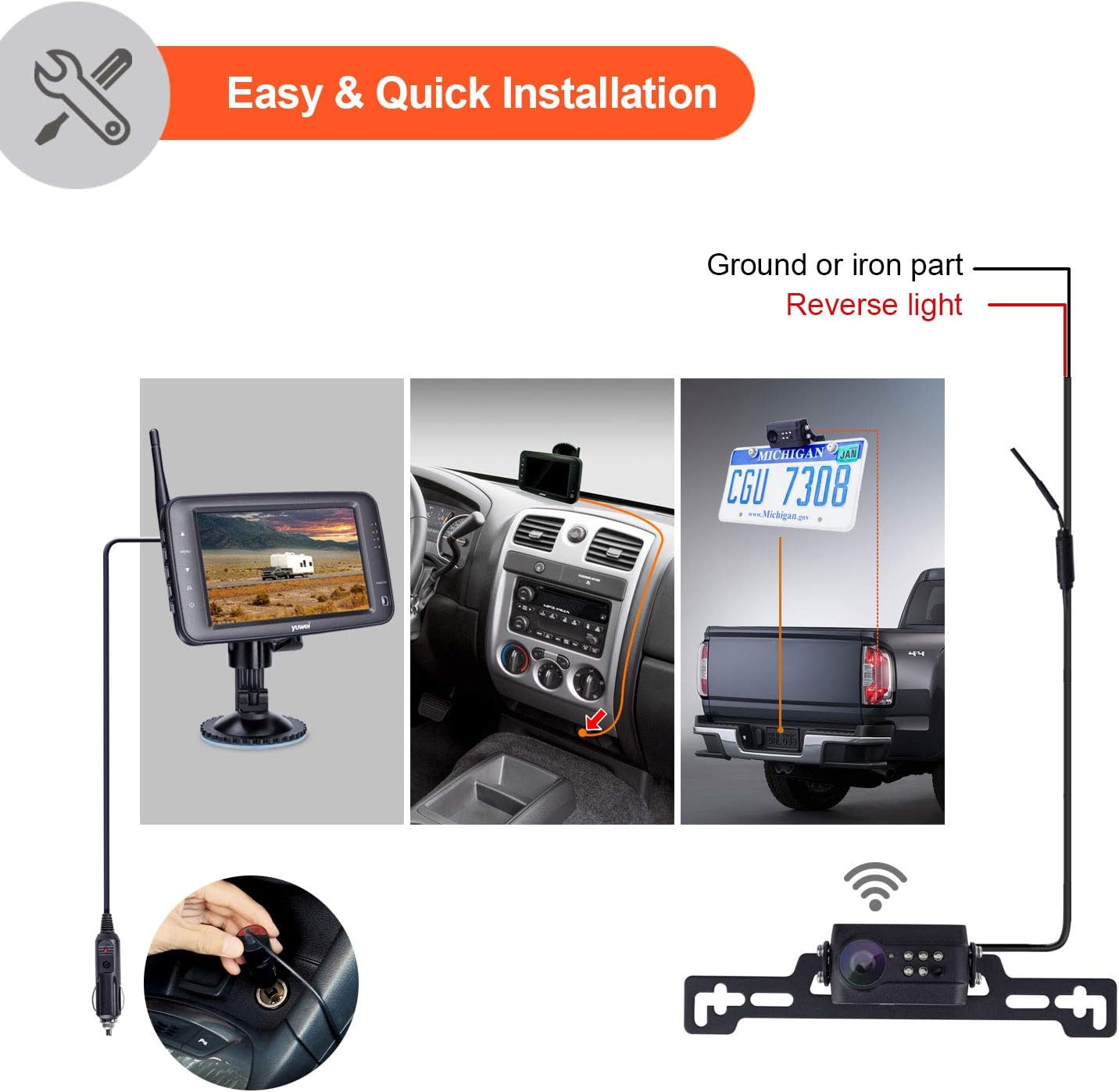
Image: This illustration compares the stable, clear signal of digital wireless transmission with the unstable, interference-prone signal of analog wireless transmission, highlighting the benefits of the yuwei system's digital technology.

Image: This graphic demonstrates the system's ability to maintain a clear and instant digital wireless signal even when the vehicle is traveling at speeds up to 80 mph.

Image: This image illustrates the system's resilience, showcasing its IP69 waterproof rating, heat resistance up to 158°F (70°C), and cold resistance down to -4°F (-20°C), making it suitable for various harsh environments.
3. Package Contents
Please verify that all items listed below are included in your package:
- 4.3-inch Wireless LCD Monitor
- Wireless License Plate Camera
- Suction Cup Bracket for Monitor
- User Manual
- Car Charger (8.2ft)
- Slip-on Bracket (Optional)
- U-Shape Bracket (Optional)
- Antenna
- Screws & Clamps for Installation

Image: This image displays all components included in the yuwei Wireless Backup Camera System package, such as the monitor, camera, various brackets, charger, and installation hardware.
4. Setup and Installation
The yuwei Wireless Backup Camera System is designed for easy and quick installation. A screwdriver is typically the only tool required.
4.1 Monitor Installation
- Attach the suction cup bracket to the 4.3-inch wireless LCD monitor.
- Mount the monitor securely on your vehicle's windshield or dashboard using the suction cup. Ensure the placement does not obstruct your view of the road.
- Plug the car charger into your vehicle's cigarette lighter socket. The monitor will power on automatically.
4.2 Camera Installation
The camera is typically mounted near the license plate. It includes a built-in wireless transmitter module.
- Choose the appropriate bracket (license plate bracket, slip-on bracket, or U-shape bracket) for your vehicle and desired camera position.
- Securely attach the camera to your vehicle using the provided screws and clamps.
- Connect the camera's power cable to your vehicle's electrical system.
- For monitoring when backing up: Connect the camera's power to the reversing light circuit.
- For continuous monitoring: Connect the camera's power to an ACC (Accessory) power source.

Image: This diagram illustrates various installation methods for the camera, including mounting on a license plate, and shows the system's compatibility with multiple vehicle types such as cars, trucks, RVs, and buses.
5. Operation
Once installed and powered, the system operates automatically.
5.1 Power On/Off
The monitor powers on automatically when connected to the cigarette lighter and the vehicle's ignition is on. To turn off, simply unplug the car charger or turn off the vehicle's ignition.
5.2 Viewing the Feed
The camera's video feed will appear on the 4.3-inch monitor. If the camera is connected to the reversing light, the display will activate when the vehicle is put into reverse.
5.3 Parking Guidelines
The monitor features adjustable parking guidelines. These guidelines can be turned on or off using a dedicated button on the monitor, assisting with precise parking maneuvers.
5.4 Night Vision
The camera automatically activates its night vision feature in low-light conditions, providing a clear view up to 20 feet behind your vehicle.
6. Maintenance
To ensure optimal performance and longevity of your yuwei Wireless Backup Camera System, follow these maintenance guidelines:
- Cleaning the Camera Lens: Regularly clean the camera lens with a soft, damp cloth to remove dirt, dust, or water spots that may obstruct the view. Avoid abrasive cleaners.
- Cleaning the Monitor Screen: Use a soft, dry, anti-static cloth to clean the monitor screen. Do not use liquid cleaners directly on the screen.
- Checking Connections: Periodically inspect all cable connections for tightness and ensure they are free from corrosion or damage.
- Weather Resistance: While the camera is IP69 waterproof, extreme conditions like heavy snow or ice buildup should be cleared from the lens for clear visibility.
7. Troubleshooting
If you encounter issues with your yuwei Wireless Backup Camera System, refer to the following common troubleshooting steps:
7.1 No Image on Monitor
- Check Power: Ensure the monitor's car charger is securely plugged into the cigarette lighter and the vehicle's ignition is on. Verify the camera is receiving power (e.g., if connected to reversing lights, ensure the vehicle is in reverse).
- Check Connections: Confirm all power connections to the camera are secure and correctly wired.
- Signal Interference: Although designed for interference-free operation, strong electromagnetic interference from other devices might temporarily affect the signal. Try repositioning the monitor or camera slightly if possible, or check for other active wireless devices nearby.
7.2 Image is Unclear or Flickering
- Clean Lens: Ensure the camera lens is clean and free from dirt, moisture, or obstructions.
- Signal Strength: While the system has a long range, extreme distances or significant physical obstructions (e.g., large metal structures) between the camera and monitor can weaken the signal. Ensure the vehicle is within the effective transmission range.
- Power Fluctuation: Ensure the camera and monitor are receiving stable power. Unstable voltage can affect image quality.
7.3 Monitor Not Turning On
- Cigarette Lighter Function: Test the cigarette lighter socket with another device to ensure it is functional.
- Car Charger Fuse: Check the fuse in the car charger plug. Replace if blown.
8. Specifications
| Feature | Specification |
|---|---|
| Model Number | YW-34132 |
| Screen Size | 4.3 Inches |
| Viewing Angle | 110 Degrees (Real Angle of View) |
| Optical Sensor Technology | CMOS |
| Voltage | 12 Volts (DC) |
| Installation Type | Surface Mount |
| Connector Type | Wireless |
| Video Capture Resolution | 1080p |
| Waterproof Rating | IP69 |
| Operating Temperature | -4°F (-20°C) to 158°F (70°C) |
| Product Dimensions | 13.5L x 8W x 1.9H Centimetres |
9. Warranty and Support
This product comes with a standard warranty. For specific warranty details, please refer to the documentation included with your purchase or contact customer support.
Customer Support:
For technical assistance, troubleshooting, or warranty inquiries, please contact yuwei customer support:
- Email: info@51forsafe.com
- Manufacturer: Guangzhou Forsafe Electronics Technology Co.,Ltd