
Introduction
This manual provides comprehensive instructions for the WODESYS AC600 Dual-Band USB WiFi Adapter. This adapter is designed to provide wireless connectivity to your desktop or laptop computer, supporting both 2.4 GHz and 5 GHz frequencies for high-speed internet access.
Package Contents:
- 1 x WODESYS AC600 Mini Wireless Adapter
- 1 x Driver CD
Setup
Driver Installation:
- Insert the included Driver CD into your computer's CD-ROM drive.
- Follow the on-screen instructions to install the necessary drivers.
- For Windows 10 users, the adapter is typically Plug and Play, meaning drivers may install automatically upon connection. However, if issues arise, use the provided CD.
Hardware Connection:
- Ensure the drivers are installed or are in the process of automatic installation.
- Carefully insert the WODESYS AC600 USB WiFi Adapter into an available USB port on your desktop or laptop computer.
- The operating system should detect the new hardware.
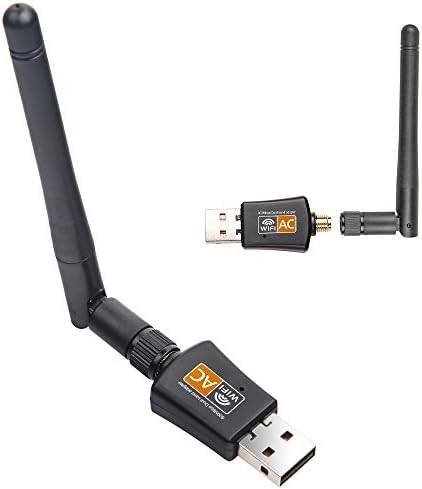
This image shows the WODESYS AC600 USB WiFi Adapter with its external antenna connected, ready for insertion into a USB port.
Operating Instructions
Connecting to a Wireless Network:
- Once the adapter is installed and recognized by your system, locate the wireless network icon in your computer's system tray (Windows) or menu bar (Mac).
- Click on the icon to view available wireless networks.
- Select your desired WiFi network (SSID) from the list.
- Enter the network security key (password) if prompted.
- Click 'Connect'. Your computer should now be connected to the internet via the WODESYS AC600 adapter.
Dual-Band Functionality:
The AC600 adapter supports both 2.4 GHz and 5 GHz frequency bands. The 2.4 GHz band offers wider coverage, while the 5 GHz band provides faster speeds and less interference, ideal for HD video streaming and online gaming. Ensure your router supports dual-band operation and that you select the appropriate network (e.g., 'MyWiFi_2.4GHz' or 'MyWiFi_5GHz') for your needs.
Maintenance
- Keep Drivers Updated: Periodically check the WODESYS website for the latest driver updates to ensure optimal performance and compatibility.
- Cleanliness: Keep the adapter free from dust and debris. Use a soft, dry cloth for cleaning.
- Storage: When not in use, store the adapter in a cool, dry place away from direct sunlight and extreme temperatures.
Troubleshooting
Common Issues and Solutions:
- No Wireless Networks Detected:
- Ensure the adapter is securely plugged into a USB port.
- Verify that the drivers are correctly installed.
- Check if your computer's WiFi is enabled (if applicable).
- Restart your computer and router.
- Slow Connection Speed:
- Move closer to your WiFi router to improve signal strength.
- Try connecting to the 5 GHz band if available, as it generally offers faster speeds.
- Ensure there are no physical obstructions or sources of interference (e.g., microwaves, cordless phones) near the adapter or router.
- Update your adapter's drivers.
- Adapter Not Recognized:
- Try a different USB port.
- Reinstall the drivers from the provided CD or WODESYS website.
- Ensure your operating system is supported (Windows 10/8.1/8/7/XP/Vista, Mac OS X 10.4 – 10.12, 32/64-bit Linux).
Specifications
| Feature | Detail |
|---|---|
| Brand | WODESYS |
| Model Number | 4330950565 |
| Chipset | Realtek 8811au |
| Wireless Standard | 802.11ac (backward compatible with a/b/g/n) |
| Wireless Speed | AC600 (433 Mbps at 5 GHz, 150 Mbps at 2.4 GHz) |
| Frequency Bands | 2.4 GHz and 5 GHz |
| Interface | USB |
| Supported OS | Windows 10/8.1/8/7/XP/Vista, Mac OS X 10.4 – 10.12, 32/64-bit Linux |
| Package Dimensions | 16.8 x 9.9 x 2.2 cm |
| Weight | 36 g |

This image illustrates the physical dimensions of the WODESYS AC600 USB WiFi Adapter, including its length, width, and antenna length.
Warranty and Support
Warranty Information:
The WODESYS AC600 USB WiFi Adapter comes with a 2-year warranty for replacement or refund. Please retain your proof of purchase for warranty claims.
Technical Support:
For technical assistance, troubleshooting beyond this manual, or warranty inquiries, please contact WODESYS customer support. Refer to the product packaging or the official WODESYS website for contact details.