
1. Introduction
This manual provides comprehensive instructions for the operation and maintenance of your Armitron Sport Unisex Digital Chronograph Silicone Strap Watch, Model 40/8417. This digital watch features a quartz movement with a multifunctional display, designed for everyday use and active lifestyles.
2. Product Overview
The Armitron Sport 40/8417 watch is equipped with a black square-shaped case, a glass crystal lens, and a reverse LCD display. It features a comfortable black and red double-injected silicone strap with a buckle closure. Key functions include time display, seconds, day, date, chronograph, lap time, alarm, military time, and a backlight with a three-second delay.

Figure 2.1: Front view of the Armitron Sport Digital Chronograph Watch, showing the digital display and side buttons.

Figure 2.2: The Armitron Sport Digital Chronograph Watch worn on a wrist, demonstrating its size and fit.
2.1 Watch Components
- Display: Reverse LCD display showing time, seconds, and day.
- Case: Black square-shaped case with a glass crystal lens.
- Strap: Black and red double-injected silicone strap with buckle closure.
- Buttons:
- ADJ (Adjust) Button: Typically used to enter setting modes and confirm selections.
- MODE Button: Used to cycle through different modes (Time, Chronograph, Alarm, etc.).
- STOP/START Button: Used to start/stop functions like the chronograph or adjust values.
- EL (Electroluminescent) Button: Activates the backlight for improved visibility in low light.
3. Initial Setup
Upon first use or after a battery replacement, you may need to set the time and date. Please follow these steps carefully.
3.1 Setting Time and Date
- From the normal time display mode, press and hold the ADJ button until the seconds begin to flash. This indicates you are in setting mode.
- Press the MODE button repeatedly to cycle through the settings: Seconds → Hour → Minute → Year → Month → Day.
- While a value is flashing, use the STOP/START button to increase the value. Hold the button down for faster adjustment.
- Once all desired settings are adjusted, press the ADJ button again to exit the setting mode and save your changes.
- To switch between 12-hour and 24-hour (military) time format, press the STOP/START button while the hour is flashing in setting mode.
Note: If no button is pressed for a certain period during setting, the watch may automatically exit setting mode.
4. Operating Instructions
Your Armitron Sport watch offers several useful functions. Use the MODE button to cycle through the different modes.
4.1 Chronograph (Stopwatch) Function
- Press the MODE button until "CHRONO" or "STW" appears on the display, indicating the chronograph mode.
- Press the STOP/START button to begin timing.
- Press the STOP/START button again to pause the timing. Press it once more to resume.
- To record a lap time while the chronograph is running, press the ADJ button. The lap time will display briefly, and the chronograph will continue running in the background.
- To reset the chronograph to zero, ensure it is paused, then press the ADJ button.
4.2 Alarm Function
- Press the MODE button until "ALARM" or "AL" appears on the display.
- Press and hold the ADJ button until the alarm hour flashes.
- Use the STOP/START button to adjust the hour. Press MODE to move to minutes, then use STOP/START to adjust.
- Press ADJ to confirm the alarm time.
- To activate or deactivate the alarm, press the STOP/START button while in alarm mode (not in setting mode). An alarm icon will appear/disappear on the display.
- When the alarm sounds, press any button to silence it.
4.3 Backlight Function
To illuminate the display in low-light conditions, press the EL button. The backlight will remain active for approximately three seconds.
Video 4.1: A 360-degree view of the Armitron Sport Unisex Digital Chronograph Watch, showcasing its design and features from all angles.
5. Care and Maintenance
Proper care will ensure the longevity and optimal performance of your Armitron Sport watch.
5.1 Cleaning
- Wipe the watch case and strap with a soft, damp cloth.
- For silicone straps, mild soap and water can be used, then rinse thoroughly and dry.
- Avoid using harsh chemicals or abrasive materials, as these can damage the watch's finish.
5.2 Water Resistance
This watch is water resistant to 165 feet (50 meters). This rating means it is suitable for short periods of recreational swimming, but not for diving or snorkeling. Do not operate buttons while the watch is wet or submerged.

Figure 5.1: Water Resistance Chart, illustrating different levels of water resistance and their corresponding activities. This watch is rated for 50M (165FT) water resistance, suitable for swimming.
5.3 Battery Replacement
The watch uses 1 Lithium Metal battery. Battery replacement should ideally be performed by a qualified watch technician to ensure proper sealing and water resistance integrity.
6. Troubleshooting
If you encounter issues with your watch, refer to the following common problems and solutions.
| Problem | Possible Cause | Solution |
|---|---|---|
| Display is blank or dim. | Low or dead battery. | Replace the battery. Consult a professional for battery replacement. |
| Cannot set time/date. | Not in setting mode, or incorrect button sequence. | Ensure you press and hold the ADJ button until seconds flash. Follow the setting instructions precisely. If buttons are stuck, gently clean around them. |
| Chronograph not working. | Not in chronograph mode, or not reset. | Press MODE to enter chronograph mode. Ensure it is reset to zero before starting a new measurement. |
| Alarm does not sound. | Alarm is deactivated. | In alarm mode, press STOP/START to activate the alarm (alarm icon should appear). Ensure alarm time is set correctly. |
| Water inside the watch. | Water resistance compromised, or buttons pressed underwater. | Immediately take the watch to a professional for inspection and repair. Avoid further water exposure. |
7. Product Specifications
- Model Number: 40/8417BRD
- Movement: Quartz Digital
- Case Diameter: 38mm
- Water Resistance: 165 feet (50 meters)
- Strap Material: Silicone
- Display Type: Digital LCD (Reverse)
- Functions: Time (12/24-hour), Seconds, Day, Date, Chronograph, Lap Time, Alarm, Backlight
- Battery: 1 Lithium Metal battery (included)
- Product Dimensions: 4.2 x 4.1 x 3.1 inches; 1.6 ounces
- Country of Origin: China
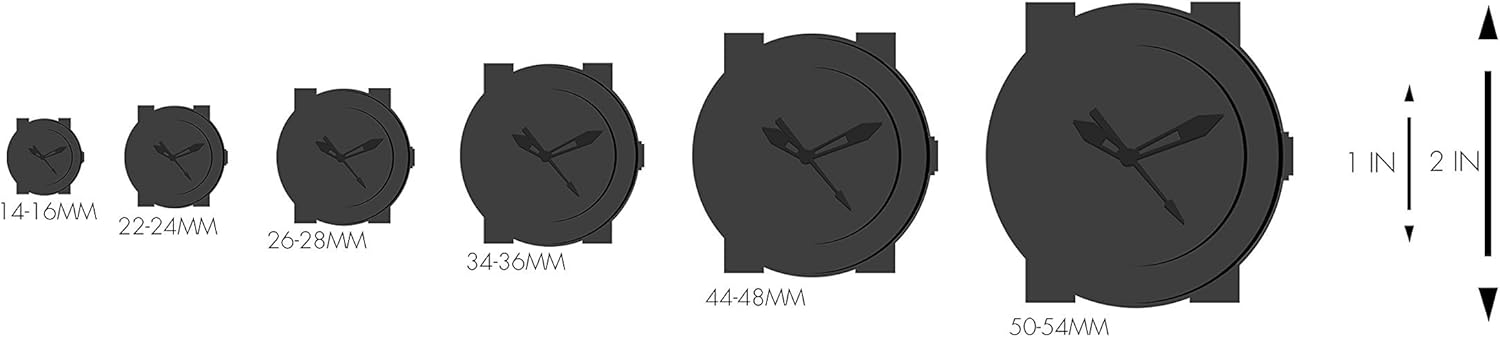
Figure 7.1: Watch size comparison chart, showing various watch diameters in millimeters and their approximate size relative to inches. This watch has a 38mm case diameter.
8. Warranty and Support
For detailed warranty information and customer support, please refer to the official Armitron website or the provided warranty document.
You can access the official warranty document here: Armitron Warranty (PDF)
For further assistance, please contact Armitron customer service.


