
1. Introduction
This manual provides essential instructions for the setup, operation, and maintenance of your VTech CLIO10B wired telephone. Please read this manual thoroughly before using your new telephone to ensure proper functionality and longevity.
The VTech CLIO10B is a basic, reliable wired telephone designed for clear communication. It features an incoming call indicator, flash function, and a durable coiled cord.
2. Package Contents
Ensure all items are present in your package:
- VTech CLIO10B Wired Telephone Unit
- Handset with Coiled Cord
- Telephone Line Cord
- Wall Mount Bracket (optional use)
3. Setup
Follow these steps to set up your VTech CLIO10B telephone:
- Connect the Handset: Plug one end of the coiled cord into the handset and the other end into the handset jack on the side of the telephone base.
- Connect the Telephone Line: Plug one end of the telephone line cord into the jack labeled 'LINE' on the back of the telephone base. Plug the other end into a standard telephone wall jack.
- Placement: Place the telephone on a flat, stable surface. Ensure it is within reach of the telephone wall jack.
- Wall Mounting (Optional): If you wish to wall mount the telephone, attach the wall mount bracket to the wall using appropriate hardware (not included). Then, slide the telephone base onto the bracket until it clicks securely into place.
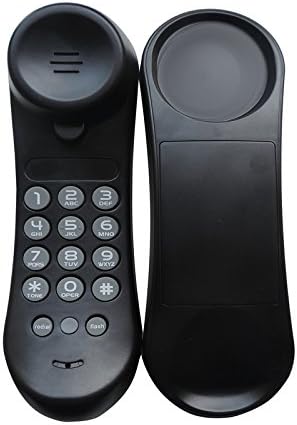
Figure 1: Front view of the VTech CLIO10B telephone, showing the keypad and handset receiver.

Figure 2: Side view of the VTech CLIO10B telephone, illustrating its slim profile and the location of the handset jack.
4. Operating Instructions
4.1 Making a Call
- Pick up the handset.
- Listen for a dial tone.
- Dial the desired telephone number using the keypad.
- Wait for the call to connect.
- To end the call, place the handset back on the telephone base.
4.2 Answering a Call
When the telephone rings and the incoming call indicator light flashes:
- Pick up the handset.
- Begin your conversation.
- To end the call, place the handset back on the telephone base.
4.3 Redial Function
To redial the last number called:
- Pick up the handset.
- Press the REDIAL button. The telephone will automatically dial the last number.
4.4 Flash Function
The FLASH button is used for certain telephone services, such as call waiting or transferring calls, if provided by your telephone service provider. Pressing this button briefly sends a signal to your service provider.
4.5 Mute Function
The telephone features a mute switch, typically located on the side of the unit. When activated, the mute function prevents your voice from being transmitted to the other party, while still allowing you to hear them. Ensure this switch is in the correct position for normal conversation.
4.6 Ringer Volume
The telephone may have a ringer volume switch (often with settings like Low, Medium, High) on the base. Adjust this switch to your preferred ringer volume level.
5. Maintenance
To keep your VTech CLIO10B telephone in optimal condition:
- Cleaning: Wipe the telephone with a soft, slightly damp cloth. Do not use liquid cleaners or abrasive chemicals, as these can damage the plastic surface.
- Avoid Water: Keep the telephone away from water and moisture.
- Temperature: Avoid exposing the telephone to extreme temperatures or direct sunlight.
- Cord Care: Periodically check the coiled cord and telephone line cord for any signs of wear or damage. Replace if necessary.

Figure 3: Top view of the VTech CLIO10B telephone, showing the VTech branding.
6. Troubleshooting
If you experience issues with your telephone, try these troubleshooting steps:
- No Dial Tone:
- Ensure the telephone line cord is securely plugged into both the telephone base and the wall jack.
- Test the wall jack with another working telephone to confirm the line is active.
- Cannot Hear or Be Heard:
- Check that the coiled cord is firmly connected to both the handset and the telephone base.
- Verify that the mute switch on the side of the telephone is not accidentally activated.
- Ringer Not Working:
- Check the ringer volume switch on the telephone base and ensure it is not set to 'Off' or 'Low' if you desire a louder ring.
- Keypad Issues:
- Ensure you are pressing the keys firmly. The keypad is a single rubber plate, requiring a clear press for each digit.
7. Specifications
| Brand | VTech |
| Model Number | TELCLIO10B |
| Type | Wired Telephone |
| Color | Black |
| Material | Thermoformed Plastic |
| Dimensions (L x W x H) | 6.4 x 5.1 x 17.8 cm (2.5 x 2.0 x 7.0 inches) |
| Weight | 350 g (0.77 lbs) |
| Power Source | DC (Line Powered) |
| Features | Incoming Call Indicator, Flash Function, Redial, Wall Mountable |
| Caller ID | No |
8. Warranty and Support
For warranty information and customer support, please refer to the documentation provided with your purchase or contact your retailer. VTech provides support for its products, and details can typically be found on the official VTech website or through your point of purchase.
