Introduction
This instruction manual provides comprehensive guidance for the setup, operation, and maintenance of your SKAGEN SKT1113 Hybrid Smartwatch. Born in 1989, SKAGEN is a brand with a rich history, continuously pursuing the aesthetics of Danish design. Inspired by the coastal town of Skagen, where the North Sea and Baltic Sea meet, SKAGEN delivers collections that embody the Danish spirit of 'hygge' (warm hospitality), respect for nature, and an aesthetic appreciation for essential beauty. The SIGNATUR series, meaning 'signature' in Danish, introduces hybrid smartwatches that blend minimalist design with the latest technology. These watches offer traditional functions like automatically adjusted accurate time display and a highly legible dial, enhanced with smart technology for greater convenience and style. Please read this manual thoroughly to ensure proper use and to fully utilize all features of your watch.
Package Contents
Upon opening your SKAGEN SKT1113 Hybrid Smartwatch package, please verify that all the following items are included:
- SKAGEN SKT1113 Hybrid Smartwatch Unit
- Product Box
- Instruction Manual
- Warranty Information (included within the instruction manual)
Watch Overview
Familiarize yourself with the key components of your SKAGEN SKT1113 Hybrid Smartwatch.

Figure 1: Front View. This image displays the watch face, hands, and minimalist design of the SKAGEN SKT1113 Hybrid Smartwatch.

Figure 2: Side View. This image highlights the three control buttons located on the right side of the watch case, used for various smart functions.
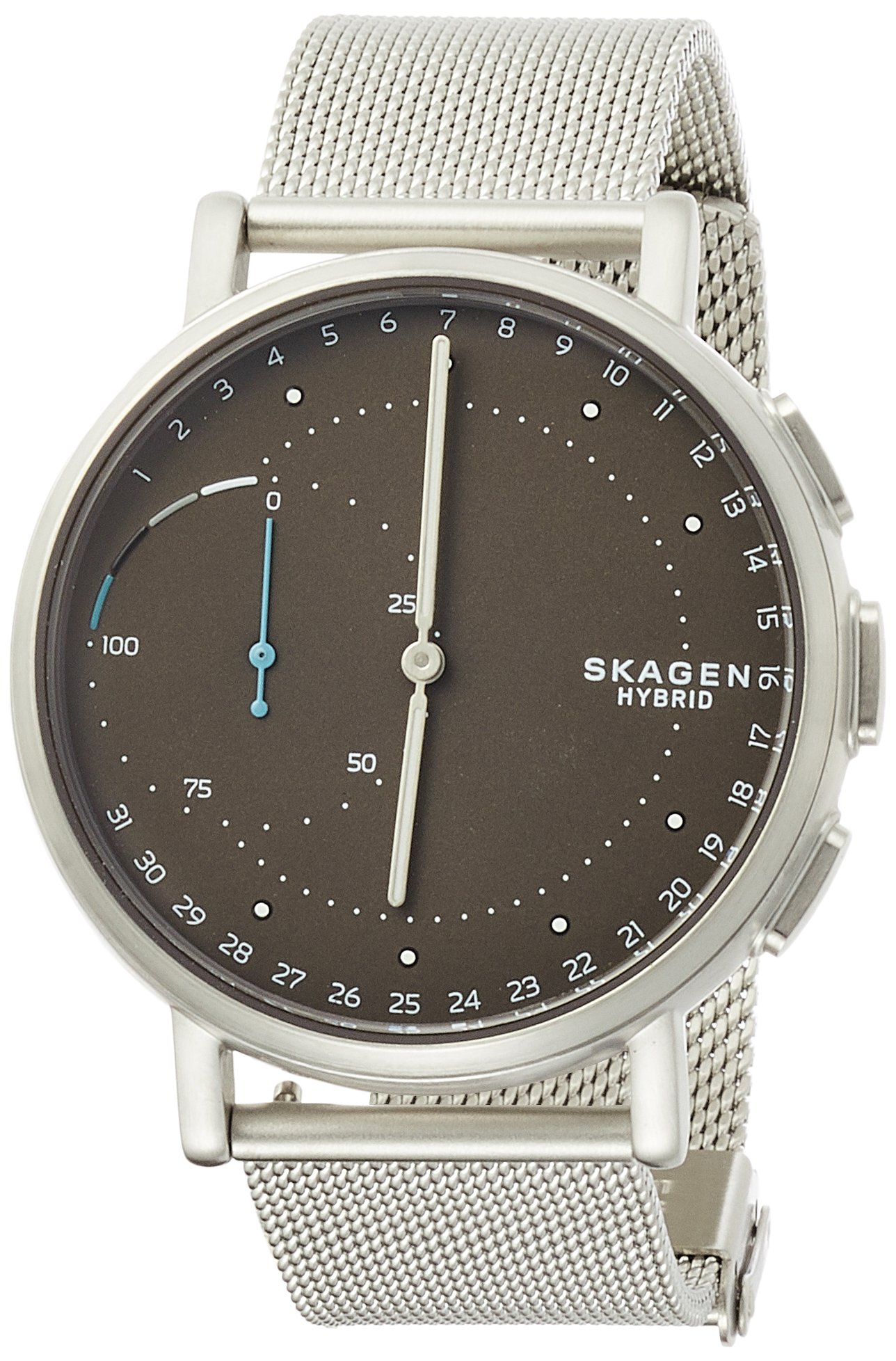
Figure 3: Rear View. This image shows the case back of the SKAGEN SKT1113 Hybrid Smartwatch, displaying model information, and the mesh strap attachment.
Key Components:
- Watch Face: Displays time and other indicators.
- Hour/Minute Hands: Indicate the current time.
- Sub-dial (if present): May indicate date, activity progress, or other customizable information.
- Crown/Buttons: Used for setting time, accessing smart features, and navigating functions. (Refer to the app for customizable button functions).
- Strap: Securely fastens the watch to your wrist.
- Case Back: Contains model information and sensors (if applicable).
Setup
Follow these steps to set up your SKAGEN SKT1113 Hybrid Smartwatch for the first time.
- Download the SKAGEN Connected App: Search for "SKAGEN Connected" in your smartphone's app store (App Store for iOS or Google Play Store for Android) and download the application.
- Launch the App and Create an Account: Open the SKAGEN Connected app. If you are a new user, follow the on-screen prompts to create an account. Existing users can log in.
- Pair Your Watch:
- Ensure your smartphone's Bluetooth is enabled.
- In the SKAGEN Connected app, select "Add New Device" or a similar option.
- The app will search for your watch. When your SKT1113 appears, select it to initiate pairing.
- Follow any on-screen instructions to complete the pairing process. This may involve pressing a button on your watch.
- Synchronize Time: Once paired, your watch will automatically synchronize its time with your smartphone, ensuring accurate timekeeping.
- Set Up Your Profile: Complete your personal profile within the app, including information such as height, weight, and daily step goals, to optimize activity tracking.
Operating Your Watch
Your SKAGEN SKT1113 Hybrid Smartwatch offers a blend of traditional timekeeping and smart features. All smart functions are managed and customized through the SKAGEN Connected app.
Basic Timekeeping:
The watch hands display the current time, which is automatically adjusted via your paired smartphone. This ensures accuracy and automatic updates for time zone changes.
Smart Features (Customizable via App):
- Activity Tracking: Tracks steps, distance, and calories burned throughout the day. View your progress in the app.
- Sleep Tracking: Monitors your sleep patterns, including light and deep sleep, to help you understand your rest quality.
- Notifications: Receive discreet vibrations and hand movements on your watch for incoming calls, messages, and app alerts from selected contacts.
- Customizable Buttons: The side buttons can be assigned various functions through the app, such as:
- Music Control (play/pause, skip track)
- Camera Remote (take photos from your phone)
- Find My Phone (triggers an alert on your phone)
- Date Display (hands point to the current date on the dial)
- Second Time Zone (hands point to a pre-set second time zone)
- Automatic Time Zone Updates: The watch automatically updates to the correct time zone when you travel, as long as it's connected to your smartphone.
Maintenance
Proper care and maintenance will extend the life and functionality of your SKAGEN SKT1113 Hybrid Smartwatch.
Cleaning:
- Watch Case and Glass: Wipe gently with a soft, lint-free cloth. For stubborn dirt, slightly dampen the cloth with water. Avoid harsh chemicals or abrasive materials.
- Strap: For mesh straps, use a soft brush and mild soapy water if necessary, then rinse thoroughly and dry completely. For leather straps, wipe with a dry cloth and avoid excessive moisture.
Water Resistance:
Your SKAGEN SKT1113 Hybrid Smartwatch has a water resistance rating of 3 BAR (3 ATM). This means it is suitable for daily use and can withstand splashes, rain, and brief immersion in water (e.g., washing hands). It is not suitable for showering, bathing, swimming, diving, or any water sports. Exposure to hot water or steam should also be avoided as it can compromise the seals.
Battery Replacement:
The SKAGEN SKT1113 uses a standard coin cell battery. When the battery is low, the app will notify you. Battery replacement should ideally be performed by a qualified watch technician or an authorized SKAGEN service center to ensure proper sealing and water resistance. Refer to the SKAGEN Connected app for battery status and replacement instructions.
Troubleshooting
If you encounter issues with your SKAGEN SKT1113 Hybrid Smartwatch, refer to the following common problems and solutions.
- Watch Not Connecting to Phone:
- Ensure Bluetooth is enabled on your phone.
- Make sure the watch is within Bluetooth range of your phone.
- Check if the SKAGEN Connected app is running in the background.
- Restart your phone and/or the watch (if applicable, by removing and reinserting the battery, or following app instructions for a soft reset).
- Try unpairing and re-pairing the watch through the app's settings.
- Incorrect Time Display:
- Ensure your watch is properly paired and connected to the SKAGEN Connected app.
- Verify that your phone's time and date settings are correct.
- Perform a manual synchronization through the app.
- If the hands are misaligned, use the "Calibrate Hands" feature in the app.
- Activity Tracking Issues (e.g., inaccurate step count):
- Ensure your personal profile (height, weight) in the app is accurate.
- Wear the watch snugly on your wrist.
- Synchronize the watch with the app regularly.
- Notifications Not Received:
- Check notification settings within the SKAGEN Connected app to ensure desired apps and contacts are enabled.
- Verify that your phone's notification permissions are granted to the SKAGEN Connected app.
- Ensure the watch is connected to your phone via Bluetooth.
Specifications
| Model Number | SKT1113 |
| Brand | SKAGEN |
| Department | Men's |
| Water Resistance | 3 BAR (3 ATM) - Daily life waterproof |
| Package Dimensions | 9 x 8.8 x 8.4 cm |
| Item Weight | 98 g |
| ASIN | B074V4SVZG |
Warranty and Support
Your SKAGEN SKT1113 Hybrid Smartwatch comes with a manufacturer's warranty. Please refer to the warranty information included in your instruction manual for details regarding coverage, terms, and conditions.
For further assistance, technical support, or service inquiries, please visit the official SKAGEN website or contact their customer service department. Contact information can typically be found on the SKAGEN website or within the SKAGEN Connected app.


