
Product Overview
The Thunderbolt Magnum Solar 100 Watt Solar Panel Kit provides a clean, quiet energy source for various applications. This kit is designed for ease of use and portability, making it suitable for powering small cabins, boats, and RVs. It includes all necessary components to begin generating renewable energy.
Package Contents
Before beginning setup, ensure all components listed below are present in your kit:
- 100 Watt Solar Panel (foldable)
- Voltage Regulator / Charge Controller
- Mounting Hardware
- 12V Light Kit
- Battery Terminal Clamps
- Universal DC Power Adapter
- USB Port (integrated into charge controller)
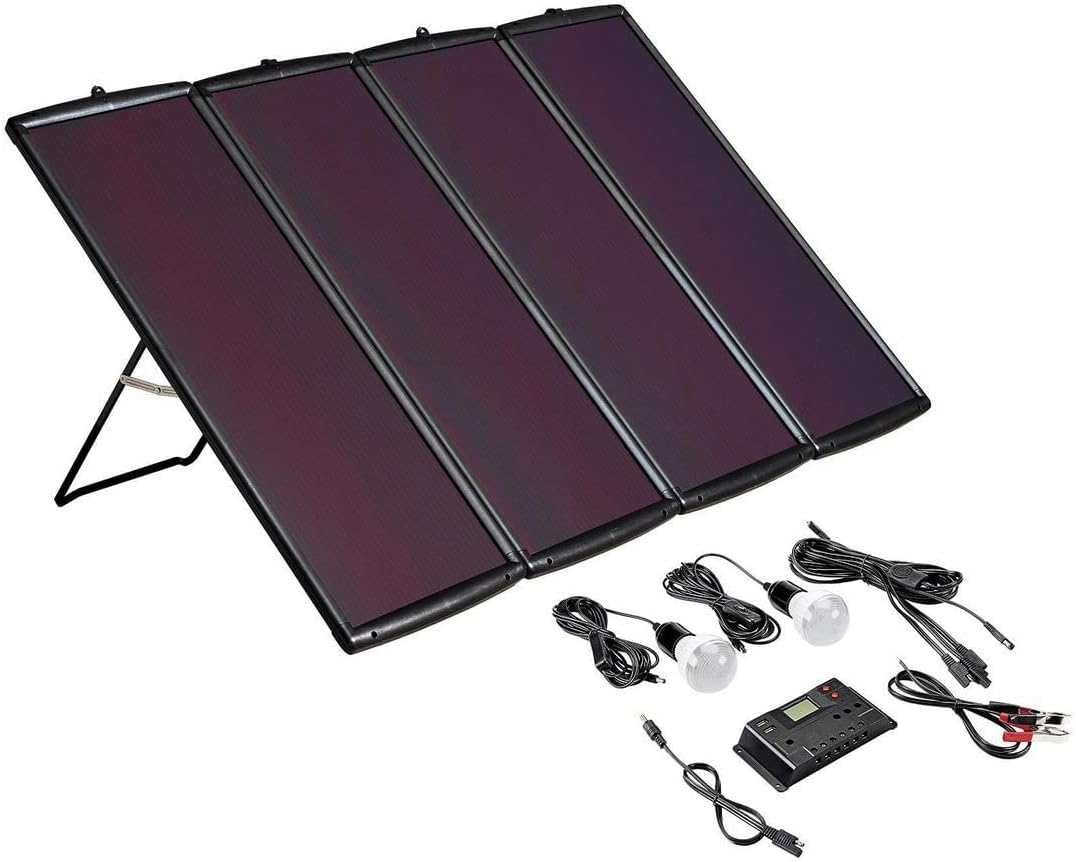
Image: The complete 100 Watt Solar Panel Kit, showing the foldable solar panel, charge controller, light bulbs, and various connection cables and adapters.
Setup Instructions
- Unfold the Solar Panel: Carefully unfold the 100 Watt solar panel and extend its integrated stand. Position the panel in a location that receives maximum direct sunlight throughout the day. Ensure the panel is stable and will not be easily knocked over.
- Connect the Charge Controller: Locate the charge controller. Connect the cable from the solar panel to the designated "Solar Input" or "PV Input" terminals on the charge controller. Ensure the polarity is correct (positive to positive, negative to negative).
- Connect to Battery: Connect the battery terminal clamps to the "Battery Output" terminals on the charge controller. Then, securely attach the red clamp to the positive (+) terminal of your 12V battery and the black clamp to the negative (-) terminal. The charge controller will protect your battery from overcharge or discharge.
- Connect Devices:
- For the 12V Light Kit, plug the light bulbs into the appropriate 12V output ports on the charge controller or use the universal DC power adapter if needed.
- To charge smartphones and tablets, use the integrated USB port on the charge controller.
- Verify Connection: Once all connections are made, the charge controller's display should indicate power input from the solar panel and battery charge status. A blue indicator light on the solar panel itself may also illuminate when generating power.
Operating Guidelines
To maximize the performance and lifespan of your solar panel kit, follow these operating guidelines:
- Optimal Positioning: Always position the solar panel to face direct sunlight. Adjust the angle of the panel throughout the day to track the sun's movement for maximum energy capture.
- Charge Controller Monitoring: Regularly check the charge controller's display to monitor the battery's charge level and the power being generated by the solar panel.
- Load Management: Avoid overloading the system. Ensure the total power consumption of connected devices does not exceed the kit's capacity.
- Cloudy Conditions: The amorphous silicon solar cells are designed for maximum output in both bright and cloudy conditions, but direct sunlight will always yield the best results.
- Nighttime Operation: The integrated blocking diode prevents the panels from discharging your battery at night when there is no sunlight.
Maintenance
Proper maintenance ensures the longevity and efficiency of your solar panel kit:
- Cleaning: Periodically clean the surface of the solar panels with a soft, damp cloth to remove dust, dirt, or debris that may accumulate and reduce efficiency. Do not use abrasive cleaners.
- Connection Check: Regularly inspect all electrical connections for tightness and corrosion. Loose or corroded connections can lead to power loss or system malfunction.
- Storage: When not in use, fold the solar panel and store it in a dry, cool place away from direct sunlight and extreme temperatures. The lightweight, weatherproof construction allows for easy maintenance.
- Battery Health: Ensure your connected battery is well-maintained according to its manufacturer's guidelines.
Troubleshooting
| Problem | Possible Cause | Solution |
|---|---|---|
| No power output from panel. | Insufficient sunlight; dirty panel surface; loose connections; faulty charge controller. | Ensure direct sunlight exposure; clean panel surface; check all cable connections; verify charge controller display. |
| Battery not charging or charging slowly. | Low sunlight; panel not angled correctly; battery issues; excessive load. | Adjust panel angle for optimal sun exposure; check battery health; reduce connected load. |
| Devices not receiving power from USB/12V ports. | Battery low; charge controller fault; incorrect device connection. | Check battery charge level on controller; ensure devices are correctly plugged in. |
Specifications
- Power Output: 100 Watts
- Cell Type: Amorphous Silicon
- Construction: Lightweight, Weatherproof
- Features: Integrated Blocking Diode, Charge Controller, USB Port
- Included Accessories: Mounting Hardware, 12V Light Kit, Battery Terminal Clamps, Universal DC Power Adapter
- Package Dimensions: 45.6 x 17.7 x 8.3 inches
- Item Weight: 47.6 pounds
- Manufacturer: Thunderbolt Magnum Solar
Warranty and Support
For detailed warranty information and technical support, please refer to the documentation provided with your purchase or contact Thunderbolt Magnum Solar directly. Keep your proof of purchase for warranty claims.
This manual provides general instructions for the safe and efficient use of your 100 Watt Solar Panel Kit. Always prioritize safety and consult a qualified professional if you have any doubts about installation or operation.