
MIFA A1-BK
MIFA A1 Portable Bluetooth Speaker User Manual
Model: A1-BK
Introduction
Welcome to the MIFA A1 Portable Bluetooth Speaker user manual. This guide provides detailed instructions for setting up, operating, maintaining, and troubleshooting your new speaker. The MIFA A1 is designed for portability and durability, featuring IP56 dustproof and water-resistant capabilities, a 12-hour playtime, and enhanced sound.

The MIFA A1 Portable Bluetooth Speaker.
Package Contents
Please check the package for the following items:
- 1 × A1 Bluetooth Speaker
- 1 × Micro USB Cable
- 1 × 3.5 mm Audio Cable
- 1 × Detachable Strap
- 1 × User Manual

The MIFA A1 package contents.
Product Overview
Speaker Components and Controls
Familiarize yourself with the speaker's layout and functions:
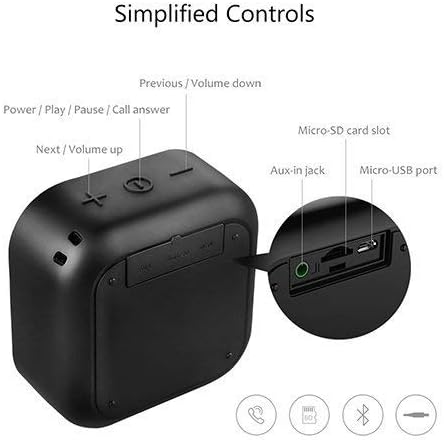
Overview of MIFA A1 controls and ports.
- Power / Play / Pause / Call Answer Button: Controls power, music playback, and call management.
- Next / Volume Up Button (+): Increases volume and skips to the next track.
- Previous / Volume Down Button (-): Decreases volume and goes to the previous track.
- Micro-SD Card Slot: For playing music directly from a Micro-SD card.
- Aux-in Jack: For wired audio connection using a 3.5mm audio cable.
- Micro-USB Port: For charging the speaker.
Key Features
- Superior Loud Sound: 5W driver & Class-G double charge pump audio power amplifier delivers high-quality DSP 3D stereo sound & enhanced bass; supports TWS, allowing you to enjoy true wireless stereo (right + left channels) by connecting two A1 speakers.
- IP56 Dust-Proof & Water-Resistant: Features woven fabric housing; great looking while shock-resistant; allows outlasting all of your adventures.
- Long Battery Life: Built-in 1200 mAh rechargeable lithium polymer battery plays up to 12 hours at 70% volume on a full charge; recharge in just 3 hours with the included Micro USB cable.
- Bluetooth 4.2 Technology: Easy to pair with any Bluetooth-enabled device; auto-reconnects to the last-used device within up to 33 feet; 3.5mm AUX and Micro-SD capability offers more audio options; built-in microphone for hands-free calls.
- Super Portable: Mini size for take-anywhere convenience; slips into a bag or a coat pocket easily; offers a strap to hang from a backpack; 3.3 × 1.8 × 3.4 in; 6.2 oz.
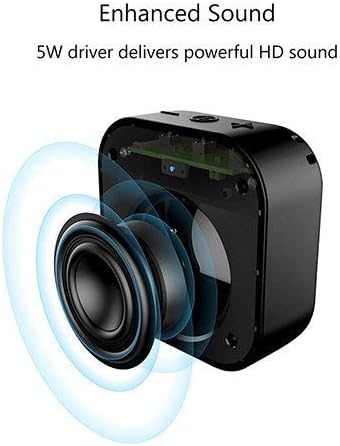
The 5W driver delivers powerful HD sound.
Setup
Charging the Speaker
The MIFA A1 speaker comes with a built-in 1200 mAh rechargeable lithium polymer battery.
- Connect the Micro USB cable to the speaker's Micro-USB port and the other end to a USB power adapter (not included) or a computer's USB port.
- The charging indicator light will illuminate.
- A full charge takes approximately 3 hours.
- Once fully charged, the speaker provides up to 12 hours of playtime at 70% volume.

Enjoy up to 12 hours of playtime.
Powering On/Off
- To power on, press and hold the Power button until you hear an audible prompt.
- To power off, press and hold the Power button again until the speaker shuts down.
Operation
Bluetooth Pairing
- Ensure the speaker is powered on and in Bluetooth pairing mode (indicated by a flashing LED).
- On your device (smartphone, tablet, laptop), enable Bluetooth and search for available devices.
- Select "MIFA A1" from the list of devices.
- Once paired, the speaker will provide an audible confirmation, and the LED indicator will become solid.
- The speaker will automatically reconnect to the last-used device within a range of up to 33 feet (10 meters).
Playing Audio
Bluetooth Mode
After successful pairing, audio from your connected device will play through the speaker.
- Press the Power button to Play/Pause music.
- Press the '+' button to increase volume. Press and hold '+' to skip to the next track.
- Press the '-' button to decrease volume. Press and hold '-' to go to the previous track.
AUX-in Mode
Use the included 3.5mm audio cable to connect the speaker to any device with a 3.5mm audio output. The speaker will automatically switch to AUX mode.
Micro-SD Card Playback
Insert a Micro-SD card (up to 32GB, not included) loaded with audio files into the Micro-SD card slot. The speaker will automatically begin playing music from the card.
Hands-Free Calling
When connected via Bluetooth, the built-in microphone allows for hands-free calls.
- Press the Power button to answer an incoming call.
- Press the Power button again to end a call.
- Press and hold the Power button to reject an incoming call.
True Wireless Stereo (TWS) Pairing (for two A1 speakers)
If you have two MIFA A1 speakers, you can pair them together for a true wireless stereo experience (left and right channels).
- Ensure both speakers are powered off.
- Power on both speakers.
- On one speaker (this will be the master), double-press the Power button. It will search for the other speaker.
- Once connected, both speakers will provide an audible confirmation, and the master speaker's LED will flash slowly, while the slave speaker's LED will be solid.
- Connect your device via Bluetooth to the master speaker.
- Audio will now play in stereo through both speakers.
Maintenance
Cleaning
To clean the speaker, use a soft, damp cloth. Do not use harsh chemicals or abrasive cleaners.
Water and Dust Resistance (IP56)
The MIFA A1 is IP56 rated, meaning it is protected against dust ingress and powerful water jets.
While it can withstand splashes and rain, it is not designed to be submerged in water. Ensure all port covers are securely closed before exposing the speaker to water or dust.
This video demonstrates the MIFA A1's robust IP56 rating, showcasing its ability to withstand exposure to wet mud and water jets without affecting performance. It highlights the speaker's durability for outdoor and adventurous use.

The MIFA A1 speaker is built with an IP56 dust-proof and water-resistant fabric and TPU housing.
Troubleshooting
Common Issues and Solutions
| Problem | Solution |
|---|---|
| Speaker does not power on | Ensure the battery is charged. Connect to a power source using the Micro USB cable. |
| Cannot pair via Bluetooth | Ensure the speaker is in pairing mode. Check if Bluetooth is enabled on your device. Move the speaker closer to your device. Disconnect from other Bluetooth devices. |
| No sound | Check volume levels on both the speaker and your connected device. Ensure the correct input mode (Bluetooth, AUX, Micro-SD) is selected. |
| Poor sound quality / Distortion | Move the speaker closer to your device to improve Bluetooth signal. Reduce volume if distortion occurs at maximum levels. Ensure the speaker is on a stable surface. |
| TWS pairing fails | Ensure both speakers are MIFA A1 models. Power off both speakers and try the TWS pairing process again. |
Specifications
Technical Details
| Feature | Detail |
|---|---|
| Model Name | A1 |
| Speaker Maximum Output Power | 5 Watts |
| Connectivity Technology | Bluetooth 4.2 |
| Wireless Communication Technology | Bluetooth |
| Bluetooth Range | 10 Meters (33 Feet) |
| Battery Life | 12 Hours (at 70% volume) |
| Battery Capacity | 1200 mAh |
| Charging Time | 3 Hours |
| Water Resistance Level | IP56 (Dustproof & Water-Resistant) |
| Product Dimensions | 3.4"D x 3.3"W x 1.8"H |
| Item Weight | 6.2 ounces (175 Grams) |
| Material | Plastic, Metal, Fabric |
| Included Components | 1 × A1 Bluetooth Speaker, 1 × Micro USB Cable, 1 × 3.5 mm Audio Cable, 1 × Detachable Strap, 1 × User Manual |
Warranty and Support
Warranty Information
Please refer to the warranty card included with your purchase for detailed warranty terms and conditions.
Customer Support
For further assistance or support, please visit the official MIFA website or contact MIFA customer service.
You can also refer to the official user manual PDF for more details: Download User Manual (PDF)
Related documentsA1-BK


Ask a question about this manual
Ask about setup, troubleshooting, compatibility, parts, safety, or missing instructions. Manuals+ will review the question and use this page’s manual context to help answer it.