
T POWER TZ-CO3AE
Contents
T POWER Charger for AHPUCEP Cordless Tools (Model TZ-CO3AE)
Instruction Manual
1. Product Overview
This manual provides essential information for the safe and efficient use of your T POWER charger, model TZ-CO3AE. This charger is designed to provide reliable power for compatible AHPUCEP cordless tools, including weed wackers, grass trimmers, string trimmers, and mini chainsaws.
The charger features an input voltage range of AC 100V - 240V and delivers a stable 21V DC output. It incorporates advanced safety features to protect your devices during charging.
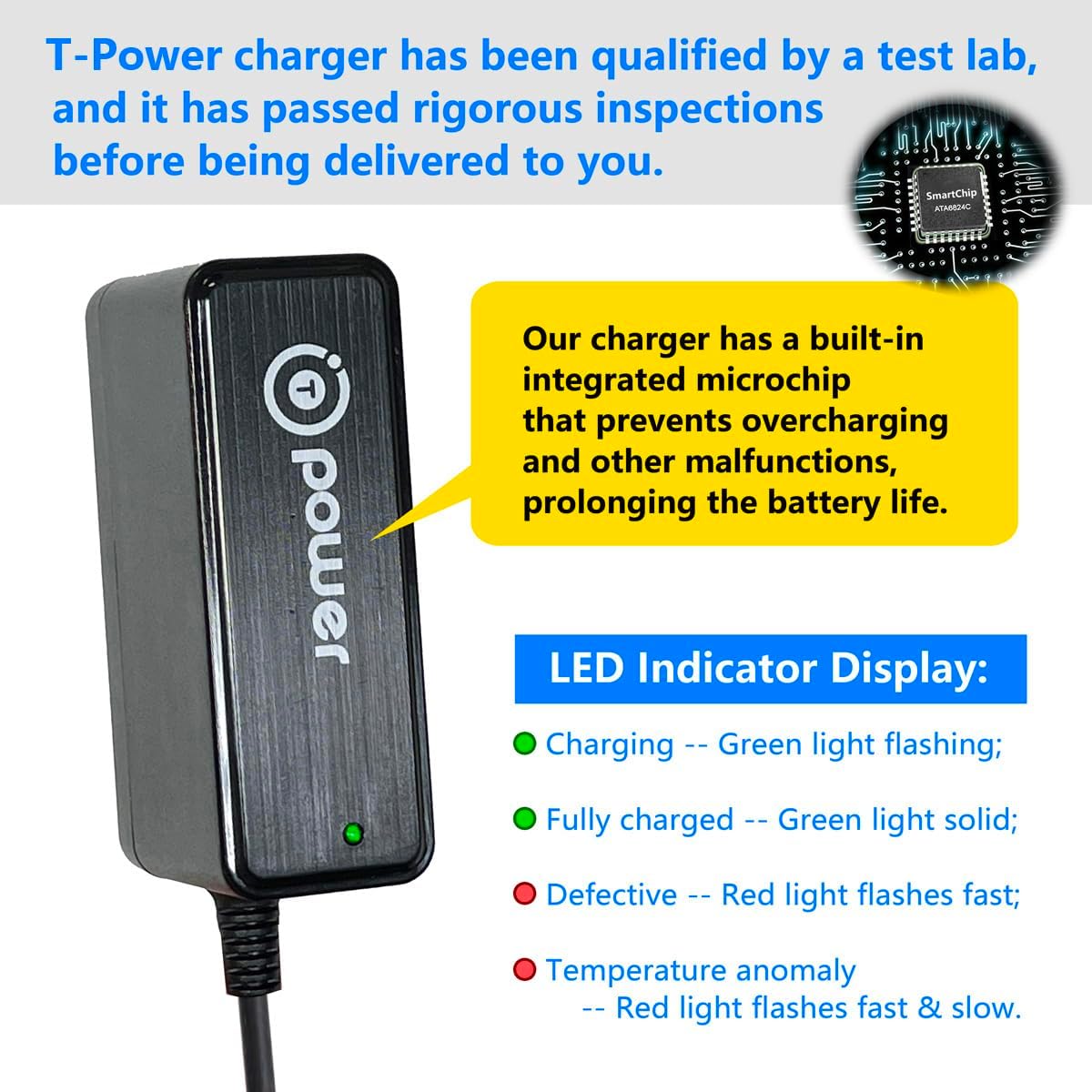
Image 1: T POWER charger highlighting its integrated microchip for overcharge protection and LED indicator display.
2. Safety Information
Please read all safety instructions carefully before using the charger. Failure to follow these instructions may result in electric shock, fire, or serious injury.
- Compatibility: Ensure the charger is compatible with your specific AHPUCEP cordless tool model (e.g., TZ-CO3AE). Refer to your tool's manual for charger specifications.
- Indoor Use Only: This charger is designed for indoor use. Do not expose it to rain, moisture, or extreme temperatures.
- Proper Ventilation: Do not cover the charger during use. Ensure adequate ventilation to prevent overheating.
- Damage Inspection: Before each use, inspect the charger and its cable for any signs of damage. Do not use a damaged charger.
- Unplug When Not in Use: Disconnect the charger from the power outlet when not in use or during cleaning.
- Children and Pets: Keep the charger out of reach of children and pets.
- Certifications: This product meets CE and RoHS safety standards.

Image 2: Overview of T POWER charger's superior safety protections, including over-current, over-temperature, over-voltage, and short circuit protection.
3. Setup
- Unpack the Charger: Carefully remove the T POWER charger from its packaging.
- Connect to Power: Plug the AC power cord of the charger into a standard wall outlet (AC 100V - 240V).
- Connect to Device: Insert the barrel connector of the charger into the charging port of your compatible AHPUCEP cordless tool's battery or the tool itself, if it has an integrated charging port. Ensure a secure connection.

Image 3: The charger's barrel connector properly inserted into a compatible battery pack for charging.
4. Operating Instructions
Once the charger is connected to both the power outlet and your device, the charging process will begin automatically. The charger features an LED indicator to display the charging status:
- • Charging: Green light flashing
- • Fully Charged: Green light solid
- • Defective: Red light flashes fast
- • Temperature Anomaly: Red light flashes fast & slow
When the green light is solid, the device is fully charged. Disconnect the charger from the device and then from the power outlet.
5. Maintenance
- Keep the charger clean and dry. Use a soft, dry cloth to wipe any dust or debris.
- Do not use liquid cleaners or solvents.
- Store the charger in a cool, dry place when not in use.
- Avoid bending or kinking the power cord excessively.
6. Troubleshooting
| Problem | LED Indicator | Possible Cause / Solution |
|---|---|---|
| Device not charging | No light |
|
| Charging stops unexpectedly | Red light flashes fast |
|
| Charging stops unexpectedly | Red light flashes fast & slow |
|
If you encounter issues not listed here or if troubleshooting steps do not resolve the problem, please contact T POWER technical support.
7. Specifications
| Feature | Detail |
|---|---|
| Brand | T POWER |
| Model Numbers | TZ-CO3AE, TP-ag6-FL3 |
| Input Voltage Range | AC 100V - 240V |
| Output Voltage | 21V DC |
| Output Current | 2 Amps |
| Connector Type | Barrel Connector |
| Item Weight | 4 Ounces |
| Item Dimensions | 4 x 4 x 2 inches |
| Certifications | CE, RoHS |
8. Warranty and Support
- Manufacturer Warranty: This T POWER charger comes with a 1-year manufacturer warranty covering defects in materials and workmanship.
- Return Policy: You may return your undamaged product and packaging within 30 days of purchase for a full refund for any reason.
- Technical Support: For technical assistance, compatibility questions, or if you received a wrong item, please contact T POWER customer support. We are available to help you find the ideal power adapter solution.
For further assistance, please visit the T POWER Store on Amazon.
Documents and downloads
Ask a question about this manual
Ask about setup, troubleshooting, compatibility, parts, safety, or missing instructions. Manuals+ will review the question and use this page’s manual context to help answer it.