
EWA A106
EWA A106 Mini Bluetooth Speaker User Manual
Model: A106 | Brand: EWA
1. Introduction
Thank you for choosing the EWA A106 Mini Bluetooth Speaker. This compact and powerful speaker is designed to provide high-quality audio in a portable form factor. Please read this manual carefully before use to ensure proper operation and to maximize your listening experience.
2. What's in the Box
- 1x EWA A106 Bluetooth Speaker
- 1x Micro USB Charging Cable
- 1x Carrying Case
- 1x Metal Hook
- 1x User Manual

Figure 2.1: Package Contents. The image displays the EWA A106 speaker, its protective carrying case, a USB charging cable, a metal carabiner clip, and the user manual, all neatly arranged.
3. Product Overview
The EWA A106 speaker is engineered for portability and sound quality, featuring a robust design and intuitive controls.

Figure 3.1: EWA A106 Speaker in hand. This image showcases the speaker's small size and its water-resistant properties, with water droplets visible on its surface.
3.1. Acoustic Design
Equipped with a custom-made, high-performance 3W neodymium driver and a passive radiator, the A106 delivers clear sound with impressive bass for its size.

Figure 3.2: Internal Bass Radiator. A transparent diagram illustrating the speaker's internal components, specifically highlighting the passive radiator responsible for enhanced bass.

Figure 3.3: High-Performance Driver. A detailed view of the speaker's 3W high-performance driver, emphasizing its role in producing loud and clear audio.
3.2. IP67 Waterproof Rating
The speaker is designed to withstand water exposure, making it suitable for various environments, including outdoor use, showers, and beach trips.

Figure 3.4: IP67 Waterproofing. The speaker is shown partially submerged in water, illustrating its waterproof capability.
3.3. Simple Control Button
The A106 features a single silicone button for all essential functions, simplifying operation.

Figure 3.5: Simple & Functional Button. A close-up of the speaker's single button, accompanied by a visual guide detailing its various functions based on press duration and count.
3.4. Compact Size
Designed to be highly portable, the A106 is significantly smaller than many other portable speakers.

Figure 3.6: Size Comparison. This image compares the EWA A106 with the EWA Classic A109, highlighting the A106's compact dimensions.
4. Setup
4.1. Charging the Speaker
- Connect the micro USB charging cable to the charging port on the speaker.
- Connect the other end of the cable to a USB power adapter (not included) or a computer's USB port.
- The LED indicator will glow red while charging.
- The LED indicator will turn off when the speaker is fully charged. A full charge takes approximately 0.5 hours with a 1A charger.
4.2. Bluetooth Pairing
- Press and hold the single button on the speaker for 2 seconds to power it on. The LED indicator will flash blue, indicating it is in pairing mode.
- On your device (smartphone, tablet, computer), enable Bluetooth.
- Search for available Bluetooth devices and select "EWA A106" from the list.
- Once connected, the LED indicator will glow solid blue. The speaker is now ready to play audio.
5. Operating Instructions
The EWA A106 speaker is controlled by a single multi-function button:
- Power On/Off: Press and hold the button for 2 seconds.
- Play/Pause: Single-click the button.
- Next Track: Double-click the button.
- Previous Track: Triple-click the button.
Volume control is managed directly from your connected Bluetooth device.
6. Maintenance
- Keep the speaker clean by wiping it with a soft, dry cloth.
- Avoid using abrasive cleaners or solvents.
- Ensure the charging port is dry before connecting the charging cable.
- Store the speaker in its carrying case when not in use to protect it from scratches and impacts.
7. Troubleshooting
| Problem | Possible Cause | Solution |
|---|---|---|
| Speaker does not power on. | Battery is depleted. | Charge the speaker fully. |
| Cannot pair with Bluetooth device. | Speaker is not in pairing mode or device's Bluetooth is off. | Ensure speaker is flashing blue. Turn off and on Bluetooth on your device. Move speaker closer to device. |
| No sound after pairing. | Volume on speaker or device is too low. | Increase volume on both the speaker (via connected device) and your device. |
| Sound is distorted. | Volume is too high or speaker is too far from device. | Reduce volume. Move speaker closer to the connected device. |
8. Specifications
| Feature | Detail |
|---|---|
| Product Dimensions | 1.9 x 1.9 x 1.6 inches (48mm x 48mm x 40mm) |
| Item Weight | 6.2 ounces (182g) |
| Model Number | A106 |
| Output Power | 3W |
| Battery | 1 Lithium Metal battery (700mAh) |
| Play Time | Up to 5 hours (up to 8 hours at 50% volume) |
| Charging Time | Approx. 0.5 hours (with 1A charger) |
| Wireless Range | Up to 20 meters |
| Waterproof Rating | IP67 |
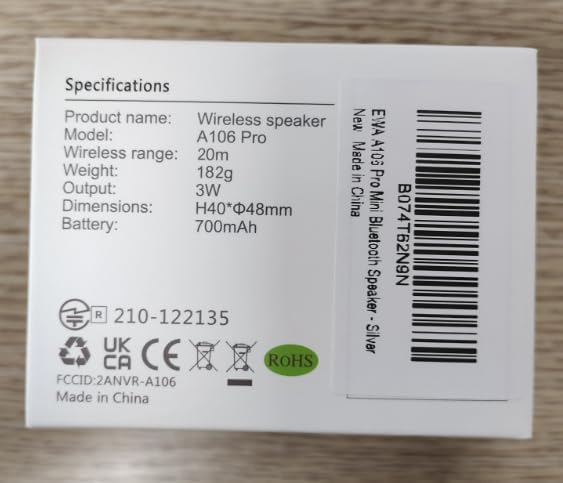
Figure 8.1: Product Specifications on Packaging. This image shows the side of the product box with printed specifications, confirming details like model number, wireless range, weight, output, dimensions, and battery.
9. Warranty and Support
EWA products are designed for reliability and performance. For warranty information and customer support, please refer to the official EWA website or contact us directly.
- Email: info@ewacn.com
- Website: www.ewacn.com

Figure 9.1: Manufacturer Contact Information. The bottom of the product box displays contact details for J.Y.M. Electronics Co., Ltd., including their address, phone numbers, email, and website.
Related documentsA106


Ask a question about this manual
Ask about setup, troubleshooting, compatibility, parts, safety, or missing instructions. Manuals+ will review the question and use this page’s manual context to help answer it.