Introduction
This manual provides essential information for the setup, operation, and maintenance of your One For All Replacement Telefunken TV Remote Control (Model URC1918). This remote is designed as a direct replacement for original Telefunken TV remote controls, offering immediate functionality without complex setup procedures.
Package Contents
- One For All Replacement Telefunken TV Remote Control (URC1918)
- User Manual (this document)
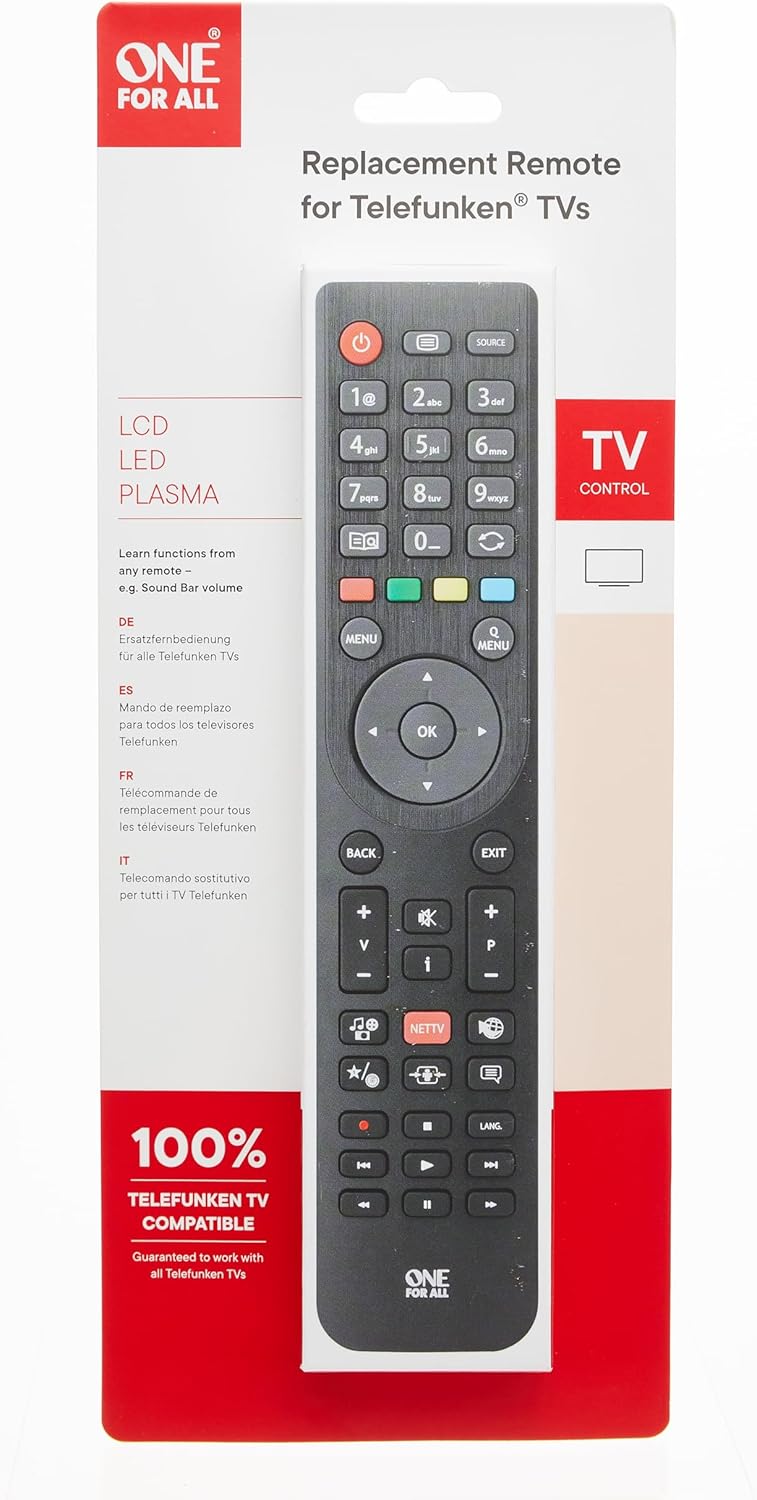
Image: The One For All Replacement Telefunken TV Remote Control shown in its original retail packaging, highlighting its compatibility with Telefunken TVs.
Setup
1. Battery Installation
The remote control requires two (2) AAA batteries (not included). Follow these steps to install them:
- Locate the battery compartment cover on the back of the remote control.
- Slide the cover downwards or press the latch to open it.
- Insert two AAA batteries, ensuring the positive (+) and negative (-) terminals align correctly with the markings inside the compartment.
- Close the battery compartment cover by sliding it back into place until it clicks securely.
2. Initial Use
This One For All replacement remote is pre-programmed for Telefunken TVs. Once batteries are installed, it should function immediately with your Telefunken television without any additional setup or code entry. Simply point the remote at your TV and begin using it.
For advanced functions or if you wish to learn functions from another remote (e.g., a soundbar volume control), this remote supports learning capabilities. Refer to the online support resources for detailed instructions on the learning feature.

Image: Front view of the remote control, showing all buttons and their layout.
Operating Instructions
The URC1918 remote control features an ergonomic design for comfortable use and provides all standard functions for your Telefunken TV. Below is a general overview of the main button functions:
| Button | Function |
|---|---|
| Power (●) | Turns the TV on or off. |
| Source | Selects input source (HDMI, AV, etc.). |
| 0-9 (Number Buttons) | Direct channel selection. |
| Menu | Accesses the TV's main menu. |
| OK / Navigation Arrows | Confirms selections and navigates through menus. |
| Back | Returns to the previous screen or menu. |
| Exit | Exits the current menu or application. |
| Volume (+ / -) | Adjusts the volume level. |
| Channel (P+ / P-) | Changes TV channels up or down. |
| Mute | Mutes or unmutes the TV audio. |
| Info (i) | Displays program information. |
| NETTV | Direct access to Smart TV/Netflix features (if supported by TV). |
| Media Controls (Play, Pause, Stop, Rewind, Fast Forward, Skip) | Controls media playback on compatible devices or TV functions. |
| Colored Buttons (Red, Green, Yellow, Blue) | Context-sensitive functions, often used in menus or Smart TV applications. |

Image: An angled view of the remote control, showcasing its ergonomic shape and button layout.
Maintenance
Battery Replacement
If the remote control's performance degrades or it stops responding, it may be time to replace the batteries. Follow the battery installation steps outlined in the "Setup" section. Always replace both batteries at the same time with new AAA alkaline batteries.
Cleaning
To clean the remote control, use a soft, dry cloth. For stubborn dirt, slightly dampen the cloth with water or a mild, non-abrasive cleaner. Do not use harsh chemicals or abrasive materials, as these can damage the remote's surface or internal components. Avoid getting moisture into the battery compartment or around the buttons.
Troubleshooting
If you encounter issues with your remote control, try the following troubleshooting steps:
- Remote not responding:
- Ensure the batteries are inserted correctly with the correct polarity (+/-).
- Replace the batteries with fresh AAA batteries.
- Make sure there are no obstructions between the remote control and the TV's infrared receiver.
- Ensure you are within the effective range of the TV's IR receiver.
- Specific buttons not working:
- Check if the button is physically stuck.
- If the remote has a learning function and you've used it, ensure the learned function is correct.
- TV not responding to any commands:
- Verify that the TV itself is powered on and functioning correctly.
- Try using the original TV remote (if available) to confirm the TV's responsiveness.
If problems persist after trying these steps, please refer to the support section for further assistance.
Specifications
| Feature | Detail |
|---|---|
| Model Number | URC1918 |
| Product Dimensions | 8.39 x 1.81 x 0.79 inches |
| Item Weight | 3.17 ounces |
| Manufacturer | One For All |
| Batteries Required | 2 AAA batteries |
| Connectivity Technology | Infrared (IR) |
| Compatible Devices | Telefunken Televisions |
| Max Number of Supported Devices | 1 (dedicated to Telefunken TV) |
| Special Feature | Ergonomic design |

Image: Side profile of the remote control, illustrating its slim and ergonomic form factor.
Warranty Information
One For All products typically come with a manufacturer's warranty. For specific details regarding the warranty period and terms for your URC1918 remote control, please refer to the documentation included with your purchase or visit the official One For All website. Keep your proof of purchase for warranty claims.
Support
For further assistance, frequently asked questions, or to access additional resources, please visit the official One For All support channels:
- Online Support: Visit the One For All website for comprehensive support, FAQs, and troubleshooting guides.
www.oneforall.com/guaranteedtowork - Helpdesk: Contact the One For All helpdesk for personalized support. Contact details can typically be found on the manufacturer's website or product packaging.

Image: The back of the product packaging, displaying multilingual information, online support links, and contact details for One For All.


