
ANYSECU SF-103
ANYSECU SF-103 / A-SF103 Portable Frequency Counter User Manual
Model: SF-103 / A-SF103
For Two-Way Radio Frequency Measurement
1. Introduction
The ANYSECU SF-103 / A-SF103 is a versatile and compact portable frequency counter, an upgraded version of the SF401, specifically designed for measuring the frequency of continuous carrier signals from two-way radios. It provides essential information such as frequency and signal strength, making it an invaluable tool for radio enthusiasts, technicians, and maintenance personnel. Its intuitive four-button interface and portable design ensure ease of use and convenience in various settings.
2. Safety Information
- Do not expose the device to extreme temperatures, direct sunlight, or high humidity.
- Avoid dropping or subjecting the device to strong impacts.
- Keep the device away from water and liquids. While portable, it is not designed to be waterproof.
- Use only the provided USB cable and charger for powering and charging the device.
- Do not attempt to disassemble or repair the device yourself. Refer to qualified service personnel.
- Ensure proper ventilation when charging.
3. Package Contents
Please check the box for the following items:
- ANYSECU SF-103 / A-SF103 Frequency Counter
- Antenna
- USB Charging Cable
- USB Charger (Power Adapter)
- Belt Clip
- User Manual (this document)

Figure 3.1: Standard Package Contents. Includes the frequency counter, antenna, USB cable, belt clip, and USB charger.
4. Product Overview
The SF-103 / A-SF103 features a clear display and intuitive button layout for easy operation.

Figure 4.1: Front view of the SF-103 / A-SF103 with key components labeled. This includes the display, function buttons (F1-F4), power button, and antenna port.
4.1. Components and Functions
- Display Screen: Shows measured frequency, signal strength, CTCSS/DCS codes, and other operational parameters.
- Antenna Port: Connects the included antenna for signal reception.
- USB Charger Port: Used for charging the device's internal battery.
- F1 (Power On/Off): Press and hold to power the device on or off.
- F2 (Stop): Stops the current frequency measurement.
- F3 (Menu/Down): Accesses the menu or navigates down in menu options.
- F4 (About/Up): Displays device information or navigates up in menu options.

Figure 4.2: The ANYSECU SF-103 / A-SF103 Portable Frequency Counter, showcasing its compact design and clear display.

Figure 4.3: Dimensions of the SF-103 / A-SF103, illustrating its compact and portable size.
5. Setup
5.1. Charging the Device
- Connect the small end of the provided USB charging cable to the USB Charger Port on the side of the frequency counter.
- Connect the standard USB end of the cable to the provided USB charger (power adapter).
- Plug the USB charger into a standard wall outlet.
- The device will indicate charging status on its display. A full charge typically takes approximately 3-4 hours.
5.2. Attaching the Antenna
- Locate the antenna port on the top of the frequency counter.
- Gently screw the provided antenna clockwise into the antenna port until it is finger-tight. Do not overtighten.
5.3. Powering On/Off
- To power on: Press and hold the F1 (Power) button until the display illuminates.
- To power off: Press and hold the F1 (Power) button until the display turns off.
6. Operating Instructions
6.1. Basic Frequency Measurement
- Ensure the device is powered on and the antenna is attached.
- Place the frequency counter near the two-way radio or signal source you wish to measure. For best results, position the counter's antenna close to the radio's antenna.
- Activate the transmission on the two-way radio (e.g., press the PTT button).
- The frequency counter will automatically detect and display the frequency of the transmitted signal. The display will show the frequency in MHz, along with a signal strength indicator.
- To stop the measurement and hold the current reading, press the F2 (Stop) button. Press F2 again to resume continuous measurement.
6.2. CTCSS/DCS Measurement
The SF-103 / A-SF103 is capable of measuring CTCSS (Continuous Tone-Coded Squelch System) and DCS (Digital Coded Squelch) codes, which are used to filter out unwanted transmissions on a radio channel.
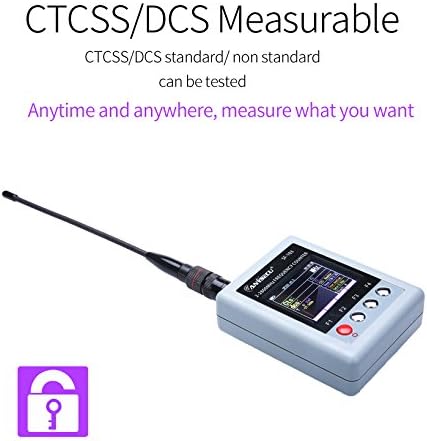
Figure 6.1: The SF-103 / A-SF103 displaying its CTCSS/DCS measurement capability, allowing for testing of standard and non-standard codes.
- While measuring a frequency, if the signal contains a CTCSS or DCS tone, the counter will automatically detect and display it.
- The detected CTCSS tone will be shown as a frequency (e.g., 88.5 Hz), and DCS will be shown as a three-digit code (e.g., D023N).
6.3. Menu Navigation
Use the F3 (Menu/Down) and F4 (About/Up) buttons to navigate through the device's menu options. The menu allows for adjustments such as gate time, display settings, and other advanced features. Refer to the on-screen prompts for specific menu functions.
6.4. Operational Demonstration Video
Watch this official product video for a demonstration of the SF-103 / A-SF103 in action, including frequency measurement with a two-way radio.
Video 6.1: Demonstration of the SF-103 Portable Frequency Counter measuring radio frequencies. This video shows the device's real-time frequency detection capabilities.
7. Maintenance
- Cleaning: Use a soft, dry cloth to clean the device. Do not use abrasive cleaners or solvents.
- Storage: Store the device in a cool, dry place away from direct sunlight and extreme temperatures when not in use.
- Battery Care: To prolong battery life, avoid fully discharging the battery frequently. If storing for an extended period, charge the battery to about 50% and recharge every few months.
- Antenna Care: Handle the antenna carefully. Do not bend or force it, as this can damage the connector.
8. Troubleshooting
- Device won't turn on: Ensure the battery is charged. Connect the charger and try again. If the issue persists, contact support.
- No frequency reading:
- Ensure the two-way radio is transmitting.
- Check that the antenna is securely attached to the frequency counter.
- Move the frequency counter closer to the transmitting radio.
- Verify the signal strength of the transmitting radio is sufficient.
- Incorrect frequency reading:
- Ensure there are no other strong interfering signals nearby.
- Check the frequency range setting in the device's menu (if applicable).
- Ensure the radio is transmitting on the expected frequency.
- Display is dim or flickering: The battery might be low. Recharge the device.
9. Specifications
| Feature | Description |
|---|---|
| Model Number | SF-103 / A-SF103 |
| Frequency Range | 2MHz - 200MHz / 27MHz - 2800MHz |
| Battery | 1 AA battery required (included) / 3.7V 1500mAh (internal) |
| Dimensions (approx.) | 90mm (H) x 70mm (W) x 26mm (D) (excluding antenna) |
| Weight (approx.) | 3.84 ounces (113g) |
| Color | Grey |
| Special Feature | Portable, CTCSS/DCS Measurable |
10. Warranty and Support
For warranty information and technical support, please contact your original point of purchase or visit the official ANYSECU website. Please have your product model number (SF-103 / A-SF103) and purchase details ready when contacting support.
Related documentsSF-103


Ask a question about this manual
Ask about setup, troubleshooting, compatibility, parts, safety, or missing instructions. Manuals+ will review the question and use this page’s manual context to help answer it.