
Dooya DM35RL 6/28
Dooya DM35RL 6/28 Metal AC Tubular (Roller) Curtain Motor User Manual
Model: DM35RL 6/28
1. Introduction
This manual provides essential information for the safe and efficient installation, operation, and maintenance of your Dooya DM35RL 6/28 Metal AC Tubular Motor. This motor is designed for use with roller curtains, offering heavy-duty, noise-free operation with remote control capability.

Image 1.1: Dooya DM35RL 6/28 Tubular Motor. This image shows the main tubular motor unit, highlighting its green casing and the electrical connection point.
2. Safety Instructions
Please read all safety instructions carefully before installation and operation to prevent injury or damage to the product. Keep this manual for future reference.
- Installation must be performed by a qualified electrician or technician in accordance with local electrical codes.
- Ensure the power supply is disconnected before performing any installation, maintenance, or troubleshooting.
- Do not allow children to play with the motor or remote control.
- Do not operate the motor if any part is damaged or if it is not functioning correctly.
- The motor is designed for indoor use only and should not be exposed to moisture or extreme temperatures.
- Ensure the maximum weight capacity of 50 KG is not exceeded.
3. Product Components
The Dooya DM35RL 6/28 motor system includes the following main components:
- DM35RL 6/28 Tubular Motor: The primary unit responsible for curtain movement.
- Remote Control: For wireless operation of the motor.
- Accessories: Includes necessary mounting brackets and adapters for installation. (Note: Roller track pipe is not included and must be purchased separately.)
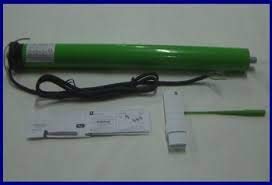
Image 3.1: Dooya Tubular Motor and Remote Control. This image displays the tubular motor alongside its remote control unit, illustrating the complete system.
4. Setup and Installation
Proper installation is crucial for the motor's performance and longevity. Follow these general steps for setup:
4.1 Mounting the Motor
- Ensure the roller track pipe (not included) is securely mounted in the desired location.
- Insert the DM35RL motor into the roller track pipe. Ensure it fits snugly and is properly aligned.
- Secure the motor using the provided mounting brackets and screws.

Image 4.1: Motor End with Wiring. This image provides a close-up view of the motor's end, showing the electrical wiring connections and the mounting point.
4.2 Electrical Connection
Connect the motor to a 230V AC power supply. Refer to the wiring diagram provided with the motor for specific connections. Ensure all connections are secure and insulated.
4.3 Remote Pairing and Limit Setting
After mounting and wiring, the remote control needs to be paired with the motor, and the upper and lower travel limits for the curtain must be set. Specific instructions for pairing and limit setting are typically provided on a separate sheet with the remote or motor. Generally, this involves pressing specific buttons on the motor and remote in sequence to enter programming mode and define the stop positions.
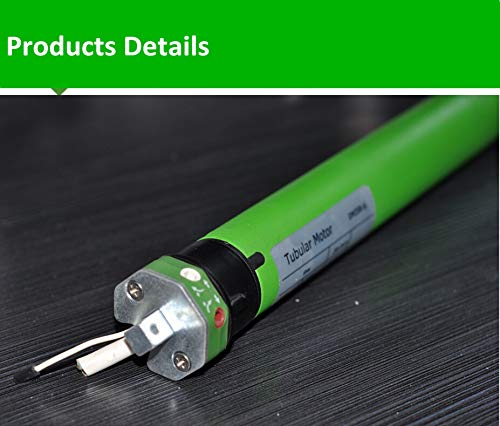
Image 4.2: Motor Limit Adjustment Points. This image shows the end of the motor with visible adjustment screws or buttons, which are typically used for setting the upper and lower travel limits of the curtain.
5. Operation
Once installed and configured, operating the Dooya DM35RL 6/28 motor is straightforward using the remote control.
- Up Button: Press to raise the curtain. The motor will stop automatically at the set upper limit.
- Down Button: Press to lower the curtain. The motor will stop automatically at the set lower limit.
- Stop Button: Press to stop the curtain at any desired intermediate position.

Image 5.1: Person Operating Blinds with Remote. This image depicts a user comfortably operating a set of roller blinds using the remote control, demonstrating the ease of use of the motorized system.
6. Maintenance
The Dooya DM35RL 6/28 motor is designed for durability and requires minimal maintenance. However, periodic checks can ensure optimal performance.
- Cleaning: Wipe the motor casing with a dry, soft cloth. Do not use abrasive cleaners or solvents.
- Inspection: Periodically check the mounting brackets and wiring connections to ensure they are secure and free from damage.
- Obstructions: Ensure the curtain path is clear of any obstructions that could impede movement or damage the motor.
7. Troubleshooting
If you encounter issues with your Dooya DM35RL 6/28 motor, refer to the following common troubleshooting steps:
| Problem | Possible Cause | Solution |
|---|---|---|
| Motor does not respond to remote. | No power supply; Remote battery low; Remote not paired. | Check power connection; Replace remote battery; Re-pair remote with motor. |
| Curtain stops unexpectedly. | Obstruction in curtain path; Motor overheating (thermal protection). | Remove obstruction; Allow motor to cool down for 15-20 minutes. |
| Curtain does not stop at set limits. | Limits incorrectly set or lost. | Re-set the upper and lower travel limits according to the programming instructions. |
| Unusual noise during operation. | Motor not properly seated in pipe; Obstruction; Internal issue. | Check motor seating; Remove obstructions; If noise persists, contact support. |
8. Specifications
| Feature | Detail |
|---|---|
| Model | DM35RL 6/28 (Item Part Number: F29) |
| Brand | Dooya |
| Type | Tubular (Roller) Curtain Motor |
| Voltage | 230 V AC |
| Max. Weight Capacity | 50 KG |
| Operation | Remote Control |
| Noise Level | Noise-free operation |
| Color | Green |
| Item Weight | 600 g |
| Package Dimensions | 40 x 6 x 6 cm |

Image 8.1: Product Certificates. This image displays various certifications, indicating compliance with quality and safety standards for the product.
9. Warranty Information
The Dooya DM35RL 6/28 Tubular Motor comes with a 5-year manufacturing warranty. This warranty covers defects in materials and workmanship under normal use. Please retain your proof of purchase for warranty claims. The warranty is subject to Pune Jurisdiction.
10. Customer Support
For any queries, technical assistance, or support regarding your Dooya DM35RL 6/28 motor, please contact us:
- Direct Sales Helpline: +91 9112733594
- Direct Technical Support: +91 9284431611
Ask a question about this manual
Ask about setup, troubleshooting, compatibility, parts, safety, or missing instructions. Manuals+ will review the question and use this page’s manual context to help answer it.