
1. Introduction
Thank you for choosing the AboveTEK Multi-Angle Adjustable Tablet Stand. This stand is designed to provide stable and flexible support for your tablets and smartphones, enhancing your viewing experience and productivity. Its robust aluminum construction and versatile adjustability make it suitable for various environments, from office desks to kitchen countertops.
2. Product Overview
The AboveTEK Tablet Stand features a premium metal base and arm for stability, along with rubber padding to protect your devices. It offers extensive flexibility with a 15-inch aluminum arm, 360-degree rotation, and multi-angle folding capabilities. The design promotes ergonomic viewing by elevating your device up to 1.3 feet. It also includes a ¼" DSLR Camera Adapter for additional versatility.
Key Features:
- Sturdy metal base and arm with anti-slip pads.
- 15-inch long aluminum arm for extended reach.
- 360-degree rotation and multi-angle folding for optimal viewing.
- Ergonomic design for eye-level viewing and improved posture.
- Adjustable clamps with anti-scratch silicone pads.
- Integrated cutouts for charging cable access.
- Includes a ¼" DSLR Camera Adapter for tripod or projector use.
- Compatible with 4"-11" display tablets and 4.5"-7.5" width/length smartphones.

Figure 2.1: The AboveTEK Tablet Stand in use for cooking, video calls, and meetings, demonstrating its versatility.

Figure 2.2: Compatibility diagram illustrating the stand's adjustable clamp for devices between 4 and 11 inches (diagonal), with specific clamp dimensions.
3. Setup Instructions
The AboveTEK Tablet Stand comes largely pre-assembled. Follow these steps for initial setup:
- Unpack Components: Carefully remove all components from the packaging. You should find the stand base, the adjustable arm, the device holder, and an Allen key set.
- Attach Device Holder: The device holder typically comes pre-attached to the arm. If not, align the holder with the ball joint on the arm and secure it by tightening the collar.
- Position the Stand: Place the stand on a flat, stable surface. The heavy-duty base with anti-slip pads ensures stability.
- Adjust Arm Tightness (if needed): The joints of the arm may require adjustment for optimal tension. Use the provided Allen key (M3 for smaller screws, M4 for larger screws) to tighten or loosen the joints clockwise to tighten, counter-clockwise to loosen. This ensures the arm holds its position firmly.
- Place Your Device: Gently pull apart the adjustable clamps of the device holder and insert your tablet or smartphone. Ensure the device is securely held by the silicone pads.
Video 3.1: A user demonstrating the unboxing and initial setup of the AboveTEK Tablet Stand, including placing a device.

Figure 3.1: Illustration of using the included Allen key to adjust the arm's tightness for stability.
4. Operating Instructions
The stand offers multiple ways to adjust your device for optimal viewing:
- Adjusting Height and Angle: The multi-jointed aluminum arm allows you to raise, lower, and extend your device. Gently move the arm to the desired position. The joints are designed to hold their angle once set.
- 360-Degree Rotation: The device holder can rotate 360 degrees, allowing you to switch between portrait and landscape orientations effortlessly.
- Device Placement: The adjustable clamps accommodate devices from 4 to 11 inches diagonally. Ensure your device is centered and securely gripped by the silicone pads.
- Charging Access: Utilize the integrated cutouts on the device holder and base to route your charging cable, keeping your device powered while in use.
- Tripod/Projector Mode: To use the stand as a tripod or projector mount, remove the device holder and attach the ¼" DSLR Camera Adapter to the arm. You can then mount compatible cameras or projectors.
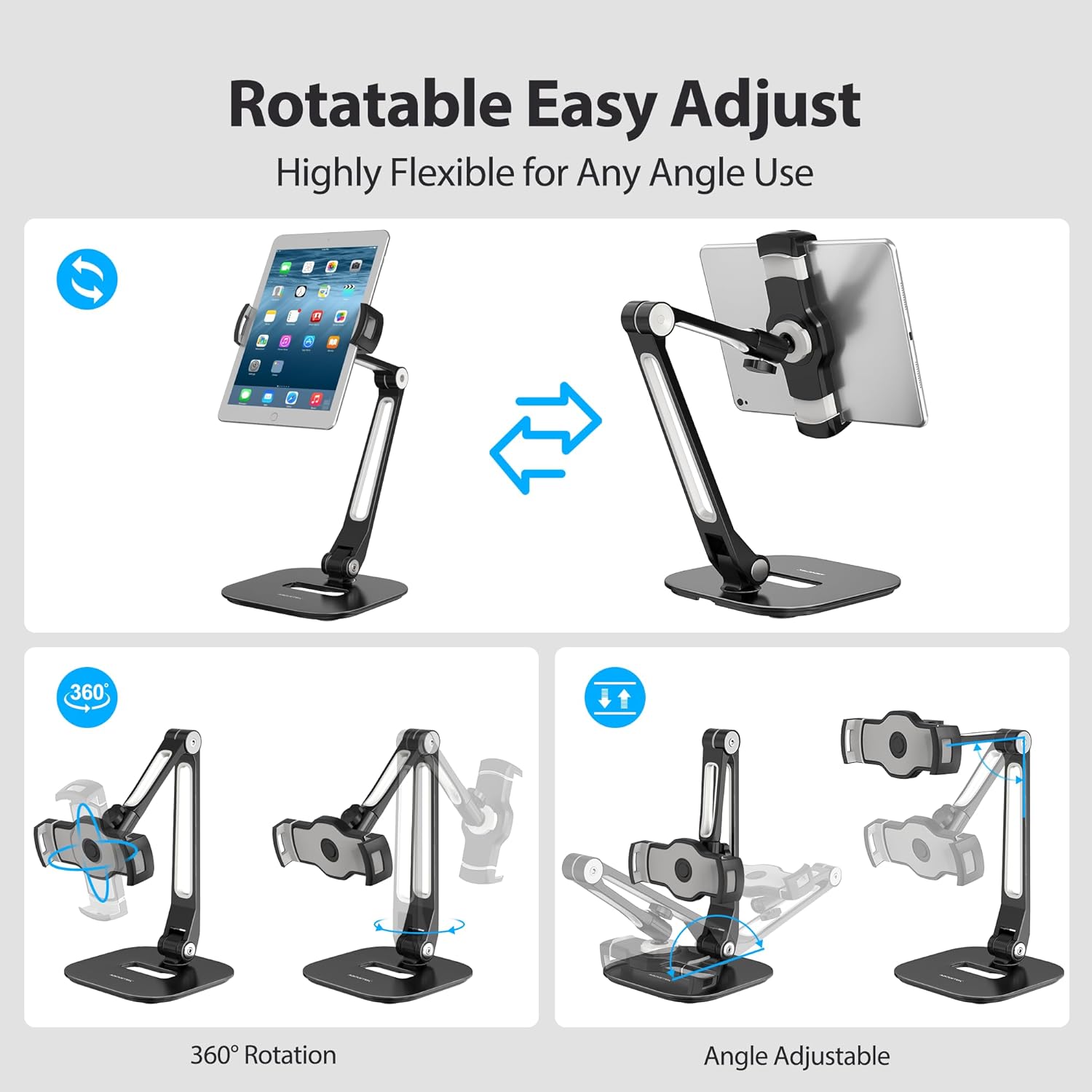
Figure 4.1: Visual representation of the stand's 360-degree rotation and flexible angle adjustments.
Video 4.1: Official AboveTEK video demonstrating the features and various uses of the Long Arm Aluminum Tablet Stand.

Figure 4.2: The stand's versatility with the included ¼" DSLR Camera Adapter, transforming it into a tripod or projector stand.
5. Maintenance
To ensure the longevity and optimal performance of your AboveTEK Tablet Stand, follow these maintenance guidelines:
- Cleaning: Wipe the stand with a soft, damp cloth to remove dust and smudges. Avoid abrasive cleaners or solvents that could damage the finish.
- Joint Tightness: Over time, the adjustable joints may loosen with frequent use. Use the provided Allen key to periodically check and tighten the screws at the joints to maintain stability. Refer to Figure 3.1 in the Setup section for guidance.
- Rubber Pads: Ensure the anti-slip rubber pads on the base and the silicone clamp pads are clean and free from debris to maintain grip and prevent scratches to your device and surface.
6. Troubleshooting
If you encounter any issues with your tablet stand, refer to the following common solutions:
| Problem | Possible Cause | Solution |
|---|---|---|
| Stand feels wobbly or unstable. | Joints are loose; device is too heavy or improperly placed. | Use the included Allen key to tighten the screws at the arm joints (refer to Figure 3.1). Ensure your device is within the recommended size/weight limits and is centered in the clamp. |
| Device slips from the clamp. | Clamp not fully secured; device outside compatible dimensions; silicone pads are dirty. | Ensure the clamp is fully extended and securely gripping your device. Verify your device fits the 4"-11" diagonal range and 4.5"-7.5" width/length. Clean the silicone pads. |
| Arm does not hold its position. | Joints are too loose. | Tighten the screws at the arm joints using the provided Allen key until the desired tension is achieved. |
7. Specifications
- Brand: AboveTEK
- Model Name: TS-196B
- Color: Black
- Material: Aluminum
- Item Dimensions: 15.2 x 5.9 x 3.5 inches
- Item Weight: 3.3 pounds
- Compatible Devices: 4"-11" display tablets (e.g., iPad Air/Mini/Pro, Galaxy Tab) and 4.5"-7.5" width/length smartphones (e.g., iPhone series, Samsung Galaxy series).
- Mounting Type: Bracket Holder
- Special Features: Multi-angle adjustable, 360° rotation, heavy-duty base, anti-slip pads, anti-scratch silicone clamp pads, charging port access, ¼" DSLR Camera Adapter included.
- UPC: 608119111923
8. Warranty and Support
Warranty: Your AboveTEK Tablet Stand comes with a 12-month warranty. Please retain your proof of purchase for warranty claims.
Customer Support: For any questions, inquiries, or assistance regarding product use, exchanges, or returns, please contact AboveTEK customer service directly. We are committed to providing support and resolving any issues you may encounter.
You can visit the official AboveTEK store for more information and support: AboveTEK Store

Figure 8.1: Information regarding AboveTEK's after-sales service and warranty.