
Soundstream VM-23B
Soundstream VM-23B Car Stereo Instruction Manual
Model: VM-23B | Brand: Soundstream
1. Introduction
Thank you for choosing the Soundstream VM-23B Car Stereo. This manual provides detailed instructions for the installation, operation, and maintenance of your new car audio system. Please read this manual thoroughly before using the product to ensure proper operation and to prevent damage.
Key Features:
- Integrated Bluetooth for audio streaming and hands-free calls.
- MP3/WMA playback compatibility.
- Front USB and SD card inputs for convenient media access.
- Front Auxiliary (AUX) input for external audio devices.
- FM Tuner for radio reception.
- Removable faceplate for security.
- Kameleon Feature with 7 changing colors for display customization.
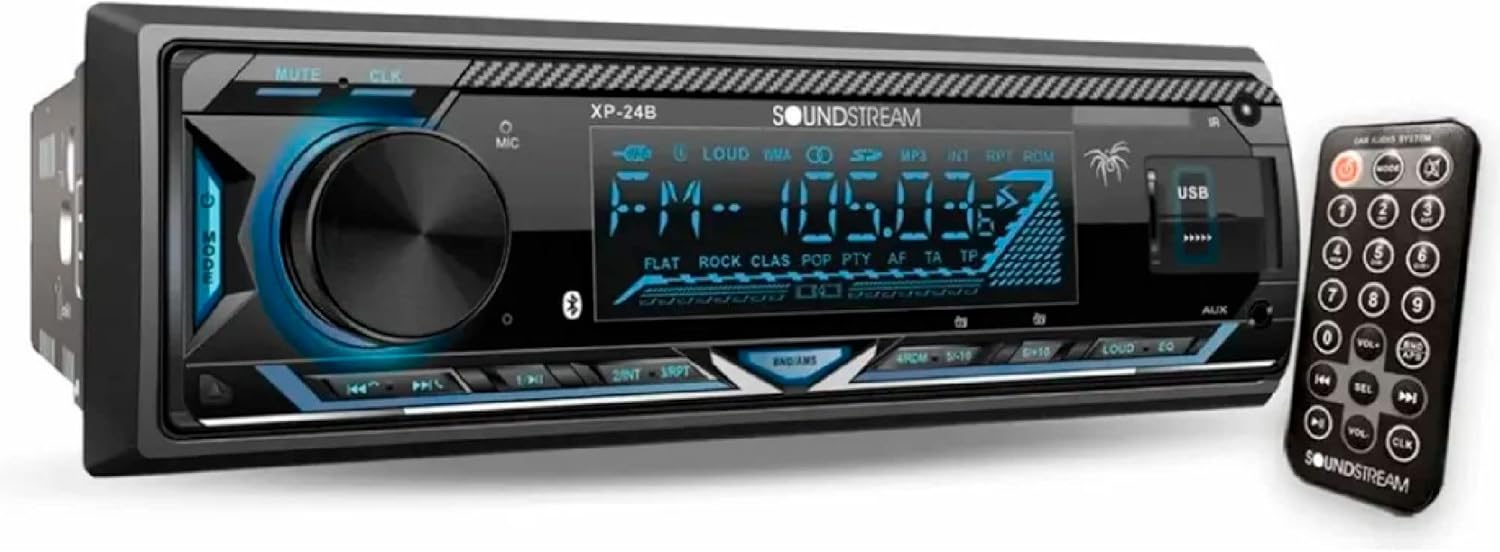
Image 1.1: Front view of the Soundstream VM-23B Car Stereo and its remote control.
2. Safety Information
To ensure safe operation and prevent damage, please observe the following precautions:
- Professional Installation Recommended: For optimal performance and safety, it is highly recommended to have this unit installed by a qualified professional.
- Power Supply: This unit is designed for a 12V DC negative ground electrical system.
- Avoid Distractions: Do not operate the unit or watch videos while driving. Always keep your attention on the road.
- Volume Level: Keep the volume at a level where you can still hear outside sounds (e.g., emergency vehicles).
- Fuse Replacement: Always replace fuses with new ones of the specified rating (10A). Using an incorrect fuse can cause damage or fire.
- Avoid Moisture: Do not expose the unit to moisture or water to prevent electric shock or fire.
- Temperature: Avoid exposing the unit to direct sunlight or extreme temperatures.
3. Package Contents
Please check the package for the following items:
- Soundstream VM-23B Car Stereo Unit
- Remote Control
- Wiring Harness
- Mounting Hardware (sleeves, keys, screws)
- User Manual (this document)
4. Setup and Installation
Proper installation is crucial for the performance and longevity of your car stereo. If you are unsure about any steps, consult a professional installer.
4.1. Wiring Diagram
Refer to the diagram below for correct wiring connections. Ensure all connections are secure and properly insulated.

Image 4.1: Rear panel wiring connections.
- F-L (White) Front Left Output: Connect to the front left speaker.
- R-L (White) Rear Left Output: Connect to the rear left speaker.
- Audio Harness (Speakers): Main connector for speaker wires.
- F-R (Red) Front Right Output: Connect to the front right speaker.
- R-R (Red) Rear Right Output: Connect to the rear right speaker.
- Power Harness: Main connector for power, ground, and ignition wires.
- 10A Fuse: Protects the unit from power surges. Replace only with a 10A fuse.
- Antenna: Connect your car's FM/AM antenna.
4.2. Removable Faceplate
The faceplate of the VM-23B is removable for security. To remove, press the release button (usually on the left side). To attach, align the faceplate with the unit and push until it clicks into place.
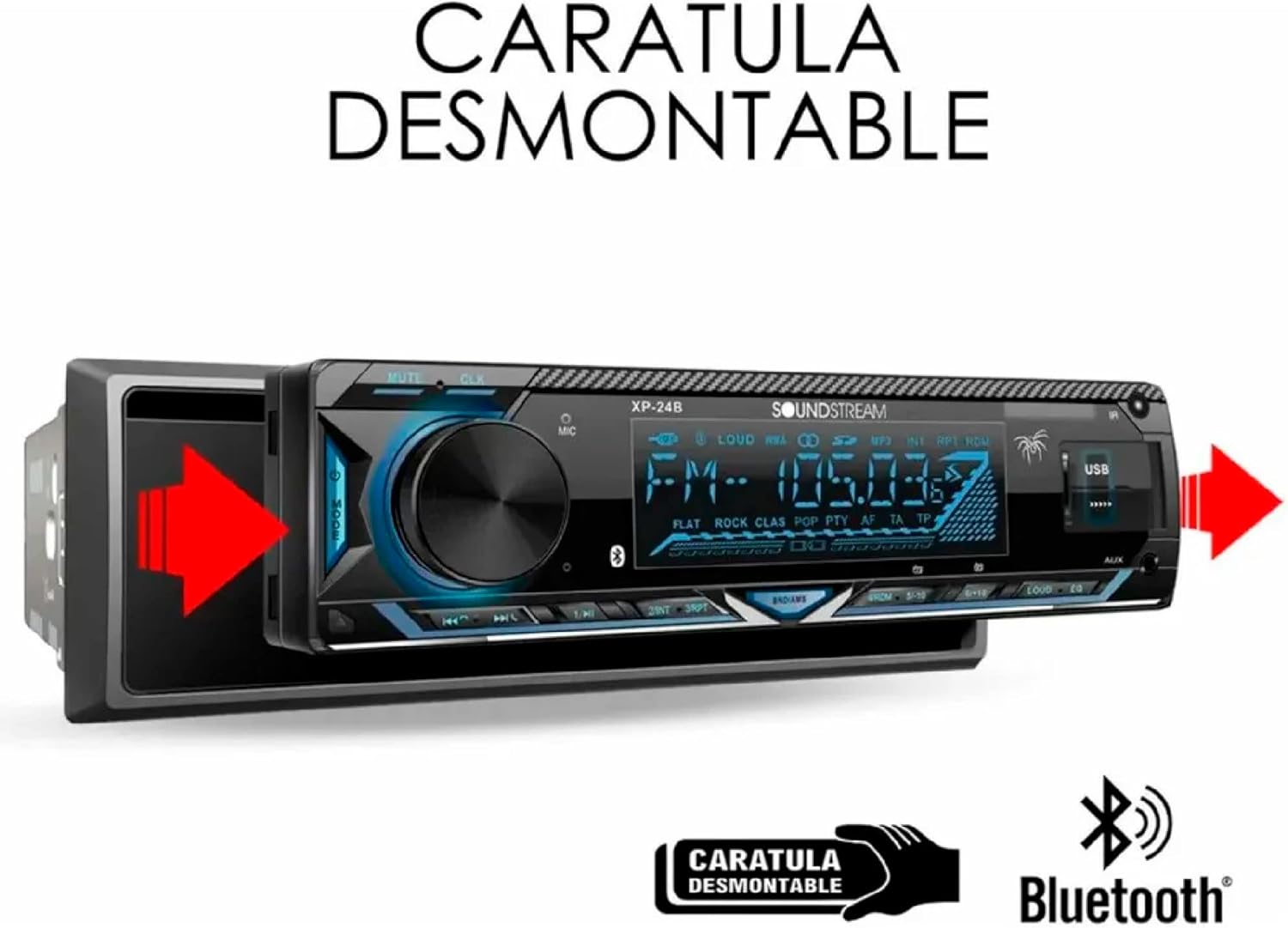
Image 4.2: Illustration of the removable faceplate feature.
4.3. General Installation Steps
- Disconnect the negative terminal of your car battery.
- Remove the existing car stereo from the dashboard.
- Connect the wiring harness of the VM-23B to your car's wiring, following the diagram in Section 4.1.
- Connect the antenna cable.
- Slide the mounting sleeve into the dashboard opening and secure it.
- Slide the VM-23B unit into the mounting sleeve until it locks into place.
- Reconnect the car battery.
- Test the unit's functions before fully reassembling the dashboard.
5. Operating Instructions
5.1. Basic Controls
Familiarize yourself with the front panel controls and the remote control for easy operation.
- Power/Mode Button: Press to turn on/off, long press to cycle through audio sources (FM, USB, SD, AUX, Bluetooth).
- Volume Knob: Rotate to adjust volume. Press to access audio settings (Bass, Treble, Balance, Fader, EQ).
- Mute Button: Mutes/unmutes audio.
- CLK Button: Displays clock. Long press to set time.
- EQ Button: Cycles through preset equalizer settings (Flat, Rock, Pop, Classic, etc.).
- LOUD Button: Activates/deactivates loudness feature for enhanced bass and treble at low volumes.
- USB Port: Insert USB flash drives for media playback or mobile charging.
- SD Card Slot: Insert SD cards for media playback.
- AUX Input: Connect external audio devices using a 3.5mm audio cable.
5.2. Bluetooth Operation
The VM-23B features integrated Bluetooth for wireless audio streaming and hands-free calling.
- Pairing:
- Ensure Bluetooth is enabled on your mobile device.
- Select "Bluetooth" as the source on the VM-23B. The unit will enter pairing mode.
- On your mobile device, search for available Bluetooth devices and select "Soundstream VM-23B" (or similar name).
- Once paired, the Bluetooth icon on the stereo display will illuminate.
- Audio Streaming: Play music from your paired device, and it will stream wirelessly to the stereo. Use the stereo's controls (play/pause, skip) or your device's controls.
- Hands-Free Calling:
- When a call comes in, the stereo display will show the caller ID (if supported).
- Press the "Answer" button (usually the green phone icon on the remote or a dedicated button on the unit) to answer.
- Press the "End Call" button (red phone icon) to end a call.
- Use the built-in microphone for conversations.
5.3. USB/SD Playback
Enjoy your digital music collection from USB flash drives or SD cards.
- Insert a USB flash drive into the front USB port or an SD card into the SD card slot.
- The unit will automatically switch to USB/SD mode and begin playback.
- Use the PREV/NEXT buttons to skip tracks.
- Use the PLAY/PAUSE button to control playback.
- The unit supports MP3 and WMA audio formats.
5.4. FM Tuner Operation
Listen to your favorite radio stations.
- Press the MODE button until "FM" is displayed.
- Auto Scan: Long press the BAND button (or a dedicated scan button) to automatically scan and save strong stations to presets.
- Manual Tuning: Short press the PREV/NEXT buttons to fine-tune the frequency.
- Preset Recall: Press the numbered preset buttons (1-6) to recall saved stations.
5.5. AUX Input
Connect external audio devices like smartphones or portable MP3 players.
- Connect your external device to the front AUX input using a 3.5mm audio cable.
- Press the MODE button until "AUX" is displayed.
- Control playback from your external device.
5.6. Kameleon Feature (7 Colors Changing)
Customize the display illumination to match your mood or car interior.

Image 5.1: Examples of the 7 changing display colors.
The unit features a "Kameleon" function allowing you to cycle through 7 different display colors. Refer to your remote control or the unit's manual for the specific button (often labeled "COLOR" or "DISP") to change the illumination color.
5.7. USB Mobile Charging
The front USB port can also be used to charge your mobile devices.

Image 5.2: Charging a mobile phone using the front USB port.
Simply connect your mobile phone to the front USB input using a compatible USB cable. The stereo will provide power to charge your device.
6. Maintenance
- Cleaning the Unit: Use a soft, dry cloth to wipe the front panel. For stubborn stains, dampen the cloth with water. Never use harsh chemicals or abrasive cleaners.
- Cleaning the Connectors: If the faceplate connectors become dirty, wipe them with a cotton swab lightly moistened with isopropyl alcohol.
- Fuse Replacement: If the unit does not power on, check the 10A fuse located at the rear of the unit (refer to Section 4.1). Replace it only with a fuse of the same rating.
7. Troubleshooting
If you encounter problems with your unit, refer to the following table for common issues and solutions.
| Problem | Possible Cause | Solution |
|---|---|---|
| No power | Blown fuse; Incorrect wiring; Loose power connection. | Check and replace the 10A fuse. Verify all power and ground connections are secure. |
| No sound | Volume too low; Mute activated; Incorrect speaker wiring; Speakers damaged. | Increase volume. Deactivate mute. Check speaker connections. Test speakers with another audio source. |
| Bluetooth not connecting | Bluetooth not enabled on device; Device too far; Already paired with another device. | Ensure Bluetooth is on and discoverable. Move device closer. Disconnect from other devices. Try re-pairing. |
| USB/SD not playing | Unsupported file format; Corrupted files; USB/SD not inserted correctly; Max capacity exceeded. | Ensure files are MP3/WMA. Reinsert USB/SD. Try a different USB/SD. Check file system (FAT32 recommended). |
| Poor FM reception | Antenna not connected; Weak signal area; Damaged antenna. | Check antenna connection. Try tuning to a stronger station. Consider an antenna booster if in a weak signal area. |
8. Specifications
| Feature | Specification |
|---|---|
| Model Number | VM-23B |
| Brand | Soundstream |
| Connectivity Technology | Bluetooth |
| Compatible Devices | Smartphone, Tablet, MP3 Player |
| Audio Output Mode | Stereo |
| Memory Card Slot | MP3 (SD Card) |
| Product Dimensions | 17 x 6 x 15 cm (6.7 x 2.4 x 5.9 inches) |
| Weight | 1 kg (2.2 lbs) |
| Color | Black |
9. Warranty and Support
Soundstream products are manufactured to the highest quality standards. This product is covered by a limited warranty against defects in materials and workmanship. For specific warranty terms and conditions, please refer to the warranty card included with your product or visit the official Soundstream website.
For technical support, troubleshooting assistance, or service inquiries, please contact Soundstream customer service or visit their official website:
Soundstream Official Website: www.soundstream.com
Please have your model number (VM-23B) and purchase information ready when contacting support.
Related documentsVM-23B


Ask a question about this manual
Ask about setup, troubleshooting, compatibility, parts, safety, or missing instructions. Manuals+ will review the question and use this page’s manual context to help answer it.