Lawmate BA-4400 SLIM Extended Battery User Manual
Model: BA-4400 SLIM
1. Introduction
The Lawmate BA-4400 SLIM is a 4400mAh extended battery designed to significantly increase the operating time of your Lawmate PV500 EVO, ECO, or LITE digital video recorders. This 3.7V lithium-ion battery pack provides double the capacity of standard batteries, extending recording time by up to 6 hours. Its slim design ensures minimal added bulk to your device.
2. Safety Information
- Do not disassemble, crush, puncture, or short-circuit the battery.
- Do not expose the battery to high temperatures (above 60°C / 140°F) or direct sunlight.
- Keep the battery away from water and other liquids.
- Use only the specified charger for this battery.
- Dispose of used batteries according to local regulations.
- Keep out of reach of children.
3. Package Contents
- Lawmate BA-4400 SLIM Extended Battery (1)
- (Note: Charger and PV500 series DVR sold separately)
4. Product Overview
The BA-4400 SLIM battery is designed to seamlessly integrate with your Lawmate PV500 series digital video recorder. It features a clip-on mechanism for secure attachment and provides a reliable power source for extended operation.
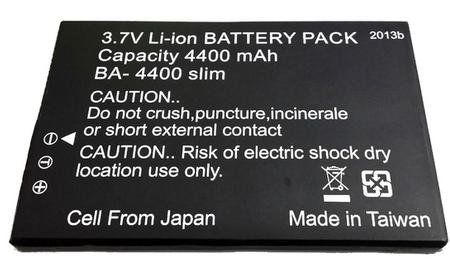
Image 1: Lawmate BA-4400 SLIM Extended Battery. This image shows the compact design of the 4400mAh battery pack, ready for attachment to a compatible Lawmate PV500 series DVR.
5. Setup and Installation
- Ensure Device is Off: Before attaching the battery, ensure your Lawmate PV500 EVO, ECO, or LITE DVR is powered off.
- Align Battery: Locate the battery compartment or attachment points on the back of your PV500 series DVR. Align the BA-4400 SLIM battery with these points.
- Clip On: Gently press the battery onto the DVR until it securely clips into place. Ensure a firm connection to prevent accidental detachment during operation.
- Verify Connection: Once attached, lightly tug on the battery to confirm it is properly secured.
6. Operating Instructions
6.1 Charging the Battery
The BA-4400 SLIM battery is charged while it is attached to the PV500 series DVR and the DVR is connected to its power adapter. Ensure you use the original charger provided with your PV500 DVR.
- Connect the PV500 DVR (with the BA-4400 SLIM attached) to its power adapter.
- Plug the power adapter into a wall outlet.
- The charging indicator on your PV500 DVR will typically illuminate to show that charging is in progress. Refer to your PV500 DVR's manual for specific charging indicator behavior.
- Allow sufficient time for a full charge. Charging time may vary depending on the remaining battery level.
6.2 Using with PV500 Series DVR
Once the BA-4400 SLIM battery is fully charged and securely attached, it will automatically provide extended power to your PV500 series DVR. Simply operate your DVR as usual, enjoying the increased recording duration.
7. Maintenance
- Storage: If storing the battery for an extended period, charge it to approximately 50% capacity and store it in a cool, dry place. Avoid storing fully charged or fully depleted batteries for long durations.
- Cleaning: Use a soft, dry cloth to clean the battery and its contacts. Do not use liquid cleaners or solvents.
- Battery Life: Lithium-ion batteries have a finite lifespan. Over time, the capacity may decrease. This is normal wear and tear.
8. Troubleshooting
| Problem | Possible Cause | Solution |
|---|---|---|
| Battery not charging. | Loose connection; faulty charger/cable; battery issue. | Ensure secure connection to DVR and power source. Try a different outlet. If possible, test with another compatible charger. |
| DVR not powering on with battery. | Battery not charged; battery not properly attached; DVR issue. | Ensure battery is fully charged. Re-attach the battery securely. Test the DVR with its original battery if available. |
| Reduced operating time. | Battery degradation (normal wear); extreme operating temperatures. | Ensure battery is fully charged before use. Operate the DVR within recommended temperature ranges. Consider replacing the battery if capacity is significantly reduced. |
9. Specifications
| Feature | Detail |
|---|---|
| Model Number | BA-4400 SLIM |
| Battery Type | Lithium Ion |
| Battery Capacity | 4400 mAh |
| Voltage | 3.7V |
| Compatibility | Lawmate PV500 EVO, ECO, LITE Digital Video Recorders |
| Extended Recording Time | Up to 6 hours (depending on DVR model and usage) |
10. Warranty and Support
For warranty information and technical support, please refer to the documentation provided with your Lawmate PV500 series DVR or visit the official Lawmate website. Keep your purchase receipt as proof of purchase for warranty claims.


