
1. Introduction
The hOmeLabs Sunrise Alarm Clock is designed to provide a gentle and natural awakening experience. It features a warm LED light that gradually brightens, simulating a sunrise, along with a selection of nature-inspired sounds or FM radio. This digital alarm clock also includes a sunset simulation sleep timer, multiple color options for ambient lighting, and a convenient snooze function.
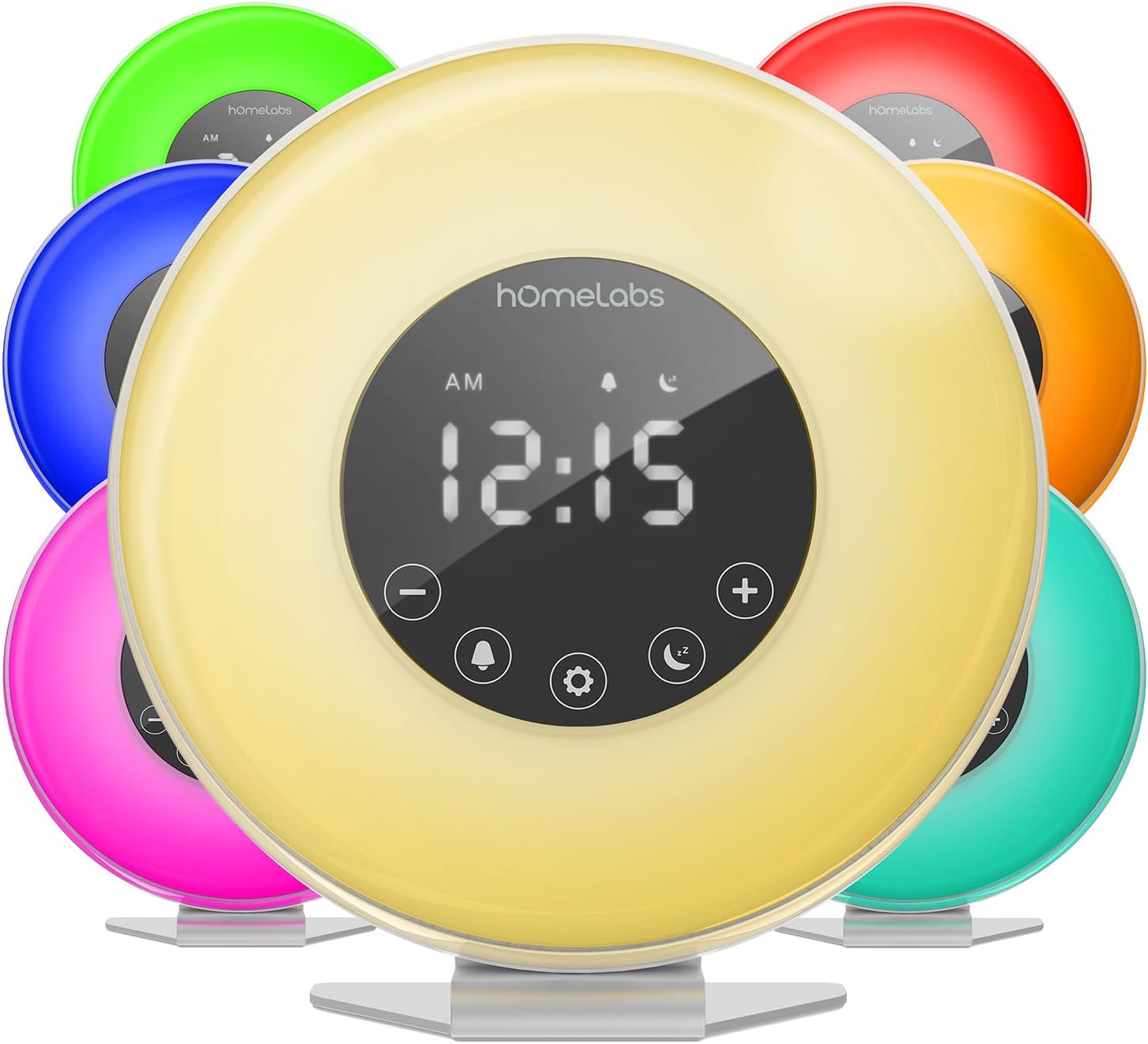
Image 1: The hOmeLabs Sunrise Alarm Clock displaying various light colors.
2. Safety Information
Please read all instructions carefully before using this product. Keep this manual for future reference.
- Do not expose the device to water or excessive moisture.
- Use only the provided power adapter.
- Keep out of reach of children.
- Do not attempt to disassemble or repair the device yourself. Contact qualified service personnel.
3. Package Contents
- hOmeLabs Sunrise Alarm Clock
- USB Power Adapter
- User Manual
4. Product Overview
Familiarize yourself with the various parts and controls of your alarm clock.
Top Controls

Image 2: Detailed view of the top control buttons including FM Radio, Alarm Tone, Volume Down, Snooze, Volume Up, Screen Brightness, and Light Color.
Front Touch Controls
- Minus (-) Button: Decrease values, navigate backward.
- Set Alarm Button: Access alarm settings.
- Time Settings Button: Adjust current time.
- Sleep Timer Button: Activate sunset simulation.
- Plus (+) Button: Increase values, navigate forward.
Rear View and Ports

Image 3: The back of the alarm clock with the USB power input and speaker grille.
- USB Power Input: Connect the power adapter here.
- Speaker: Outputs alarm sounds, nature sounds, and FM radio.
5. Setup
5.1 Power Connection
Connect the provided USB power adapter to the USB input port on the back of the alarm clock. Plug the adapter into a standard wall outlet. The clock display will illuminate.

Image 4: The alarm clock connected to its power source via USB.
5.2 Setting the Time
- Press the Time Settings button on the front touch panel. The hour display will begin to blink.
- Use the + or - buttons to adjust the hour.
- Press the Time Settings button again to confirm the hour, and the minute display will blink.
- Use the + or - buttons to adjust the minutes.
- Press the Time Settings button one more time to save the time.
- To switch between 12-hour and 24-hour display, press and hold the Time Settings button for 3 seconds.
5.3 Setting the Alarm
- Press the Set Alarm button on the front touch panel. The alarm time display will blink.
- Use the + or - buttons to adjust the alarm hour.
- Press the Set Alarm button again to confirm the hour, and the minute display will blink.
- Use the + or - buttons to adjust the alarm minutes.
- Press the Set Alarm button one more time to save the alarm.
- To activate or deactivate the alarm, touch the Alarm icon on the top panel.
6. Operating Instructions
6.1 Sunrise Simulation
The sunrise simulation feature gradually brightens the light 30 minutes before your set alarm time, mimicking a natural sunrise to gently wake you up.

Image 5: The alarm clock demonstrating the natural light simulation that gradually brightens.
6.2 Sunset Simulation (Sleep Timer)
Activate the Sleep Timer function to initiate a sunset simulation. The light will gradually dim over a set period, helping you relax and fall asleep. This can also function as a night light.
6.3 Light Color Options
The alarm clock offers 8 colorful light options, allowing it to serve as a bedside lamp or mood light. You can choose from vibrant colors like green, red, blue, purple, or yellow.

Image 6: The alarm clock showcasing its multiple color modes for ambient lighting.
6.4 FM Radio
To use the FM radio, press the Radio button on the top panel. Use the + or - buttons to tune to your desired station. The radio can also be set as an alarm sound.
6.5 Nature Sounds
Choose from a selection of soothing nature-inspired sounds, such as birds, lullaby, or ocean waves, to wake you up or help you fall asleep.
6.6 Snooze Function
When the alarm sounds, press the large Snooze button on the top of the clock to pause the alarm and turn off the light and sound for 5 minutes.

Image 7: The prominent snooze button located on the top of the alarm clock.
6.7 Display Brightness
The wide LED clock face features 3 brightness settings. Press the Screen Brightness button on the top panel to cycle through the brightness levels or turn the display off completely.
7. Maintenance
To maintain your hOmeLabs Sunrise Alarm Clock, follow these simple guidelines:
- Wipe the device with a soft, dry cloth.
- Do not use abrasive cleaners or solvents.
- Ensure the device is unplugged before cleaning.
8. Troubleshooting
- Alarm not sounding/light not brightening: Ensure the alarm is activated and the time is set correctly. Check power connection.
- Display not visible: Press the Screen Brightness button to adjust the display brightness. It may be set to off.
- FM Radio static: Adjust the position of the antenna for better reception.
- Difficulty setting time/alarm: Refer to sections 5.2 and 5.3. Ensure you press the respective setting button to confirm each step (hour/minute).
9. Specifications
| Feature | Detail |
|---|---|
| Brand | hOmeLabs |
| Model Number | 4330349651 |
| Display Type | LED |
| Power Source | Battery Powered (Backup), Electrical (Main) |
| Product Dimensions | 6.8"W x 7.2"H |
| Item Weight | 1.37 pounds |
| Special Features | FM Radio, Sunrise/Sunset Simulation, Multiple Nature Sounds, Touch Control, Snooze Function, 8 Color Options, 3 Display Brightness Settings |
10. Warranty & Support
This hOmeLabs product comes with a 45-day money-back guarantee and an 18-month warranty. For support or warranty claims, please refer to the contact information provided in your product packaging or visit the official hOmeLabs website.