
Introduction
Welcome to your new FixtureDisplays Digital Kitchen Food Meat Thermometer. This device is designed to accurately measure food temperatures and assist with cooking times using its integrated timer and alarm functions. It is suitable for use with BBQs, ovens, grills, and smokers, providing precise temperature control for various cooking needs.
Product Overview
The FixtureDisplays Model 16810 thermometer features a digital display unit and a durable stainless steel probe connected by a 40-inch mesh cable. The main unit includes intuitive control buttons for various functions and offers versatile placement options with a countertop stand and a magnetic back.
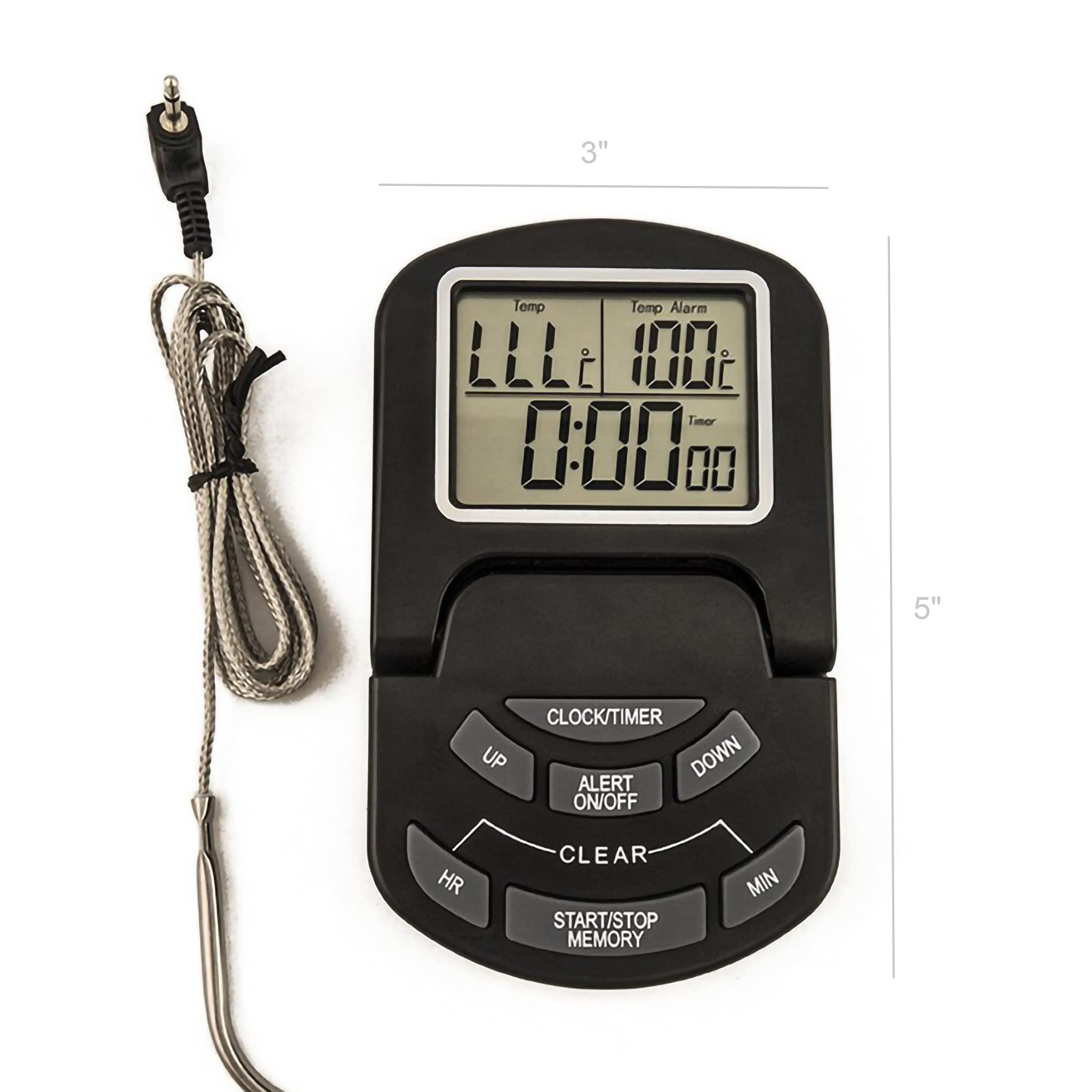
Front view of the FixtureDisplays Digital Kitchen Food Thermometer, showing the main display unit with control buttons and the connected stainless steel probe.

Rear view of the FixtureDisplays Digital Kitchen Food Thermometer, illustrating the battery compartment, magnetic back, and countertop stand.
Setup
Battery Installation
The thermometer requires one AAA battery (not included) for operation.
- Locate the battery compartment on the back of the main unit.
- Open the battery cover by sliding or lifting it.
- Insert one AAA battery, ensuring the correct polarity (+/-) is observed.
- Close the battery cover securely.
Probe Connection
Insert the stainless steel probe's jack firmly into the designated port on the side of the main unit. Ensure it is fully seated for accurate temperature readings.
Operating Instructions
Power On/Off
Press the ON/OFF button to turn the unit on or off.
Temperature Measurement
Insert the stainless steel probe into the thickest part of the food, taking care to avoid bone. The current temperature will be displayed on the screen.
To switch between Fahrenheit (℉) and Celsius (℃), press the ℃/℉ button located at the rear of the unit.
Setting the Temperature Alarm
- In temperature setting mode, press the UP button to increase the target temperature or DOWN button to decrease it.
- Once the desired temperature is set, press the ALERT ON/OFF button to activate the alarm. An alarm icon will appear on the display, indicating the alarm is active.
- When the food reaches the set temperature, the alarm will sound.
- Press ALERT ON/OFF again to turn off the alarm.
Using the Clock and Timer
The unit can function as both a clock and a countdown timer.
- Switching Modes: Press the CLOCK/TIMER button to switch between clock display mode and timer mode.
- Setting the Clock: In clock mode, press and hold the CLOCK/TIMER button for 3 seconds. The hour display will flash. Press HR to adjust the hour and MIN to adjust the minute. Press CLOCK/TIMER again to confirm. (A 12/24 hour format switch may be located on the back of the unit).
- Setting the Timer: In timer mode, press HR to set the hours and MIN to set the minutes for the countdown.
- Starting/Stopping the Timer: Press START/STOP to begin the countdown. Press START/STOP again to pause or resume the timer.
- Clearing the Timer: While the timer is stopped, press CLEAR to reset it to zero. Alternatively, press MIN and HR buttons simultaneously to clear the previously set countdown time.
Memory Function
The MEMORY button allows for recalling previous settings or stored temperatures. Refer to the full product manual for detailed usage of this feature.
Maintenance
Cleaning
Wipe the main unit clean with a damp cloth. Do not immerse the main unit in water.
The stainless steel probe can be cleaned with warm, soapy water. Ensure the probe connector is completely dry before re-inserting it into the main unit.
Storage
Store the thermometer in a dry place when not in use. If storing for extended periods, remove the battery to prevent potential leakage and damage to the unit.
Troubleshooting
No Display / Unit Not Turning On
- Check battery installation and ensure polarity is correct.
- Replace with a fresh AAA battery.
Inaccurate Temperature Readings
- Ensure the probe is fully inserted into the thickest part of the food and not touching bone.
- Verify the probe cable is securely connected to the main unit.
- If the probe appears damaged or consistently provides incorrect readings, it may need replacement.
Alarm Not Sounding
- Ensure the alarm function is activated (an alarm icon should be visible on the display).
- Check if the target temperature has been reached. The alarm only sounds when the set temperature is met.
Specifications
- Temperature Range: 32℉ to 572℉ (0℃ to 300℃)
- Accuracy: ±1℃ (0℃ to 100℃), ±1℃ (101℃ to 300℃)
- Increments: 0.2℉ / 0.1℃
- Response Time: 0.5 seconds
- Timer Range: Up to 23 hours, 59 minutes
- Cable Length: 40 inches (stainless steel mesh)
- Power Source: 1 x AAA Battery (not included)
- Material: ABS Cover (main unit), Stainless Steel (probe)
- Dimensions (Main Unit): 3" width x 4.9" height x 0.8" depth
- Weight: 0.26 lbs (unit only)
- Special Features: Programmable alarm, Countdown timer, Magnetic back, Countertop stand.
Warranty and Support
For warranty information or technical support regarding your FixtureDisplays Digital Kitchen Food Meat Thermometer Model 16810, please contact FixtureDisplays customer service. Contact details are typically found on the product packaging or the manufacturer's official website. When contacting support, please have your model number (16810) and purchase date available to expedite assistance.