1. Introduction
This manual provides detailed instructions for the installation, setup, operation, and maintenance of your Hobbywing FLYFUN-160A-HV-OPTO-V5 Electronic Speed Controller (ESC). This high-performance ESC is designed for remote-controlled aircraft, offering robust power delivery and advanced protection features. Please read this manual thoroughly before use to ensure proper functionality and safety.
2. Safety Precautions
- Always disconnect the battery from the ESC when not in use to prevent accidental motor activation.
- Ensure all connections are secure and properly insulated to avoid short circuits.
- Operate in a well-ventilated area to prevent overheating.
- Keep hands and loose clothing away from rotating propellers and motors.
- Verify correct motor rotation direction before flight.
- This product is not a toy. Recommended for users 18 years and older.
3. Product Overview
The Hobbywing FLYFUN-160A-HV-OPTO-V5 is a high-voltage, high-amperage Electronic Speed Controller featuring a powerful switch-mode BEC and multiple protection functions. It is designed for demanding RC aircraft applications.

Figure 3.1: Top-down view of the Hobbywing FLYFUN-160A-HV-OPTO-V5 ESC, illustrating the heat sink and various connection wires.
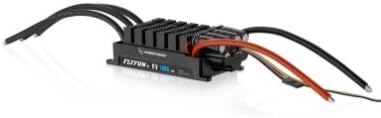
Figure 3.2: Angled view of the Hobbywing FLYFUN-160A-HV-OPTO-V5 ESC, highlighting its compact design and connection points.
Key Features:
- High-Power Switch-Mode BEC: Provides continuous 8A / peak 20A current, with adjustable voltage options of 5.2V, 6.0V, and 7.4V to power various onboard electronics.
- DEO Technology (Driving Efficiency Optimization): Enhances throttle response, improves flight stability and flexibility, increases driving efficiency for longer flight times, and reduces ESC temperature for reliable operation.
- Multiple Protection Features: Includes start-up protection, over-current protection, ESC thermal protection, capacitor thermal protection, overload protection, throttle signal loss (Fail Safe), and abnormal input voltage protection.
- Programmability: The ESC can be programmed via a transmitter or an optional LED program card.
- Soft Start-ups & Reverse Brake: Offers controlled motor start-up and braking capabilities.
4. Setup and Installation
4.1 Wiring Connections
- Motor Connection: Connect the three output wires from the ESC to the three phase wires of your brushless motor. Ensure proper soldering for a secure connection. If the motor rotates in the wrong direction, swap any two of the three ESC-to-motor wires.
- Battery Connection: Connect the red and black input wires of the ESC to the positive and negative terminals of your battery pack, respectively. Observe correct polarity to prevent damage.
- Receiver Connection: Plug the throttle signal cable from the ESC into the throttle channel of your receiver.
4.2 BEC Voltage Adjustment
The built-in BEC allows for adjustable output voltage to power your receiver and servos. The voltage can be set to 5.2V, 6.0V, or 7.4V. Refer to the programming section for instructions on how to adjust this setting. Ensure the selected voltage is compatible with your receiver and servo specifications.
4.3 Programming the ESC
The FLYFUN-160A-HV-OPTO-V5 ESC can be programmed using your transmitter or a dedicated LED program card (sold separately). While basic settings can be adjusted via transmitter, using the LED program card is recommended for comprehensive and precise configuration, including BEC voltage adjustment, brake settings, and other advanced parameters. Consult the LED program card manual for detailed programming steps.
5. Operation
5.1 Initial Power-Up
- Ensure your transmitter is powered on and the throttle stick is at its lowest position.
- Connect the battery to the ESC. The ESC will emit a series of tones indicating successful initialization and cell count detection.
- Wait for the arming tone, indicating the ESC is ready for operation.
5.2 Throttle Control
Gradually advance the throttle stick on your transmitter to control motor speed. The DEO Technology ensures a rapid and smooth throttle response, providing precise control during flight maneuvers. The soft start-up feature prevents sudden jolts to the motor and gearbox.
5.3 Reverse Brake Function
The ESC supports a reverse brake function. This feature can be configured via programming. Refer to the programming instructions for details on enabling and adjusting the brake settings.
6. Protection Features
The Hobbywing FLYFUN-160A-HV-OPTO-V5 ESC incorporates several protection mechanisms to ensure reliable operation and prolong its lifespan:
- Start-up Protection: Prevents damage from improper motor start-up conditions.
- Over-Current Protection: Automatically reduces power or shuts down if current draw exceeds safe limits.
- ESC Thermal Protection: Reduces power or shuts down if the ESC internal temperature becomes too high.
- Capacitor Thermal Protection: Monitors and protects the capacitors from overheating.
- Overload Protection: Safeguards against excessive load on the motor.
- Throttle Signal Loss (Fail Safe): If the throttle signal is lost for a set period, the ESC will reduce power or shut down to prevent runaway.
- Abnormal Input Voltage Protection: Protects the ESC from incorrect or unstable input voltage.
7. Specifications
| Feature | Value |
|---|---|
| Model | FLYFUN-160A-HV-OPTO-V5 |
| Continuous Current | 160A |
| BEC Output | Switch-mode, 8A Continuous / 20A Peak, adjustable 5.2V/6.0V/7.4V |
| Product Dimensions | 4.33 x 1.31 x 1.98 inches (110 x 33.3 x 50.3 mm) |
| Item Weight | 7.8 ounces (221 grams) |
| Manufacturer | Hobbywing Technology |
8. Troubleshooting
- Motor Not Spinning / Intermittent Operation:
- Check all wiring connections (motor, battery, receiver) for looseness or poor soldering.
- Ensure the battery is fully charged and capable of delivering the required current.
- Verify that the throttle signal cable is correctly plugged into the receiver's throttle channel.
- Confirm that the ESC has armed successfully (indicated by specific tones).
- Motor Spins in Wrong Direction:
- Swap any two of the three ESC-to-motor phase wires.
- ESC Overheating / Thermal Cutoff:
- Ensure adequate airflow around the ESC.
- Check for excessive current draw from the motor (e.g., oversized propeller, binding drivetrain).
- Verify that the ESC's timing settings are appropriate for your motor.
- If using the brake function, ensure it is not causing excessive heat build-up during rapid throttle changes. Adjust brake settings if necessary.
- Difficulty with Programming:
- Ensure the LED program card is correctly connected and functioning.
- If programming via transmitter, ensure the throttle stick is at maximum during the initial programming entry sequence, then moved to minimum for parameter selection.
- Refer to the specific programming instructions for the LED program card or transmitter method.
9. Maintenance
- Regularly inspect all wires and connectors for signs of wear, damage, or corrosion.
- Keep the ESC clean and free from dust, dirt, and moisture. Use a soft brush or compressed air for cleaning.
- Ensure the heat sink fins are clear of obstructions to allow for efficient cooling.
- Store the ESC in a dry, cool environment when not in use.
10. Warranty and Support
Hobbywing strives to provide accurate product information. However, typographical errors may occur. For the most current information regarding product descriptions, labels, and policies, please refer to the official Hobbywing website or contact their customer support.
For information regarding warranty, returns, and support, please visit the HobbywingDirect return policy page: https://www.hobbywingdirect.com/pages/return-policy.


