
1. Introduction
Thank you for choosing the Maclean MCE165 LED Wireless Ceiling/Wall Light set. This product provides convenient, battery-operated lighting for various indoor applications. The set includes six LED lights and a remote control, offering flexible illumination options for your home, office, basement, or garage. Its compact size, low power consumption, and easy installation make it ideal for lighting cabinets, niches, shelves, stairs, and bars.

Image 1: Maclean MCE165 LED Wireless Lights (6 units) and Remote Control.
2. Safety Information
- Read all instructions before use and retain for future reference.
- Do not mix old and new batteries. Do not mix alkaline, standard (carbon-zinc), or rechargeable (nickel-cadmium) batteries.
- Insert batteries with correct polarity (+ and -). Incorrect insertion can cause damage.
- Remove batteries if the product is not used for an extended period.
- Keep batteries out of reach of children.
- Do not expose the lights or remote control to water or excessive moisture.
- This product is designed for indoor use only.
3. Package Contents
Please check that all items are present:
- 6 x Maclean MCE165 LED Wireless Lights
- 1 x Remote Control
- Mounting Hardware (screws and adhesive pads)
4. Setup
4.1 Battery Installation
- For LED Lights: Each LED light requires 3 x AAA batteries (not included). Twist the back cover of each light counter-clockwise to open. Insert the batteries according to the polarity markings. Replace the cover by twisting clockwise until secure.
- For Remote Control: The remote control requires 2 x AA batteries (not included). Open the battery compartment on the back of the remote. Insert the batteries according to the polarity markings. Close the compartment cover.

Image 2: Open battery compartment of an LED light, showing space for three AAA batteries.
4.2 Mounting the Lights
The lights can be mounted using either the included adhesive pads or screws.
- Adhesive Mounting: Clean the desired surface thoroughly. Peel off the protective film from one side of an adhesive pad and attach it to the back of the LED light. Peel off the other side and firmly press the light onto the mounting surface for at least 30 seconds.
- Screw Mounting: Use the provided screws to secure the back cover of the LED light to the desired surface. Once the back cover is securely mounted, twist the LED light onto the cover clockwise until it locks into place.

Image 3: Included mounting hardware, showing screws and circular adhesive pads.
5. Operating Instructions
The Maclean MCE165 lights can be operated using the remote control or by pressing the light cover directly.
5.1 Remote Control Functions
The remote control features four buttons:
- ON (O): Turns all paired lights on at 100% brightness.
- OFF (-): Turns all paired lights off.
- 50% ON (Light Icon): Turns all paired lights on at 50% brightness.
- 30 MIN (30 min): Activates a 30-minute timer, after which all paired lights will automatically turn off.
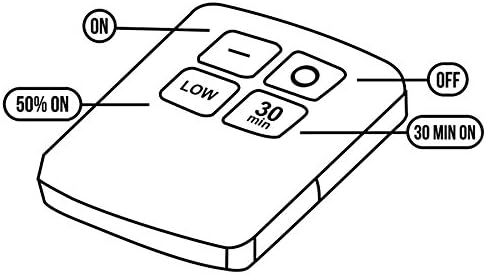
Image 4: Diagram illustrating the functions of the remote control buttons.
5.2 Manual Operation
Each individual light can be turned on or off by pressing its transparent cover. This allows for independent control of each light without the remote.

Image 5: Remote control in use, demonstrating its ability to control ceiling-mounted lights.
6. Maintenance
6.1 Battery Replacement
When the lights dim or the remote control becomes unresponsive, it is time to replace the batteries. Follow the battery installation steps in Section 4.1.
6.2 Cleaning
Wipe the lights and remote control with a soft, dry cloth. Do not use abrasive cleaners or solvents, as these may damage the surface.
7. Troubleshooting
- Lights not turning on:
- Check if batteries are inserted correctly with the right polarity.
- Replace old or depleted batteries with new ones.
- Ensure the remote control batteries are fresh and correctly inserted.
- Remote control not working:
- Ensure there is a clear line of sight between the remote and the lights.
- Replace the remote control batteries.
- Confirm the lights themselves are functioning by pressing their covers manually.
- Lights are dim:
- This indicates low battery power. Replace the batteries in the affected lights.
- Ensure the remote is not set to 50% brightness.
8. Specifications
| Brand | Maclean |
| Model Number | MCE165 |
| Dimensions (L x W x H) | 17 x 10 x 10 cm (overall package) |
| Weight | 340 g |
| Power Source | Battery Powered |
| LED Type | COB LED |
| Number of Lights | 6 |
| Batteries per Light | 3 x AAA (not included) |
| Batteries for Remote | 2 x AA (not included) |
| Special Features | Energy-efficient, Remote Control, 50% Brightness Mode, 30-minute Timer |
| Material | Plastic |
9. Warranty and Support
Maclean products are designed and manufactured to high-quality standards. For warranty information or technical support, please refer to the documentation provided with your purchase or contact your retailer. Keep your proof of purchase for any warranty claims.


