
Introduction
This manual provides detailed instructions for the YONGNUO YN968N II Speedlite Flash, a versatile external flash unit designed for Nikon DSLR cameras. It features TTL automatic flash, manual flash, multi-flash, and Gr grouping flash modes, along with high-speed sync (HSS) up to 1/8000s. The unit includes an integrated LED light and supports various wireless triggering systems, including YN622N and YN560, as well as optical wireless slave modes. Please read this manual thoroughly before using the product to ensure proper operation and to maximize its capabilities.
Setup
1. Battery Installation
The YN968N II requires four (4) AA-size batteries (alkaline or Ni-MH, not included). Open the battery compartment cover located on the side of the flash unit. Insert the batteries according to the polarity indicators inside the compartment. Close the cover securely.
2. Mounting on Camera
Slide the flash unit onto your camera's hot shoe mount. Once fully inserted, rotate the Lock-release Button clockwise to secure the flash in place. To remove, rotate the button counter-clockwise and slide the flash off.
3. Initial Power On
Press the ON/OFF button to power on the flash. The LCD panel will illuminate, displaying the current settings. To power off, press and hold the ON/OFF button.
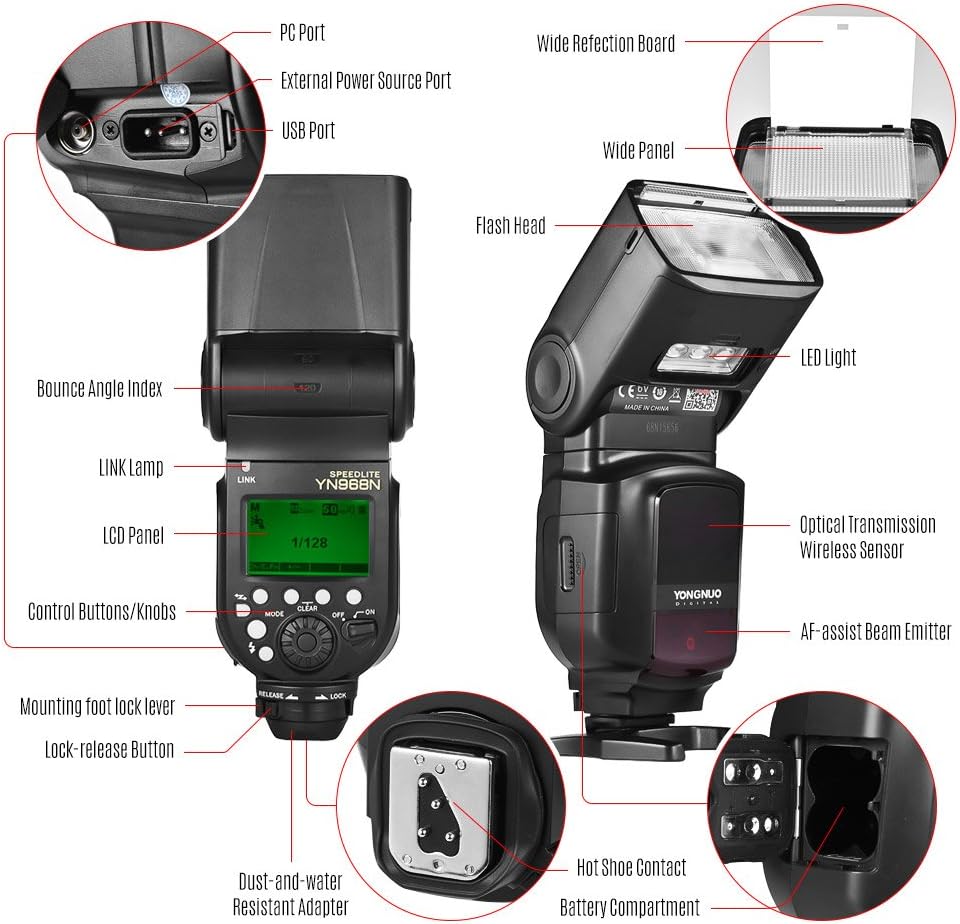
Figure 1: Key components of the YN968N II Speedlite Flash, illustrating the hot shoe contact, battery compartment, and control interface.
Operating Instructions
1. Flash Modes
Press the MODE button to cycle through the available flash modes:
- TTL (Through-The-Lens) Mode: The flash output is automatically controlled by the camera's metering system for optimal exposure.
- M (Manual) Mode: Allows manual adjustment of the flash output power from 1/1 to 1/128.
- Multi (Stroboscopic) Mode: Fires a series of rapid flashes during a single exposure, suitable for capturing multiple movements of a subject.
- Gr (Grouping) Mode: Enables control over multiple flash groups in a wireless setup.

Figure 2: LCD panel interface showing different flash mode displays and indicators.
2. Zoom Function
The flash head's zoom coverage can be set to AUTO or manually adjusted from 20mm to 200mm. In AUTO mode, the flash automatically adjusts its coverage to match the lens's focal length. In manual mode, use the control buttons to select the desired focal length.
3. Wireless System Compatibility
The YN968N II supports various wireless triggering options:
- YN622N Wireless System: Can function as a master unit to control YN968N, YN622N (II), or YN685N slave units. When set as a YN622 slave, it can receive control signals from YN968N, YN622N (II), or YN622N-TX master units for TTL/M/Multi flash.
- YN560 Wireless System: When set as a YN560 slave, it can receive signals from YN560-TX, RF603 (II), RF602, RF605, or YN560 (III/IV) master units.
- Optical Wireless Slave Modes: Supports optical wireless master signals from YONGNUO, Canon, and Nikon systems, including S1 and S2 flash modes.
4. High-Speed Sync (HSS)
The YN968N II supports high-speed sync up to 1/8000s, allowing you to use wider apertures in bright conditions or freeze fast-moving subjects with flash.

Figure 3: Examples illustrating the effect of High-Speed Sync and the flash's Guide Number.
5. Integrated LED Light
The flash unit is equipped with a high-power LED light. The brightness of the LED light can be adjusted. It includes a built-in diffuser and a color conversion filter for the LED light to modify its output color temperature.

Figure 4: The integrated LED light with its accessories and examples of its use.
6. Firmware Update
The YN968N II features a USB interface for firmware updates. Users can download the latest firmware from the official YONGNUO website to update the flash unit, ensuring access to new features and improvements.

Figure 5: Flash head rotation angles for flexible lighting.
Maintenance
Cleaning
To clean the flash unit, use a soft, dry cloth. For stubborn dirt, a slightly damp cloth can be used, followed by a dry cloth. Do not use strong detergents or solvents, as these may damage the finish or internal components. Keep the hot shoe contacts clean and free of dust.
Storage
When not in use for extended periods, remove the batteries from the flash unit to prevent leakage. Store the flash in a cool, dry place, away from direct sunlight and extreme temperatures. Use the protective bag provided to prevent scratches and dust accumulation.
Troubleshooting
- Flash does not fire: Ensure batteries are correctly installed and charged. Check that the flash is securely mounted on the camera's hot shoe. Verify flash settings on both the flash unit and the camera.
- Inconsistent flash output: Check battery levels. Ensure the flash head zoom matches the lens focal length or is set to AUTO. In wireless modes, ensure proper communication between master and slave units.
- Overheating protection activated: If the flash fires too rapidly, it may enter overheat protection mode. Allow the unit to cool down before resuming use.
- Compatibility issues with camera: While designed for Nikon, some specific camera models may have unique compatibility nuances. Ensure your camera's firmware is up to date and consult the YONGNUO support website if issues persist.
Specifications
| Brand | YONGNUO |
| Model | YN968N II |
| Guide Number | 60 (ISO 100, 200mm) |
| Flash Modes | TTL, M, Multi, Gr |
| Zoom Range | Auto, 20-200mm |
| Vertical Rotation Angle | -7 to 150 degrees |
| Horizontal Rotation Angle | 0 to 360 degrees |
| Power Supply | 4 x AA size batteries (Alkaline or Ni-MH) |
| Lighting Times | 100-1500 times (with AA alkaline batteries) |
| Optical Transmission Trigger Distance | 20-25m indoor, 10-15m outdoor |
| Radio Transmission Trigger Distance | Up to 100m |
| High-Speed Sync | Up to 1/8000s |
| Color Temperature | 5500K |
| External Interface | Hot shoe, PC port, USB port, External Power Source Port |
| Dimensions (Extended) | 7.8 x 6.05 x 20.6 cm / 3.1 x 2.4 x 8.1 inches |
| Weight | 435g / 15.3 oz |
What's in the Box
The YONGNUO YN968N II Speedlite Flash package includes the following items:
- 1 x YONGNUO YN968N II Speedlite Flash
- 1 x Mini Stand
- 1 x Color Conversion Filter for LED Light
- 1 x Protective Bag
- 1 x User Manual (English and Chinese)

Figure 6: Contents of the YN968N II Speedlite Flash package.
Warranty and Support
Warranty Information
YONGNUO products typically come with a limited warranty. Please refer to the warranty card included in your product packaging or visit the official YONGNUO website for specific warranty terms and conditions applicable to your region and purchase date.
Customer Support
For technical assistance, troubleshooting, or service inquiries, please visit the official YONGNUO support website or contact their customer service department. Contact information can usually be found on the manufacturer's website or in the product documentation.


