
1. Introduction
Thank you for choosing the FOVAL 200W Car Power Inverter. This device converts 12V DC power from your vehicle's cigarette lighter outlet into 110V AC power, allowing you to charge and power various electronic devices on the go. It features multiple USB charging ports and standard AC outlets, making it an ideal companion for road trips, camping, and emergency situations.

Image 1.1: The FOVAL 200W Car Power Inverter, a compact device designed for in-vehicle power conversion.
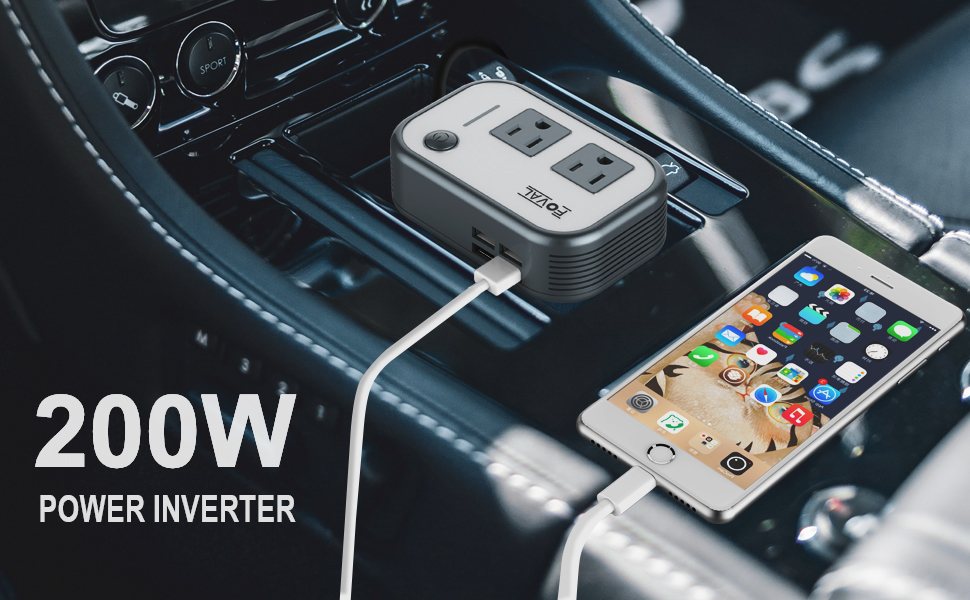
Image 1.2: The inverter provides convenient power for various activities, such as family outings and road trips.
2. Product Overview
2.1 Key Features
- 200W Power Output: Provides up to 180W continuous power (200W peak) for various electronic devices.
- Multiple Charging Ports: Equipped with 2 US standard AC sockets and 4 USB charging ports (6.2A total output).
- Compact and Portable: Designed to be space-saving and lightweight, similar in size to a credit card.
- Multi-Protection System: Includes short-circuit, low-voltage, over-charge, over-voltage, over-load, and over-temperature protection with a built-in fuse.
- Smart Cooling Fan: Operates silently and adjusts speed based on temperature to prevent overheating.
2.2 Components

Image 2.1: Diagram showing the main components of the inverter, including the Power Switch, LED Power Indicator, US Sockets, 4x 2.4A Max USB Charging Ports, Quiet Cooling Fan, Velcro Straps, and Cigarette Lighter plug.
- Power Switch: Turns the inverter's AC outlets and USB ports on/off.
- LED Power Indicator: Illuminates to indicate the inverter's operational status.
- US Sockets (AC Outlets): Two standard 110V AC outlets for powering devices.
- USB Charging Ports: Four 2.4A (max) USB ports for charging mobile devices.
- Quiet Cooling Fan: Internal fan for heat dissipation.
- Cigarette Lighter Plug: Connects the inverter to your vehicle's 12V DC power outlet.
3. Setup
To set up your FOVAL Car Power Inverter, follow these steps:
- Ensure your vehicle's engine is running or the ignition is in the 'ACC' (Accessory) position to provide power to the cigarette lighter socket.
- Insert the inverter's cigarette lighter plug firmly into your vehicle's 12V DC power outlet.
- Press the Power Switch on the inverter. The LED Power Indicator should illuminate, indicating the inverter is ready for use.
- You can use the included Velcro straps to secure the inverter in a convenient location within your vehicle, ensuring it does not obstruct driving controls or airbags.

Image 3.1: The inverter is designed to fit conveniently into your vehicle's console, providing easy access to power outlets.
Important Note:
- This inverter is designed for DC 12V vehicles only. Do not attempt to use it with DC 24V systems or in aircraft.
- Ensure the total wattage of devices connected does not exceed 180W continuous power to prevent overload.
4. Operating Instructions
Once the inverter is properly set up and powered on, you can begin charging your devices.
4.1 Using AC Outlets
- Plug your electronic device's power cord into one of the two 110V AC outlets on the inverter.
- Ensure the device's power consumption is within the inverter's rated power (180W continuous, 200W peak).
- The inverter is suitable for devices within 200W, with a peak power of 400W and overload protection at 240W ± 20W.

Image 4.1: The inverter's strong loading capacity supports devices up to 200W, with a peak power of 400W.
4.2 Using USB Charging Ports
- Connect your USB-powered device (e.g., smartphone, tablet) to any of the four USB charging ports using a compatible USB cable.
- The USB ports provide a combined output of 6.2A, suitable for fast charging of most mobile devices.

Image 4.2: The inverter offers smart multi-charging capabilities with four USB ports and two AC 110V outlets.
4.3 Compatible Devices
The FOVAL 200W Car Power Inverter is compatible with a wide range of devices, including but not limited to:
- Laptops and Tablets
- Smartphones and Digital Cameras
- Small fans and LED lights
- Portable game consoles and DVD players
- CPAP machines and nebulizers (ensure wattage is within limits)

Image 4.3: The inverter supports a wide range of electronic devices, from laptops and phones to small appliances.
Caution:
- Do not use this inverter to power high-power electrical equipment such as hair dryers, electric heaters, or microwave ovens, as this may exceed the inverter's capacity and blow the built-in fuse.
- Always ensure your vehicle's battery is adequately charged, especially when using the inverter with the engine off, to avoid draining the battery.
5. Maintenance
Proper maintenance ensures the longevity and optimal performance of your FOVAL Car Power Inverter.
- Cleaning: Regularly wipe the exterior of the inverter with a soft, dry cloth to remove dust and debris. Do not use liquid cleaners or solvents.
- Ventilation: Ensure the cooling fan and ventilation slots are clear of obstructions to allow for proper airflow. The smart cooling fan will run faster when the unit gets warmer.
- Storage: When not in use, store the inverter in a cool, dry place away from direct sunlight and extreme temperatures.
- Fuse: The inverter has a built-in fuse for protection. If the inverter stops functioning due to an overload, the fuse may have blown. Contact customer service for assistance; do not attempt to replace the fuse yourself.
6. Troubleshooting
If you encounter issues with your FOVAL Car Power Inverter, refer to the following common problems and solutions:
| Problem | Possible Cause | Solution |
|---|---|---|
| Inverter does not power on. |
|
|
| No power output from AC outlets/USB ports. |
|
|
| Inverter makes a loud noise. |
|
|
| Inverter shuts off unexpectedly. |
|
|
6.1 Protection System
The FOVAL Car Power Inverter is equipped with a comprehensive multi-protection system to ensure safe operation:
- Short-circuit Protection: Prevents damage from electrical shorts.
- Low-voltage Protection: Shuts off if vehicle battery voltage drops too low.
- Over-charge Protection: Protects against excessive charging.
- Over-voltage Protection: Safeguards against input voltage spikes.
- Over-load Protection: Automatically shuts down if connected load exceeds capacity.
- Over-temperature Protection: Prevents overheating by shutting down or increasing fan speed.

Image 6.1: The inverter features a fully protected system for safe and reliable operation, including short-circuit, overload, over-voltage, and over-heat protection.
7. Specifications
| Specification | Value |
|---|---|
| Model Name | FOVAL 200W Car Power Inverter |
| Item Model Number | SGR-NX2011SK-2 |
| Wattage | 200 watts (Peak), 180 watts (Continuous) |
| Input Voltage | DC 12V |
| Output Voltage | AC 110V |
| USB Output | 4 x USB Ports, 6.2A total (2.4A max per port) |
| Product Dimensions | 2.76 x 1.57 x 2.36 inches (70 x 40 x 60 mm approx.) |
| Item Weight | 6.3 ounces (178.6 grams) |
| Color | Grey |
| Power Source | Vehicle DC Power Socket |
| Special Features | Portable, Multi-Protection System, Smart Cooling Fan |
| What's in the Box | Inverter |

Image 7.1: The compact dimensions of the inverter, shown next to a passport for size comparison.
8. Warranty and Support
FOVAL stands behind the quality of its products. The FOVAL 200W Car Power Inverter comes with a 24-month warranty from the date of purchase.
If you experience any issues or have questions regarding your product, please do not hesitate to contact FOVAL customer service. We are committed to providing after-sale support to ensure your satisfaction.
For assistance, please refer to the contact information provided with your product packaging or visit the official FOVAL store on Amazon: FOVAL Amazon Store.