
1. Introduction
This manual provides essential information for the proper installation, operation, and maintenance of your JBL Professional CBT 200LA-1 Line Array Column Speaker. Please read this guide thoroughly before using the product to ensure safe and optimal performance. The CBT 200LA-1 is designed for professional audio applications, offering advanced Constant Beamwidth Technology for consistent sound coverage.

Front view of the JBL Professional CBT 200LA-1 Line Array Column Speaker in white, showcasing its sleek, tall design.
2. Safety Information
Always adhere to the following safety precautions to prevent injury or damage to the equipment:
- Read Instructions: Carefully read and understand all safety and operating instructions before use.
- Retain Instructions: Keep this manual for future reference.
- Heed Warnings: Follow all warnings on the product and in the operating instructions.
- Water and Moisture: Do not use this apparatus near water. This product is Not Water Resistant.
- Cleaning: Clean only with a dry cloth.
- Ventilation: Do not block any ventilation openings. Install in accordance with the manufacturer's instructions.
- Heat: Do not install near any heat sources such as radiators, heat registers, stoves, or other apparatus (including amplifiers) that produce heat.
- Power Cords: Protect the power cord from being walked on or pinched, particularly at plugs, convenience receptacles, and the point where they exit from the apparatus.
- Attachments/Accessories: Use only attachments/accessories specified by the manufacturer.
- Mounting: Mount the speaker securely using the provided swivel (pan) / tilt wall bracket. Ensure the mounting surface can support the weight of the speaker (approximately 33 pounds).
- Servicing: Refer all servicing to qualified service personnel. Servicing is required when the apparatus has been damaged in any way, such as power-supply cord or plug is damaged, liquid has been spilled or objects have fallen into the apparatus, the apparatus has been exposed to rain or moisture, does not operate normally, or has been dropped.
Proposition 65 Warning: This product may contain chemicals known to the State of California to cause cancer and birth defects or other reproductive harm.
3. Package Contents
Verify that all items are present in the package:
- JBL Professional CBT 200LA-1 Line Array Column Speaker (consisting of top and bottom speaker modules)
- Coupler plate (for connecting speaker modules)
- Swivel (pan) / tilt wall bracket

Exploded view showing the two speaker modules, coupling plate, and the swivel (pan) / tilt wall bracket included with the JBL CBT 200LA-1 speaker system.
4. Setup
4.1. Assembly
- Connect Speaker Modules: Carefully align and connect the top and bottom speaker modules using the provided coupler plate. Ensure a secure fit.
- Attach Wall Bracket: Secure the swivel (pan) / tilt wall bracket to the rear of the assembled speaker column.
4.2. Mounting
The CBT 200LA-1 is designed for wall mounting. Choose a sturdy wall location capable of supporting the speaker's weight (33 pounds) and the bracket. Use appropriate hardware for your wall type (not included, consult a professional installer if unsure).
- Mark Drilling Points: Hold the wall bracket against the desired mounting surface and mark the drilling points.
- Drill Holes: Drill pilot holes as marked, ensuring they are appropriate for your chosen mounting hardware.
- Secure Bracket: Attach the wall bracket firmly to the wall.
- Mount Speaker: Carefully lift the assembled speaker and attach it to the wall bracket. Ensure it is securely locked into place.
- Adjust Angle: Use the swivel and tilt features of the bracket to adjust the speaker's angle for optimal sound dispersion.
4.3. Wiring
The CBT 200LA-1 uses wired connectivity. Connect your audio source to the speaker's input terminals. This model supports both direct connection and 70V/100V transformer operation (each module, for 120W + 120W). Ensure correct polarity for all connections.
5. Operating Instructions
The JBL CBT 200LA-1 incorporates advanced features for precise sound control:
- Constant Beamwidth Technology (CBT): This patented technology provides true wide-band constant directivity coverage up to the highest frequencies, minimizing out-of-coverage lobing for consistent sound quality across the listening area.
- Vertical Pattern Coverage: The speaker offers selectable vertical patterns of 30° or 15°. Use the 30° setting for medium-throw applications and the 15° setting for long-throw requirements. Adjust this setting via the switches located on the speaker.
- Asymmetrical Progressive-Gradient Vertical Coverage: This setting directs more sound energy towards the far areas of the listening space, helping to achieve more consistent front-to-back sound levels. The extent of this gradient is adjustable.
- Dynamic Sonic-Guard: Integrated low-audibility overload protection safeguards the speaker components from excessive power levels.
- 70V/100V Transformer: The speaker includes a built-in 70V/100V transformer for distributed audio systems, providing 120W + 120W per module. Direct capability is also available.
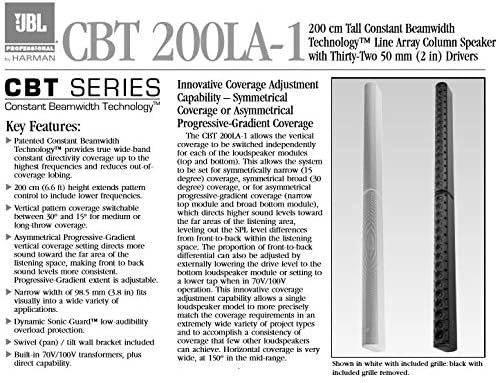
Diagram highlighting key features of the JBL CBT 200LA-1, including Constant Beamwidth Technology, selectable vertical patterns, and asymmetrical progressive-gradient coverage.
6. Maintenance
Regular maintenance ensures the longevity and optimal performance of your CBT 200LA-1 speaker.
- Cleaning: Use a soft, dry cloth to clean the exterior surfaces of the speaker. Do not use abrasive cleaners, solvents, or excessive moisture.
- Inspection: Periodically inspect all cables and connections for signs of wear or damage. Ensure mounting hardware remains secure.
- Ventilation: Ensure that ventilation openings are clear and unobstructed to prevent overheating.
7. Troubleshooting
If you encounter issues with your JBL CBT 200LA-1 speaker, refer to the following common problems and solutions:
| Problem | Possible Cause | Solution |
|---|---|---|
| No Sound Output | Incorrect wiring; Amplifier off; Source device issue; Speaker settings. | Check all cable connections and polarity. Ensure amplifier is on and functioning. Verify audio source is active. Confirm speaker settings (e.g., 70V/100V tap). |
| Distorted Sound | Overdriving amplifier/speaker; Incorrect impedance matching; Damaged speaker. | Reduce input level. Ensure amplifier output impedance matches speaker. If distortion persists, contact qualified service personnel. |
| Inconsistent Coverage | Incorrect vertical pattern setting; Improper speaker placement/angle. | Adjust vertical pattern switches (30°/15°). Re-evaluate speaker placement and adjust swivel/tilt bracket for optimal coverage. |
For issues not listed here or if problems persist, please contact JBL Professional customer support.
8. Specifications
| Feature | Detail |
|---|---|
| Model Name | CBT 200LA-1 |
| Speaker Type | Column Line Array |
| Material | Fiberglass reinforced ABS, Aluminum |
| Color | White |
| Item Weight | 33 Pounds |
| Product Dimensions | 50 x 20 x 9 inches (approximate) |
| Speaker Size | 2 Inches (drivers) |
| Speaker Maximum Output Power | 200 Watts |
| Connectivity Technology | Wired |
| Mounting Type | Wall Mount |
| Water Resistance Level | Not Water Resistant |
| Included Components | Swivel (pan) / tilt wall bracket, Coupler plate |
| UPC | 050036904308 |
9. Warranty and Support
9.1. Limited Warranty
The JBL Professional CBT 200LA-1 Line Array Column Speaker comes with a Limited Warranty. Please refer to the warranty card included with your product or visit the official JBL Professional website for detailed terms and conditions regarding coverage, duration, and claims procedures.
9.2. Customer Support
For technical assistance, product inquiries, or service requests, please contact JBL Professional customer support. Contact information can typically be found on the JBL Professional website or on your product packaging.
- Online Support: Visit the JBL Professional website for FAQs, documentation, and support resources.
- Phone Support: Refer to the JBL Professional website for regional contact numbers.


