
1. Introduction
The Potensic F181DH RC Drone Quadcopter is designed for both beginners and experienced pilots, offering a range of features for an engaging flight experience. This manual provides comprehensive instructions for setup, operation, maintenance, and troubleshooting to ensure safe and optimal use of your drone.
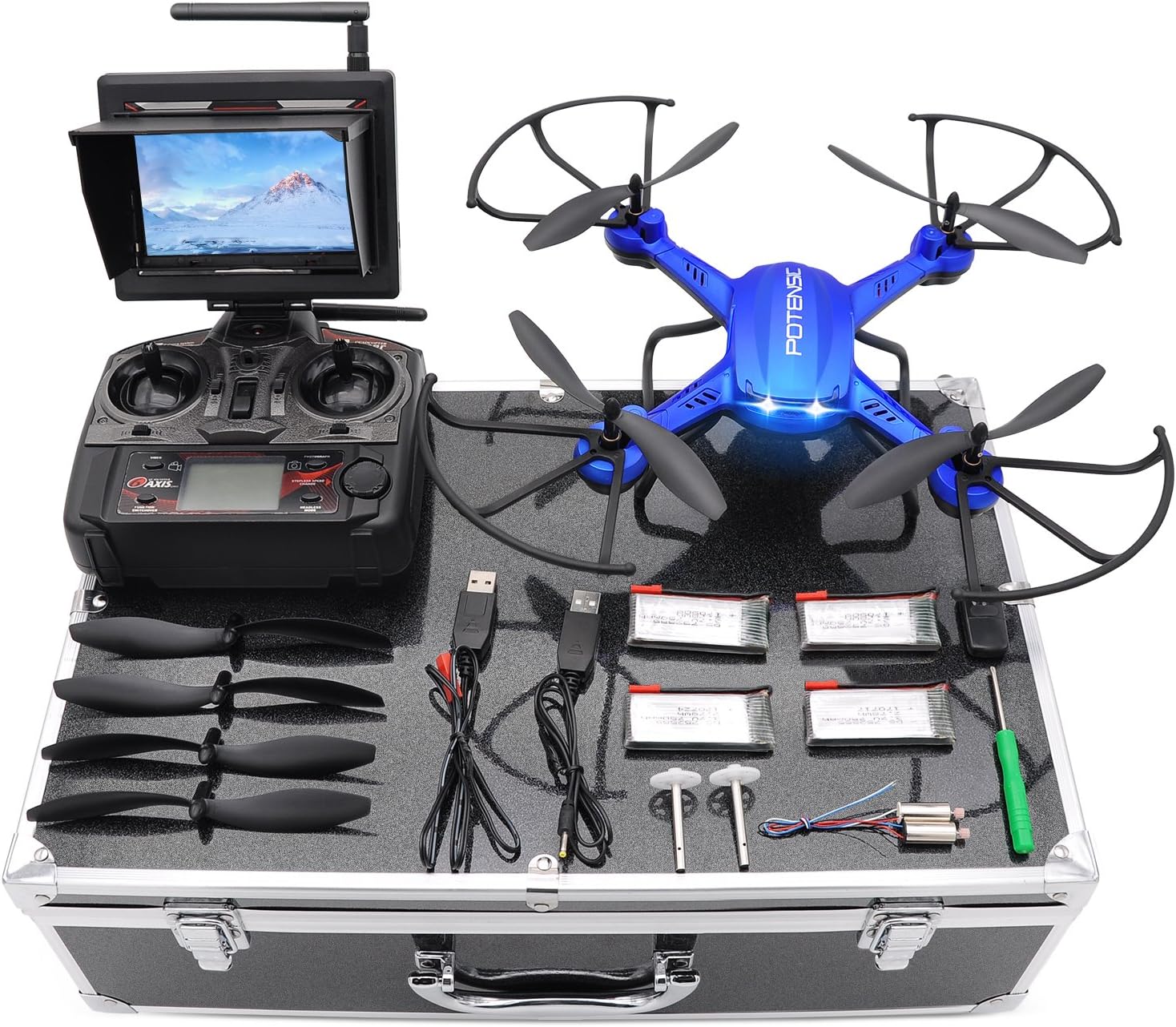
Figure 1: Potensic F181DH RC Drone Quadcopter with FPV monitor, controller, and accessories.
2. Setup
2.1 Unboxing and Component Check
Carefully unpack all components from the carrying case. Ensure all items listed below are present:
- Potensic F181DH Quadcopter
- 2.4GHz Transmitter
- 5.8GHz FPV LCD Screen
- Carrying Case
- 3.7v 750mAh Li-Po Batteries
- Motors Spare Parts
- 4GB TF Card
- USB Card Reader
- USB Battery Charger
- Extra Blades
- User Manual (this document)

Figure 2: All included components of the Potensic F181DH drone.
2.2 Battery Installation and Charging
- Locate the battery compartment on the drone.
- Insert the 3.7v 750mAh Li-Po battery into the compartment. Ensure it is securely connected.
- To charge the battery, connect it to the USB Battery Charger and plug the charger into a USB power source. The indicator light will show charging status.
- Allow sufficient time for a full charge before first use.
2.3 Propeller Attachment
Attach the propellers to the motor shafts. Ensure correct orientation (A and B propellers) as indicated in the detailed manual section (not provided here, but implied for a full manual). Secure them firmly.
2.4 Transmitter and FPV Screen Setup
- Install batteries into the 2.4GHz Transmitter.
- Attach the 5.8GHz FPV LCD Screen to the transmitter.
- Power on the transmitter and FPV screen.
- Refer to the FPV screen diagram for button functions and display information.

Figure 3: Detailed view of the 2.4GHz Transmitter and 5.8GHz FPV LCD Screen.
3. Operating Instructions
3.1 First Person View (FPV)
The drone features a 2-megapixel camera and a 5.8GHz wireless HD monitor screen for real-time video transmission. This allows you to see what the drone sees without needing to connect to a phone. Images and videos are saved directly to the monitor's TF card.

Figure 4: Real-time image transmission via the FPV monitor.

Figure 5: The drone's 720P HD camera provides clear video and still images.
3.2 Altitude Hold Function
The powerful air pressure altitude hold function allows the drone to maintain its current height after releasing the throttle stick. This feature simplifies flight control and enables stable capture of images or videos.

Figure 6: Drone utilizing the Altitude Hold function for stable flight.
3.3 Stepless-Speed Function
Designed for both experts and beginners, the stepless-speed function allows seamless speed adjustments from 10% to 100%, with 1% increments. This enables precise control for indoor and outdoor flying, facilitating skill progression.

Figure 7: Stepless-Speed Function for precise flight control.
3.4 Headless Mode
Headless Mode simplifies operation for novices by eliminating the need to orient the drone. The drone's direction will be relative to the pilot's position, regardless of the drone's actual front-facing direction.

Figure 8: Headless Mode for simplified flight control.
3.5 360° Special Rolling
Perform impressive aerial stunts with the 360° special rolling feature. Consult the detailed manual for specific button combinations to execute this maneuver.

Figure 9: The drone executing a 360° special rolling maneuver.
4. Maintenance
- Cleaning: Use a soft, dry cloth to clean the drone and controller. Avoid using harsh chemicals or solvents.
- Propeller Inspection: Regularly check propellers for damage (cracks, bends). Replace any damaged propellers immediately using the provided spare parts.
- Battery Care: Store batteries in a cool, dry place. Do not overcharge or over-discharge batteries. Disconnect batteries when not in use.
- Motor Care: Keep motors free from dust and debris. If motors become noisy or perform poorly, they may need replacement (spare motors are included).
- Storage: When not in use, store the drone and all accessories in the provided carrying case to protect them from damage.
5. Troubleshooting
| Problem | Possible Cause | Solution |
|---|---|---|
| Drone does not respond to controller. | Not properly paired/bound; low battery on drone or controller. | Ensure drone and controller are powered on and within range. Re-pair the drone and controller according to the pairing instructions in the full manual. Charge/replace batteries. |
| Drone flies erratically or drifts. | Uncalibrated gyroscope; damaged propellers; strong wind. | Perform gyroscope calibration (refer to full manual). Check and replace damaged propellers. Fly in calm conditions. |
| FPV screen shows no image or poor quality. | Weak signal; camera not connected; TF card issues. | Ensure drone and FPV screen are close enough. Check camera connection. Format or replace TF card. |
| Short flight time. | Battery not fully charged; old/worn battery. | Ensure battery is fully charged before each flight. Consider replacing old batteries. |
6. Specifications
- Brand: Potensic
- Model Name: F181DH
- Special Feature: Altitude Hold Function
- Age Range (Description): Adult (Recommended age: 14 years and up)
- Color: Blue
- Video Capture Resolution: 1080p
- Effective Still Resolution: 2 MP
- Connectivity Technology: USB, Wi-Fi
- Included Components: Potensic F181DH Quadcopter, 2.4GHz Transmitter, 5.8GHz FPV LCD Screen, Carrying Case, 3.7v 750mAh Li-Po Batteries, Motors Spare Parts, 4GB TF Card, USB Card Reader, USB Battery Charger, Extra Blades, User Manual
- Skill Level: Beginner, Professional
- Battery Capacity: 750 Milliamp Hours
- Video Capture Format: MP4
- Remote Control Technology: Bluetooth
- Control Type: Remote Control
- Media Type: SD
- Maximum Range: 300 Meters
- Material: Plastic
- Wireless Communication Technology: Wi-Fi
- Battery Cell Composition: Lithium Ion
- Are Batteries Included: Yes
- Video Output Resolution: 1080p
- Remote Control Included?: Yes
- Optical Sensor Technology: CMOS, CCD
- Rechargeable Battery Included: Yes
- UPC: 611040332879
- Item Weight: 5.04 pounds
- Package Dimensions: 17.6 x 13 x 6.2 inches
7. Warranty and Support
For warranty information and technical support, please refer to the contact details provided on the product packaging or visit the official Potensic website. Keep your purchase receipt as proof of purchase for warranty claims.
Potensic Official Website: Visit the Potensic Store on Amazon