Introduction
This manual provides comprehensive instructions for the setup, operation, maintenance, and troubleshooting of your TracFone ZTE Z233 4G LTE Prepaid Phone. Please read this manual carefully to ensure proper use and to maximize the features of your device.
The TracFone ZTE Z233 is a prepaid flip phone designed for ease of use, offering essential communication features without a long-term contract. It supports 4G LTE connectivity, text and picture messaging, and internet access.
What's in the Box
Upon opening your TracFone ZTE Z233 package, verify that all the following items are included:
- TracFone ZTE Z233 Phone
- Instruction Manual (this document)
- Wall Charger
- Service Guide
- Battery (pre-installed or separate)
- Activation Card (if not pre-installed)
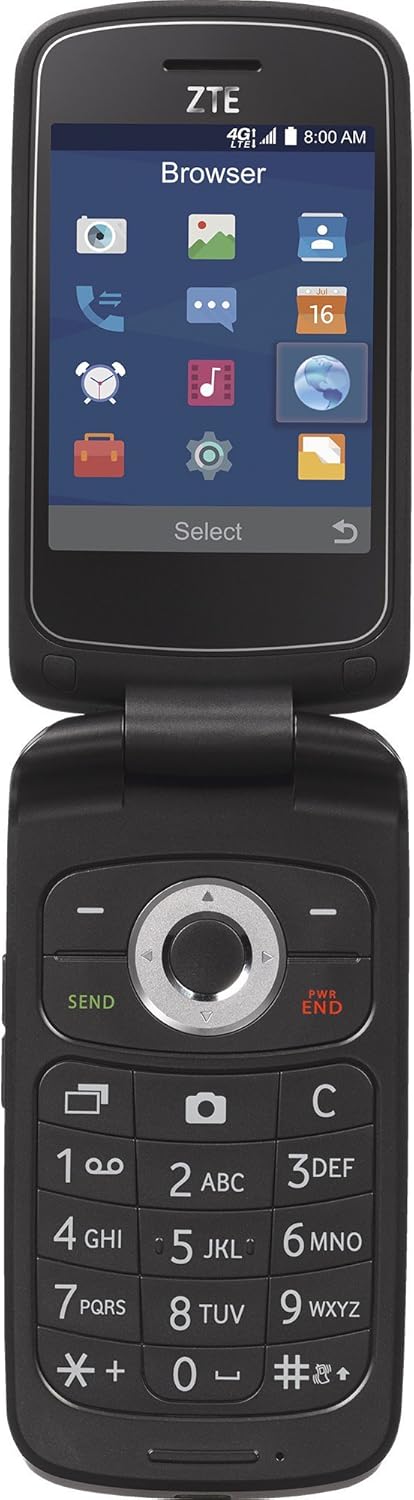
Image: The TracFone ZTE Z233 flip phone shown in its open position, displaying the screen with application icons and the physical keypad.
Setup Guide
Follow these steps to set up your new TracFone ZTE Z233 phone for first-time use.
1. Battery Installation and Charging
- Install Battery: If the battery is not pre-installed, remove the back cover of the phone. Align the battery contacts with the terminals inside the phone and gently press down until it clicks into place. Replace the back cover.
- Charge Battery: Connect the wall charger to a power outlet and then to the charging port on your phone. Allow the phone to charge completely before first use. A full charge typically takes approximately 2-3 hours.

Image: The rear view of the TracFone ZTE Z233 flip phone, showing the battery cover and camera lens.
2. SIM Card Installation (if applicable)
Your phone may come with a SIM card pre-installed. If not, or if you need to replace it:
- Power Off: Ensure the phone is powered off before installing or removing the SIM card.
- Locate SIM Slot: Remove the back cover and battery. The SIM card slot is usually located near the battery compartment.
- Insert SIM: Gently slide the SIM card into the slot with the gold contacts facing down, following the diagram near the slot.
- Reassemble: Replace the battery and back cover.
3. Phone Activation
Your TracFone ZTE Z233 requires activation with TracFone service. This phone is carrier-locked to TracFone.
- Online Activation: Visit the official TracFone website and follow the activation instructions. You will need the phone's MEID/ESN/IMEI number (found on the packaging or under the battery) and your TracFone activation card or airtime PIN.
- Phone Activation: You can also activate by calling TracFone Customer Service. Refer to the Service Guide included in your box for contact information.
Note: Activation requires purchasing a TracFone service plan separately. Ensure your device has been active on TracFone service for at least 12 months and airtime cards redeemed for the same period before considering unlocking options.
Operating Instructions
This section covers the basic functions and features of your TracFone ZTE Z233.
Basic Phone Functions
- Power On/Off: Press and hold the PWR/END button until the phone powers on or off.
- Making Calls: Enter the phone number using the keypad and press the SEND button.
- Answering Calls: When the phone rings, press the SEND button.
- Ending Calls: Press the PWR/END button.
- Adjusting Volume: Use the volume buttons located on the side of the phone during a call or to adjust ringtone volume.

Image: The left side of the TracFone ZTE Z233 flip phone, highlighting the volume rocker button.
Messaging
- Text Messaging (SMS): Navigate to the "Messages" application. Select "New Message" and enter the recipient's number and your message using the T9 keypad. Press "Send".
- Picture Messaging (MMS): Within the "Messages" application, select to attach a picture from your gallery or take a new one using the camera.
Camera and Multimedia
- Using the Camera: Access the "Camera" application from the main menu. Use the navigation keys to frame your shot and the center key to capture. The phone features a 2 MP camera.
- MP3 Player: The phone includes an MP3 player. Transfer music files to the phone's internal memory or a microSD card (up to 32 GB supported) to listen to your favorite tunes.

Image: The TracFone ZTE Z233 flip phone in its closed position, showing the compact form factor and external display.
Internet Access and Bluetooth
- Internet Browser: Access the internet through the built-in browser. Note that data usage will consume from your service plan.
- Bluetooth: Enable Bluetooth 4.1 from the settings menu to connect to compatible wireless headsets or other devices for hands-free communication.
Maintenance and Care
Proper care will extend the life of your TracFone ZTE Z233.
- Cleaning: Use a soft, dry cloth to clean the phone's exterior. Avoid liquid cleaners or aerosols.
- Battery Care: Do not expose the battery to extreme temperatures. If the phone will not be used for an extended period, store it with a partial charge.
- Environmental Conditions: Keep the phone away from excessive moisture, dust, and direct sunlight.
- Storage: When not in use, store the phone in a cool, dry place.
Troubleshooting
If you encounter issues with your phone, try the following solutions before contacting customer support.
| Problem | Possible Solution |
|---|---|
| Phone does not power on. | Ensure the battery is properly installed and fully charged. Connect the charger and try again. |
| Cannot make or receive calls. | Check for network signal. Verify your TracFone service plan is active and has sufficient minutes/days. Ensure the SIM card is correctly inserted. |
| Poor call quality. | Move to an area with better network coverage. Ensure nothing is obstructing the microphone or speaker. |
| Cannot send/receive text or picture messages. | Check your service plan for messaging allowances. Verify network connectivity. Ensure message center numbers are correctly configured (usually automatic). |
| Internet access not working. | Confirm you have data allowance on your plan. Check network signal. Restart the phone. |
| Phone freezes or is unresponsive. | Remove and reinsert the battery to perform a hard reset. |
Technical Specifications
Key technical details for the TracFone ZTE Z233 4G LTE Prepaid Phone.
| Feature | Detail |
|---|---|
| Model Name | Z233VL |
| Item Model Number | TFZEZ233VCGYP |
| Dimensions (Product) | 7.25 x 1.65 x 10.25 inches |
| Item Weight | 8.1 ounces |
| Display Size | 2.8 Inches |
| Display Resolution | 320 x 240 pixels (internal), 480 x 800 (scanner resolution listed, likely max supported) |
| Camera Resolution | 2 MP |
| Internal Memory | 4 GB |
| Expandable Memory | Supports microSD up to 32 GB |
| Processor | 1.1 GHz Quad-Core |
| Wireless Technologies | Bluetooth 4.1, Cellular (4G LTE, CDMA) |
| Battery Type | 1 Lithium Ion battery (included) |
| Phone Talk Time | Up to 6 Hours |
| Standby Time | Up to 12 Days |
| Audio Jack | 3.5 mm |
| Form Factor | Flip |
| Color | Black |
Warranty and Support
For warranty information and customer support, please refer to the Service Guide included with your phone or visit the official TracFone website.
TracFone Customer Service: For technical assistance, activation issues, or service plan inquiries, please contact TracFone directly. Contact details are typically found on the TracFone website or in the documentation provided with your phone.
Online Resources: Visit the TracFone Store on Amazon for additional product information and support resources.


