
Introduction
Thank you for choosing the DROK DC-DC Buck Converter. This device is designed to efficiently convert a higher DC input voltage to a stable 5V DC output, suitable for a wide range of applications. Please read this manual carefully before installation and operation to ensure safe and optimal performance.
Safety Information
- Ensure correct wiring polarity. Incorrect connections can damage the device and connected equipment.
- The converter features multiple protection functions including reverse connection protection, overcurrent protection, and overtemperature protection. However, always operate within specified voltage and current limits.
- Do not expose the device to extreme temperatures or harsh environments beyond its specified operating conditions.
- This product is designed with special adhesive technology for waterproof, shockproof, moisture-proof, and dustproof properties, enhancing its durability.
- Keep out of reach of children.
Product Overview
The DROK DC-DC Buck Converter is a compact and efficient power module. It utilizes a synchronous rectification chip for low heat generation and stable performance, achieving a high conversion efficiency of up to 90%.
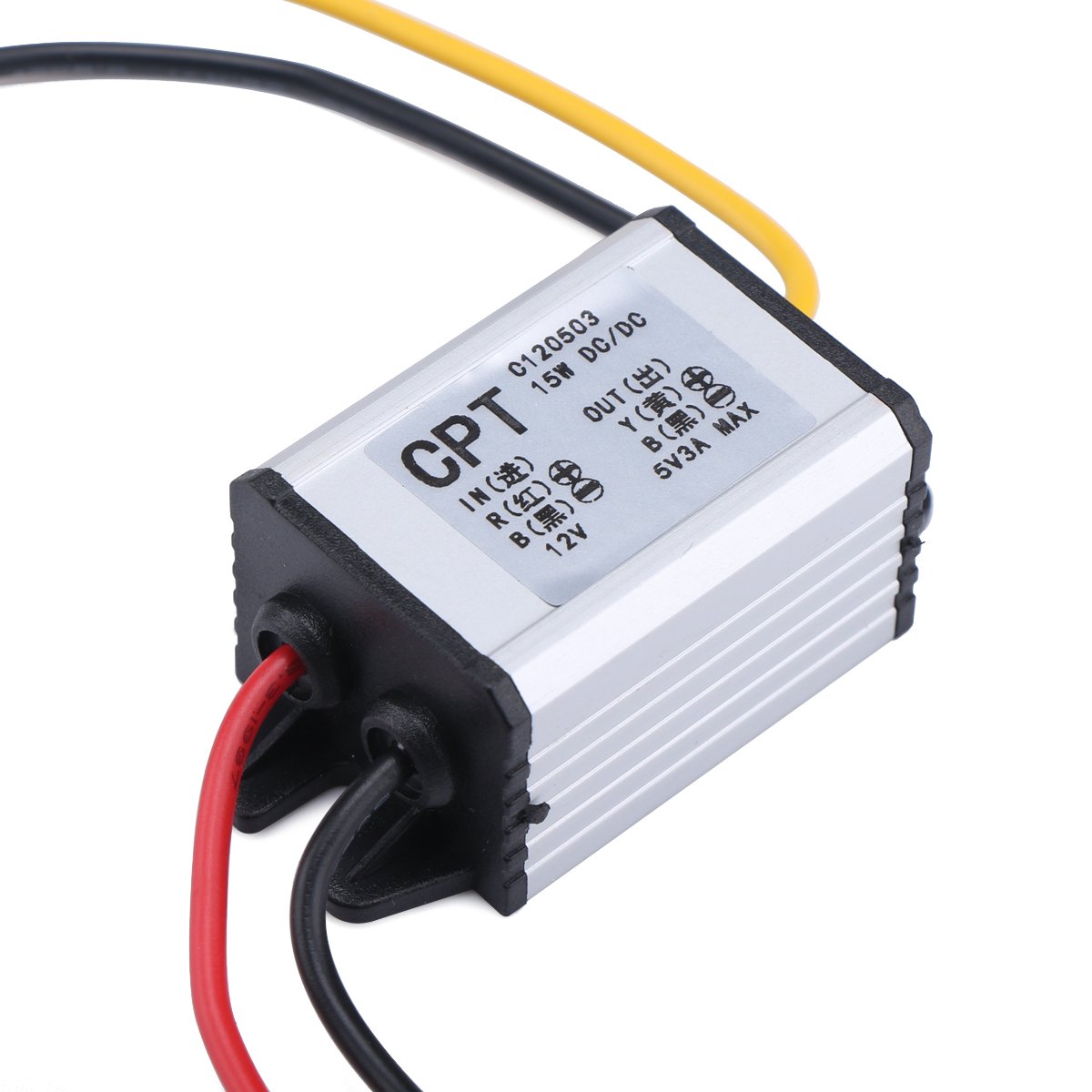
Figure 1: Front view of the DROK DC-DC Buck Converter.

Figure 2: Angled view showing the input and output wiring connections and labels on the converter.
Specifications
| Parameter | Value |
|---|---|
| Brand | DROK |
| Model Number | 090600_JPN |
| Input Voltage Range | DC 6.3V - 22V |
| Output Voltage | DC 5V |
| Output Current | 3A (Max) |
| Output Power | 15W (Max) |
| Conversion Efficiency | Up to 90% |
| Protection Features | Reverse Connection, Overcurrent, Overtemperature |
| Environmental Resistance | Waterproof, Shockproof, Moisture-proof, Dustproof |
| Dimensions | Approx. 35mm x 25mm x 20mm (L x W x H) |

Figure 3: Dimensions of the DROK DC-DC Buck Converter.
Setup and Wiring
Follow these steps for proper installation and wiring:
- Identify Wires: The converter has three wires for input and output.
- Input Positive: Red wire
- Common Negative: Black wire
- Output Positive: Yellow wire
- Connect Input: Connect the Red wire to the positive terminal of your DC power source (6.3V to 22V). Connect the Black wire to the negative terminal of your DC power source.
- Connect Output: Connect the Yellow wire to the positive terminal of your 5V device. Connect the same Black wire (common negative) to the negative terminal of your 5V device.
- Secure Connections: Ensure all connections are secure and properly insulated to prevent short circuits.

Figure 4: Detailed view of the wiring connections for the converter. Red is input positive, Black is common negative, Yellow is output positive.
Note: The black wire serves as the common negative for both input and output. Always double-check polarity before applying power.
Operating Instructions
Once properly wired, the converter operates automatically. It will step down the input voltage to a stable 5V output. The device is designed for continuous operation within its specified limits.
- Ensure the total current draw of your connected 5V devices does not exceed 3A to prevent overcurrent protection from activating.
- The converter is suitable for various applications such as powering car audio systems, GPS units, solar panel applications, toy cars, speakers, and small motors that require a stable 5V supply.
Maintenance
The DROK DC-DC Buck Converter is designed for durability and requires minimal maintenance due to its robust construction and sealed design.
- Regularly inspect wiring for any signs of wear or damage.
- Keep the device free from excessive dirt or debris, although it is dustproof.
- Do not attempt to open or modify the converter, as this will void any potential warranty and may lead to damage or injury.
Troubleshooting
If you encounter issues with the converter, consider the following:
- No Output Voltage:
- Check input voltage: Ensure it is within the 6.3V-22V range.
- Verify wiring: Confirm correct polarity for both input and output connections.
- Check for short circuits: Disconnect the load and test the output. If output appears, the load might be shorted or drawing too much current.
- Intermittent Output:
- Check for loose connections.
- Ensure the load current does not exceed 3A, which could trigger overcurrent protection.
- Allow the device to cool down if it has been operating under heavy load, as overtemperature protection might be active.
- Device Overheating:
- Ensure adequate ventilation around the converter.
- Reduce the load if it consistently operates near the maximum 3A.
Related Videos
The following videos provide additional information or demonstrations related to DC-DC converters. Please note that specific product models or features shown in these videos may vary slightly from your purchased item.
DC-DC 12V/24V to 5V 5A Buck Converter Overview
This video demonstrates a DC-DC buck converter, showing its general appearance and potential applications. While the specific model might differ, the principles of operation and connection are similar to your DROK converter. (Duration: 0:27)
USB Power Converter Demonstration
This video illustrates the use of a USB power converter, which often involves a 5V output. It can provide insight into how such converters are used in practical scenarios. (Duration: 0:15)
Warranty and Support
For warranty information or technical support, please refer to the seller's policies on the platform where you purchased this product or contact DROK customer service directly. Please have your model number (090600_JPN) and purchase details ready when seeking support.


