
1. Product Overview
The Bosch GSR12V-140FCB22 12V Max Flexiclick 5-in-1 Drill/Driver is a versatile cordless tool designed for various drilling and driving applications. Its unique Flexiclick system allows for quick and easy attachment changes, adapting the tool to different tasks and tight spaces.

Figure 1: Complete Bosch GSR12V-140FCB22 kit, including the drill/driver, two 2.0 Ah batteries, charger, and various Flexiclick attachments, all contained within a blue and black carrying bag.
Key Features:
- 5-In-1 Flexiclick Attachment System: Offers exceptional versatility with interchangeable heads.
- Compact Design: Lightweight at 1.4 lbs (tool only) and delivers 265 in.-lbs. of torque.
- Two Speed Settings: For optimized performance in various applications.
- Integrated LED Light: Illuminates dark work areas and features an afterglow function.
- Battery Indicator: Displays remaining battery charge.
2. Setup and Assembly
2.1. Battery Installation and Charging
- Insert a charged 12V Max Lithium-Ion battery into the base of the drill/driver until it clicks securely into place.
- To charge the battery, slide it into the provided charger. Connect the charger to a power outlet. The indicator lights on the charger will show the charging status.
- Ensure batteries are fully charged before first use for optimal performance.
2.2. Attaching Flexiclick Heads
The Flexiclick system features a one-click interface for secure and easy attachment changes.
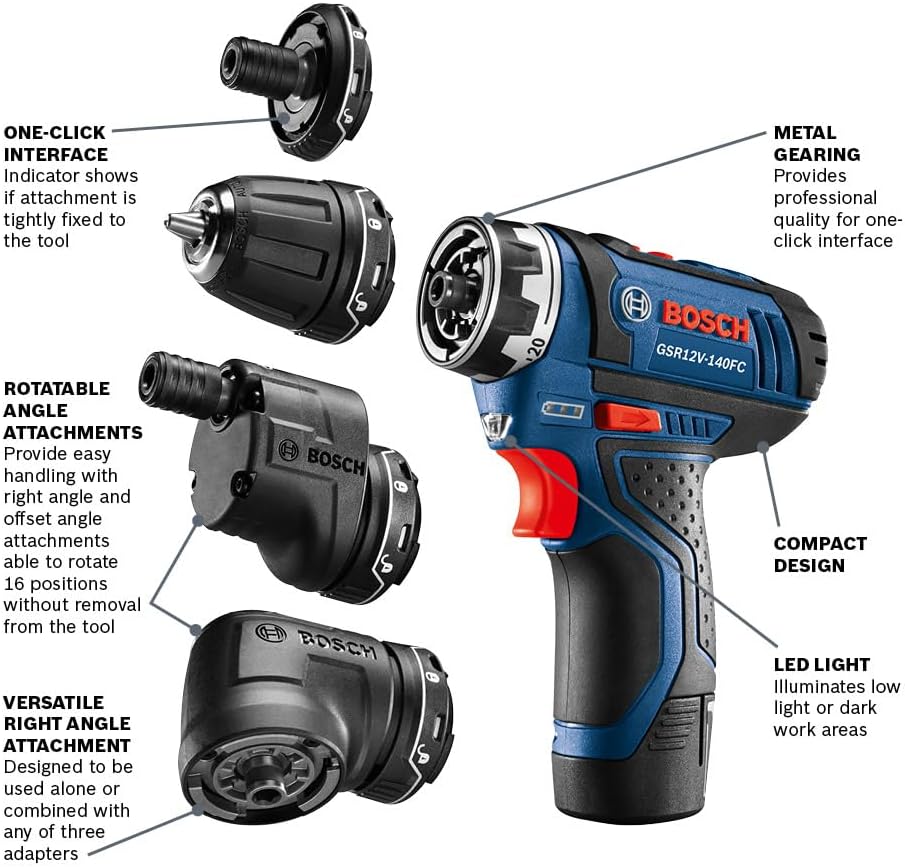
Figure 2: Visual representation of the Bosch Flexiclick 5-in-1 attachment system, showing the main drill body and the four interchangeable heads: magnetic bit holder, keyless chuck, offset angle, and right angle attachments.
- Align the desired attachment with the tool's interface.
- Push the attachment onto the tool until it clicks, indicating a secure connection.
- To remove, pull the collar on the tool forward and detach the head.
Available Attachments:
- Magnetic Bit Holder: Provides the shortest head length for basic driving tasks.
- Keyless Chuck: For standard drilling applications, accommodating various drill bit sizes.
- Locking Bit Holder: Securely locks hex bits for high-torque driving, preventing slippage.
- Right Angle Attachment: Designed for working in tight or confined spaces. It can be rotated to 16 different positions without removal.
- Offset Angle Attachment: Ideal for precise screwdriving very close to edges. Also rotates to 16 positions.

Figure 3: The magnetic bit holder attachment, ideal for quick bit changes and basic driving.
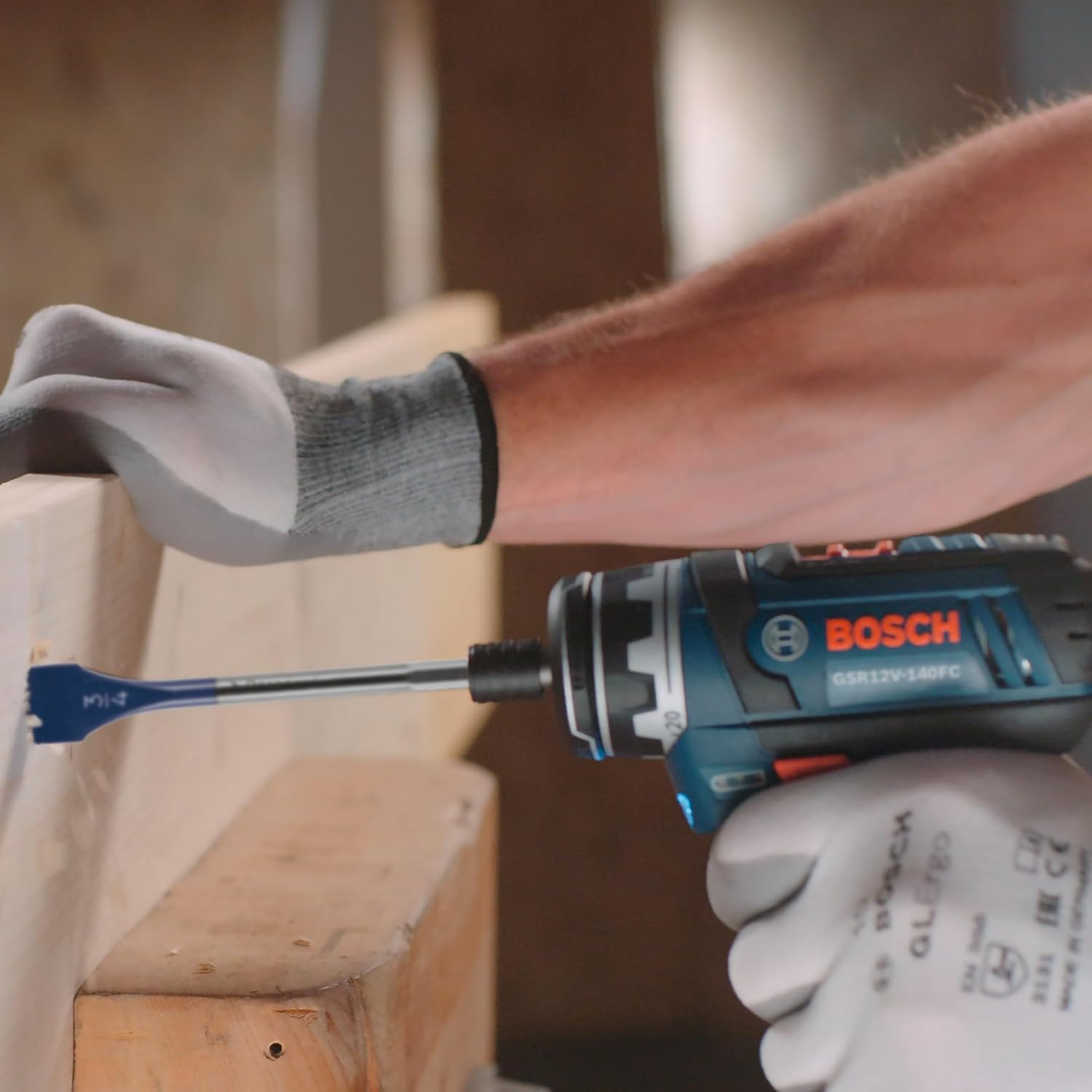
Figure 4: The keyless chuck attachment in use, demonstrating its capability for drilling into materials like metal.

Figure 5: The right angle attachment being used to drive a screw in a hard-to-reach area, showcasing its utility in confined spaces.

Figure 6: The offset angle attachment in action, allowing for screwdriving in close proximity to a surface edge.
3. Operating Instructions
3.1. Powering On/Off and Speed Control
- To power on the tool, press the trigger switch. The speed is variable based on trigger pressure.
- Release the trigger to power off.
- Use the speed selector switch (typically located on top of the tool) to choose between two speed settings: lower speed for higher torque (driving screws) and higher speed for faster drilling.
3.2. Torque Adjustment
The torque collar allows you to adjust the amount of torque applied, preventing overtightening or stripping screws. Rotate the collar to select the desired torque setting. For drilling, set the collar to the drill icon for maximum torque.
3.3. LED Light Function
The integrated LED light illuminates the work area when the trigger is pressed. It features an afterglow function, remaining lit for approximately 10 seconds after the trigger is released to provide continued visibility.
3.4. Using the Drill/Driver
Select the appropriate attachment and bit for your task. Ensure the bit is securely inserted. Apply firm, steady pressure and press the trigger. For driving screws, start with a lower torque setting and increase if necessary. For drilling, use the appropriate speed and ensure the drill is perpendicular to the surface.
4. Maintenance
4.1. Cleaning
- Regularly clean the ventilation openings of the tool to prevent overheating.
- Wipe down the tool with a soft, damp cloth. Do not use harsh chemicals or abrasive cleaners.
4.2. Battery Care
- Store batteries in a cool, dry place away from direct sunlight and extreme temperatures.
- Do not store batteries in a discharged state for extended periods.
4.3. Storage
Store the drill/driver and its accessories in the provided carrying bag in a dry, secure location, out of reach of children.
5. Troubleshooting
5.1. Tool Not Operating
- Ensure the battery is fully charged and properly inserted.
- Check for any obstructions in the chuck or attachment.
5.2. Reduced Performance
- Verify the battery charge level.
- Ensure the correct speed and torque settings are selected for the task.
- Check if the bit is dull or damaged and replace if necessary.
For persistent issues, please refer to the warranty and support section.
6. Specifications
| Feature | Specification |
|---|---|
| Brand | Bosch |
| Model Number | GSR12V-140FCB22 |
| Power Source | Battery Powered |
| Voltage | 12 Volts |
| Maximum Rotational Speed | 1300 RPM |
| Maximum Torque | 265 Inch Pounds |
| Number of Speeds | 2 |
| Item Weight | 6.19 pounds |
| Battery Capacity | 2 Amp Hours |
| Battery Cell Type | Lithium Ion |
| Product Dimensions | 5.2"L x 2"W x 7"H |
| Special Feature | Variable Speed |
7. Official Product Video
Video 1: Official overview of the Bosch GSR12V-140FCB22 12V 5-In-1 Multi-Head Power Drill Set, demonstrating its features and versatility.
8. Warranty and Support
8.1. Warranty Information
Bosch 12V Max Cordless Power Tools, including chargers and batteries, are covered by a Three-Year Limited Warranty. For detailed terms and conditions, please visit the official Bosch website or call the support number provided below.

Figure 7: Bosch 12V Max Limited Warranty details, indicating a three-year coverage for tools, batteries, and chargers.
8.2. Customer Support
For any questions, technical assistance, or warranty claims, please contact Bosch Customer Service:
- Phone: 1-877-BOSCH99
- Online: Visit the official Bosch website for product registration, FAQs, and service center locations.


