
Product Overview
The Rockville TM150B home theater system offers an integrated solution for home entertainment. Featuring two 10-inch subwoofers, six full-range drivers, and two silk dome tweeters, it provides deep bass and clear high-frequency sound. Connectivity options include Bluetooth, USB, SD card playback, and FM radio, eliminating the need for separate components. The system is designed for versatile use with movies, music, and karaoke.
Key Features
- All-in-One Home Theater System: Combines two 10" subwoofers, six full-range drivers, and two silk dome tweeters. Includes Bluetooth, USB, SD card, FM radio, and multiple input options for easy connection to your TV, smartphone, or MP3 player.
- Sound Performance: 250W RMS and 1000W peak power deliver deep bass and clear highs without distortion. Suitable for movies, music, and karaoke.
- Modern Design: Features a polished MDF wood finish in black, chrome accents, rounded edges, and a glass LCD screen.
- Customizable Audio: Fine-tune sound with 8 EQ presets and adjustable bass and treble controls. Remote control included for convenient adjustments.
- Karaoke Ready: Includes two 1/4-inch mic inputs with adjustable volume and echo controls for home karaoke.
Package Contents
- Rockville TM150B Black Home Theater System Tower Speakers (Pair)
- 10" Subwoofer (Integrated)
- Remote Control
- Speaker Cable
- RCA to RCA Cable
- RCA to 3.5mm Aux Cable
- FM Antenna
- Speaker Feet and Rubber Pads
- Owner's Manual

Setup Instructions
Speaker Placement
Position the tower speakers in your desired home entertainment area. Ensure they are placed on a stable, flat surface. For optimal sound, place them equidistant from your primary listening position and at an appropriate distance from walls to allow for bass reflection.

Connecting the Speakers
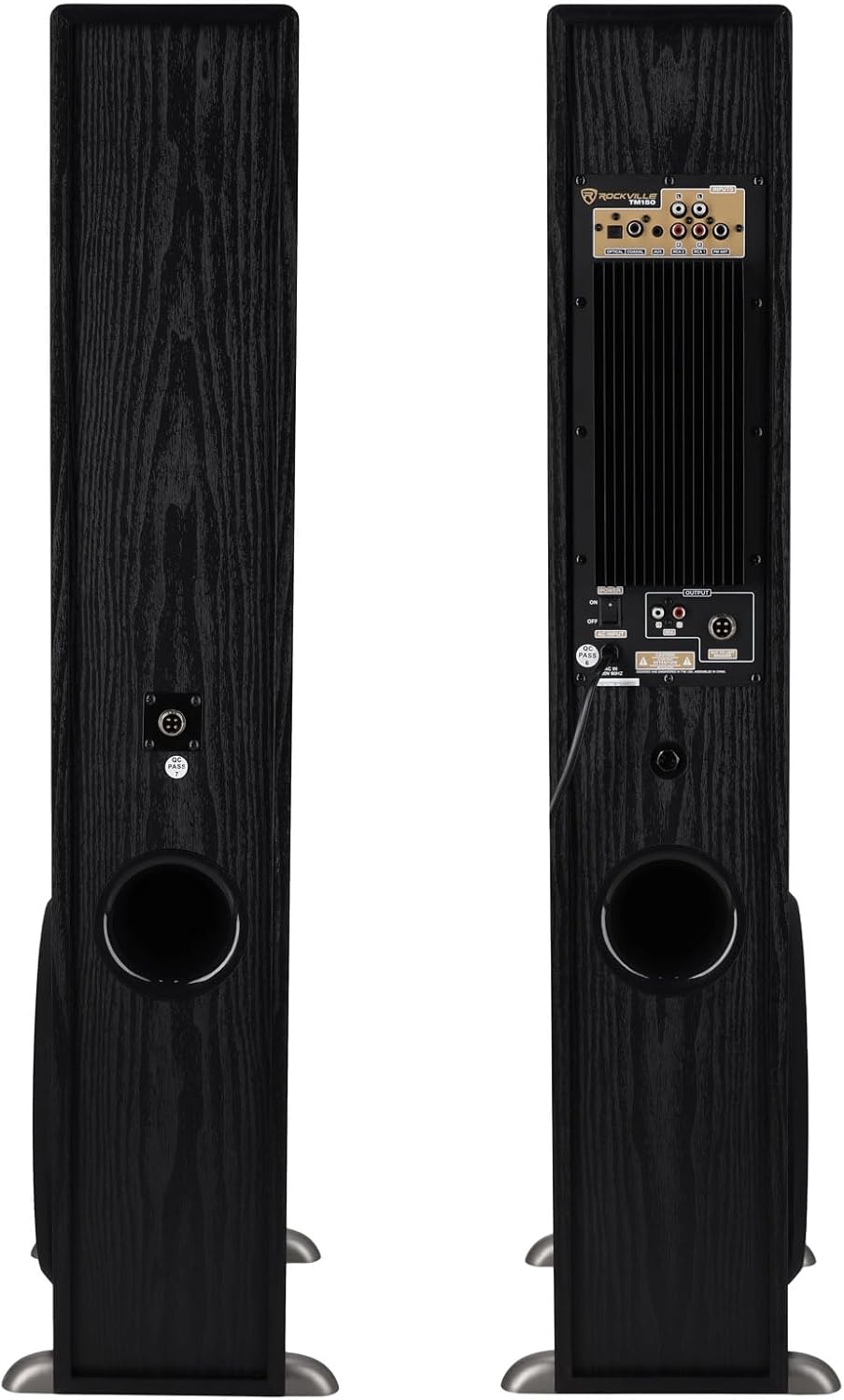
Connect the passive speaker to the active speaker using the provided speaker cable. Ensure a secure connection at both ends. Plug the active speaker into a power outlet.

Operating Instructions
Front Panel Controls
The front panel features a glass LCD screen and control buttons for power, input selection, volume adjustment, and track navigation. The master volume knob also functions as an input selector when pressed.

Remote Control
The included wireless remote control provides full functionality for the system, including power, input selection, volume, EQ presets, bass/treble adjustments, and track control. Ensure batteries are correctly inserted.
Bluetooth Connectivity
To connect a Bluetooth device, select the Bluetooth input mode on the speaker. On your device, search for "Rockville TM150B" (or similar model name) and pair. Adjust volume via your device or the speaker controls.
USB/SD Playback
Insert a USB drive or SD card containing audio files into the respective slot on the front panel. The system will automatically detect and begin playback. Use the front panel or remote controls for navigation.
FM Radio
Connect the included FM antenna to the rear panel. Select FM mode using the input button. Use the remote or front panel controls to scan for and select radio stations.
Wired Connections (Optical, Coaxial, AUX)
Connect your external audio source (e.g., TV, DVD player, gaming console) to the corresponding input ports on the rear panel (Optical, Coaxial, or AUX). Select the correct input mode on the speaker system. For digital inputs (Optical/Coaxial), ensure your source device's audio output is set to PCM format.
Karaoke Function
Plug up to two 1/4-inch microphones into the dedicated mic inputs on the front panel. Adjust microphone volume and echo effects using the remote control for an enhanced karaoke experience.
Care and Maintenance
- Cleaning: Use a soft, dry cloth to clean the speaker surfaces. Avoid abrasive cleaners or solvents.
- Placement: Keep the speakers away from direct sunlight, heat sources, and moisture. Ensure adequate ventilation.
- Handling: Handle the speakers with care to prevent damage to the drivers or cabinet.
Troubleshooting Guide
| Problem | Possible Cause | Solution |
|---|---|---|
| No power | Power cable not connected; Power switch off | Ensure power cable is securely plugged in; Turn power switch ON. |
| No sound | Incorrect input mode; Volume too low; Source device issue; Speaker cable loose | Select correct input mode; Increase volume; Check source device connection/playback; Secure speaker cable. |
| Bluetooth pairing failure | Device too far; Bluetooth not enabled on source; Incorrect pairing process | Move device closer; Enable Bluetooth on source; Follow pairing instructions. |
| Distorted sound | Volume too high; Source audio quality poor; Loose connections | Reduce volume; Check source audio; Secure all cables. |
| Remote control not working | Dead batteries; Obstruction; Remote out of range | Replace batteries; Remove obstructions; Ensure remote is within range. |
Technical Specifications
| Feature | Specification |
|---|---|
| Model Name | TM150B |
| Speaker Type | Tower |
| Speaker Maximum Output Power | 1000 Watts |
| RMS Power | 250 Watts |
| Subwoofer Diameter | 10 Inches |
| Frequency Response | 20 KHz |
| Connectivity Technology | Wired, Wireless (Bluetooth) |
| Wireless Communication Technology | Bluetooth |
| Control Method | Remote |
| Product Dimensions | 12.99"D x 6.3"W x 37.4"H |
| Item Weight | 57.4 Pounds |
| Material | Metal, Wood |
| Surround Sound Channel Configuration | 2.0 |
| Compatible Devices | Gaming Console, Home Theater, Laptop, MP3 Player, Tablet, Television |
Warranty and Support
The Rockville TM150B Home Theater System comes with a limited warranty. For detailed warranty information, please refer to the warranty card included in your package or visit the official Rockville website. For technical support or service inquiries, please contact Rockville customer support.