
1. Introduction
This manual provides essential information for the proper installation, operation, and maintenance of your new AT Cartridge and Stylus. Designed for high-fidelity audio reproduction, this cartridge is compatible with various JVC turntable models, ensuring optimal performance when correctly set up. Please read these instructions carefully before use.
2. Product Overview
The AT Cartridge and Stylus system is engineered for precise tracking and clear sound. Your package includes the cartridge body, a pre-installed stylus, a spare stylus, a fixing bolt, and a stylus guard.
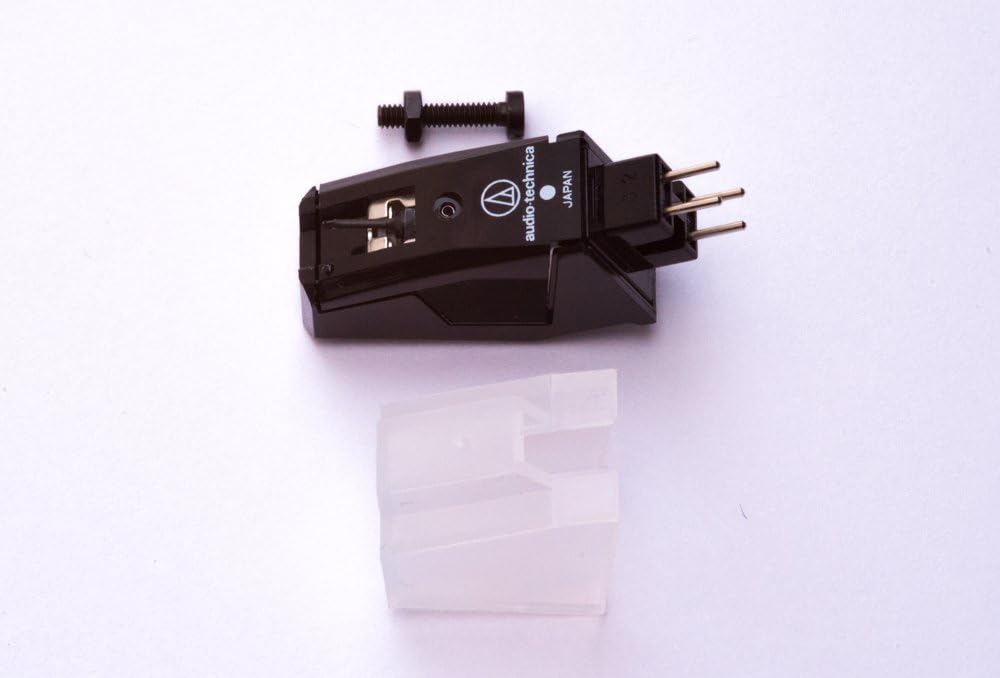
Figure 2.1: The AT cartridge assembly, including the main cartridge body, a fixing bolt for mounting, and a clear stylus guard.

Figure 2.2: Underside view of the cartridge, showing the connection pins and the fixing bolt. This view helps in understanding how the cartridge connects to the tonearm.

Figure 2.3: A close-up of the green replacement stylus. The stylus is the component that makes contact with the record groove.
3. Setup and Installation
Careful installation is crucial for optimal sound quality and to prevent damage to your records or equipment.
3.1 Mounting the Cartridge
- Ensure your turntable is powered off and unplugged.
- Carefully remove your old cartridge, if applicable, by disconnecting the four color-coded wires and unscrewing the mounting bolts.
- Align the new AT cartridge with the headshell of your turntable's tonearm. Use the provided fixing bolt to secure the cartridge to the headshell. Do not overtighten.
- Connect the four color-coded wires from the tonearm to the corresponding pins on the back of the cartridge. Typically:
- Red: Right Channel Hot (R+)
- Green: Right Channel Ground (R-)
- White: Left Channel Hot (L+)
- Blue: Left Channel Ground (L-)
3.2 Installing the Stylus
The stylus is typically pre-installed. If you need to install the spare stylus or replace an existing one:
- Gently hold the cartridge body.
- Align the new stylus with the front of the cartridge body and push it firmly but carefully into place until it clicks securely. Avoid touching the stylus tip.
3.3 Setting Tracking Force (Downforce)
The recommended tracking force for this cartridge is 1.0 to 1.5 grams. Refer to your turntable's manual for instructions on how to adjust the tonearm's counterweight and anti-skate settings to achieve the correct tracking force. Proper tracking force is essential for sound quality and to minimize record wear.
4. Operating Instructions
Once installed and properly adjusted, your AT Cartridge is ready for use. Always handle your turntable and records with care.
- Before playing a record, ensure the stylus guard is removed.
- Place the record on the platter and ensure it is clean.
- Gently lower the tonearm onto the record's lead-in groove using the cueing lever. Avoid dropping the tonearm directly onto the record.
- After playback, use the cueing lever to lift the tonearm and return it to its rest. Replace the stylus guard to protect the stylus when not in use.
5. Maintenance
Regular maintenance will prolong the life of your stylus and ensure consistent sound quality.
5.1 Stylus Cleaning
- Clean the stylus regularly to remove dust and debris. Use a soft stylus brush, brushing gently from back to front (in the direction of the tonearm pivot). Never brush from side to side or front to back.
- For stubborn dirt, a specialized stylus cleaning fluid can be used sparingly with a stylus brush.
5.2 Stylus Replacement
The stylus is a delicate component that wears out over time. A worn stylus can damage your records and degrade sound quality. Replace the stylus after approximately 500-1000 hours of playback, or sooner if you notice a significant drop in sound quality or increased record wear. Refer to section 3.2 for replacement instructions.
6. Troubleshooting
If you encounter issues, review the following common problems and solutions:
| Problem | Possible Cause / Solution |
|---|---|
| No sound or weak sound from one channel | Check cartridge wiring connections (Section 3.1). Ensure they are firm and correctly matched (L+/L-, R+/R-). Inspect stylus for damage. |
| Distorted sound or skipping | Verify tracking force is set correctly (1.0-1.5g, Section 3.3). Clean the stylus (Section 5.1). Check for a worn or damaged stylus (replace if necessary). Ensure records are clean. |
| Humming or buzzing noise | Ensure all ground wires are properly connected (turntable to amplifier, tonearm to cartridge). Check for interference from other electronic devices. |
| Stylus not tracking groove | Check tracking force (Section 3.3) and anti-skate settings. Ensure the stylus is correctly seated in the cartridge body. |
7. Specifications
- Frequency Response: 20-22,000 Hz
- Channel Separation: > 22dB at 1kHz
- Recommended Tracking Force (Downforce): 1.0 - 1.5 grams
- Manufacturer: Audio-Technica
- Model Number: 4330367148
- Compatible JVC Turntable Models: AL-A155TN, AL-A155TNX, AL-F330BK, AL-F350BKX, L-E22, L-E50B, AL-FQ555BK
8. Warranty and Support
For warranty information and technical support, please refer to the documentation provided by your retailer or contact the manufacturer, Audio-Technica, directly. Keep your proof of purchase for warranty claims.