
Introduction
The Samson Go Mic Mobile is a professional digital wireless system designed to deliver high-quality audio directly to your mobile devices, cameras, and other audio inputs. This system eliminates the need for cumbersome adapters, making it ideal for mobile filmmakers, journalists, bloggers, streamers, and videographers who require clear, reliable sound on the go.
What's in the Box
- Go Mic Mobile Receiver
- PXD2 Beltpack Transmitter
- LM8 Lavalier Microphone
- Lightning Cable (for iOS devices)
- USB Micro B Cable (for Android devices)
- USB-C Cable (for Android devices)
- 1/8" (3.5mm) Audio Cable (for analog inputs)
- AC Adapter
- Velcro (for mounting)
- User Manual
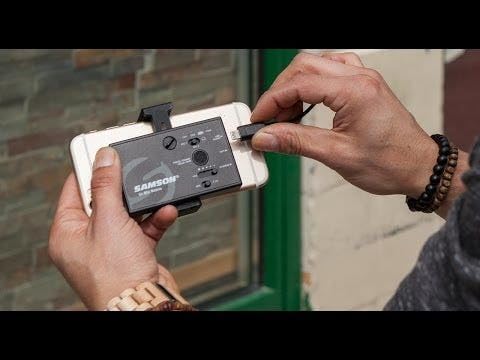
Image: All components of the Samson Go Mic Mobile system, including the receiver, transmitter, lavalier microphone, and various cables, neatly arranged in its protective carrying case.
Setup
1. Connecting the Receiver
The Go Mic Mobile Receiver can be directly attached to your smartphone or camera. Use the appropriate cable for your device:
- For iOS devices: Use the included Lightning cable.
- For Android devices: Use either the USB Micro B or USB-C cable, depending on your phone's port.
- For cameras or other analog inputs: Use the 1/8" (3.5mm) audio cable.

Image: The Go Mic Mobile Receiver securely mounted to an iPhone, connected via the Lightning cable, ready for recording.

Image: The Go Mic Mobile Receiver mounted to an Android smartphone, connected via a USB-C cable, illustrating its compatibility with various mobile devices.
2. Connecting the Transmitter and Lavalier Microphone
Connect the LM8 Lavalier Microphone to the PXD2 Beltpack Transmitter. The transmitter can be clipped onto clothing or a belt for discreet placement.

Image: The PXD2 Beltpack Transmitter with the LM8 Lavalier Microphone plugged in, showing the compact design for wearable use.

Image: A rear view of the PXD2 Beltpack Transmitter, highlighting its integrated belt clip for easy attachment to clothing or a belt.
3. Powering On and Pairing
Turn on both the receiver and the transmitter. The devices should automatically pair. Indicators on the receiver will confirm successful pairing and signal strength.

Image: The Go Mic Mobile Receiver and PXD2 Beltpack Transmitter displayed side-by-side, illustrating their compact size and wireless nature.
Operating
Dual-Channel Operation
The Go Mic Mobile Receiver supports dual-channel operation, allowing you to pair two transmitters simultaneously. This feature is useful for interviews or multi-person broadcasts. You can mix the two channels for streaming or record them on separate tracks for post-production editing.
Volume Control and Monitoring
Adjust the output volume directly on the receiver using the dedicated volume control. The receiver also includes a headphone output for real-time audio monitoring, ensuring optimal sound levels and clarity during recording.
Maintenance
Battery Information
The system uses a Lithium Polymer battery (included). Ensure the battery is fully charged before use to maximize operating time. Use the provided AC adapter for charging.
Cleaning
To clean the devices, use a soft, dry cloth. Avoid using harsh chemicals or abrasive materials, which can damage the finish or internal components.
Troubleshooting
- No Audio/Signal Dropouts: Ensure both the transmitter and receiver are powered on and properly paired. Check battery levels. Maintain a clear line of sight between the transmitter and receiver, and avoid obstacles that may interfere with the 2.4 GHz wireless signal. Keep within the recommended operating range of up to 100 feet.
- Poor Sound Quality: Verify that the lavalier microphone is securely connected to the transmitter. Adjust the gain settings on the transmitter and the volume on the receiver. Ensure the microphone is positioned correctly to capture clear audio.
- Device Not Recognized: Confirm that the correct USB or Lightning cable is used and securely connected to your mobile device or camera. Some Android devices may require specific camera apps (e.g., Open Camera) to properly utilize external microphones.
- Short Battery Life: Ensure the battery is fully charged before each use. If battery life significantly degrades over time, consider replacing the battery or contacting support.
Specifications
| Feature | Specification |
|---|---|
| Item Weight | 400 Grams (14.1 ounces) |
| Microphone Form Factor | Microphone System |
| Item Dimensions (L x W x H) | 12.2 x 7.5 x 2.6 inches |
| Power Source | Battery Powered (1 Lithium Polymer battery included) |
| Material | Stainless Steel |
| Signal-to-Noise Ratio | 65 dB |
| Hardware Platform | Camera |
| Number of Channels | 2 |
| Frequency Response | 22 KHz |
| Connectivity Technology | Wireless, USB |
| Connector Type | 3.5 mm Jack, USB |
| Special Feature | Mute Function |
| Compatible Devices | Camera, Smartphone, Tablet |
| Polar Pattern | Omnidirectional |
Warranty and Support
For detailed warranty information and technical support, please refer to the official Samson Technologies website or contact their customer service directly. Keep your purchase receipt for warranty claims.
Online resources and FAQs may also be available on the Samson product support pages.