
1. Product Overview
The ANNKE 3K Lite 8 Channel Hybrid 5-in-1 Security Digital Video Recorder is a versatile surveillance solution designed for comprehensive property monitoring. This DVR supports up to 8 analog cameras (TVI, AHD, CVI, CVBS) and an additional 2 IP cameras, offering flexible integration options. It utilizes advanced H.265+ video compression for efficient storage and smooth streaming. Key features include remote access via various devices and browsers, customizable motion detection with AI human and vehicle detection, and smart playback capabilities.

Image: The ANNKE 3K Lite 8 Channel Hybrid 5-in-1 Security Digital Video Recorder unit with a 1TB hard drive.
2. What's in the Box
Upon unboxing your ANNKE DVR system, please verify that all the following components are included:
- 1X 3K Lite DVR with 1TB Hard Drive
- 1X 5.9 ft/1.8 m HDMI Cable
- 1X 3.2 ft/1 m Ethernet Cable
- 1X Power Adapter
- 1X USB Mouse
- 1X User Manual
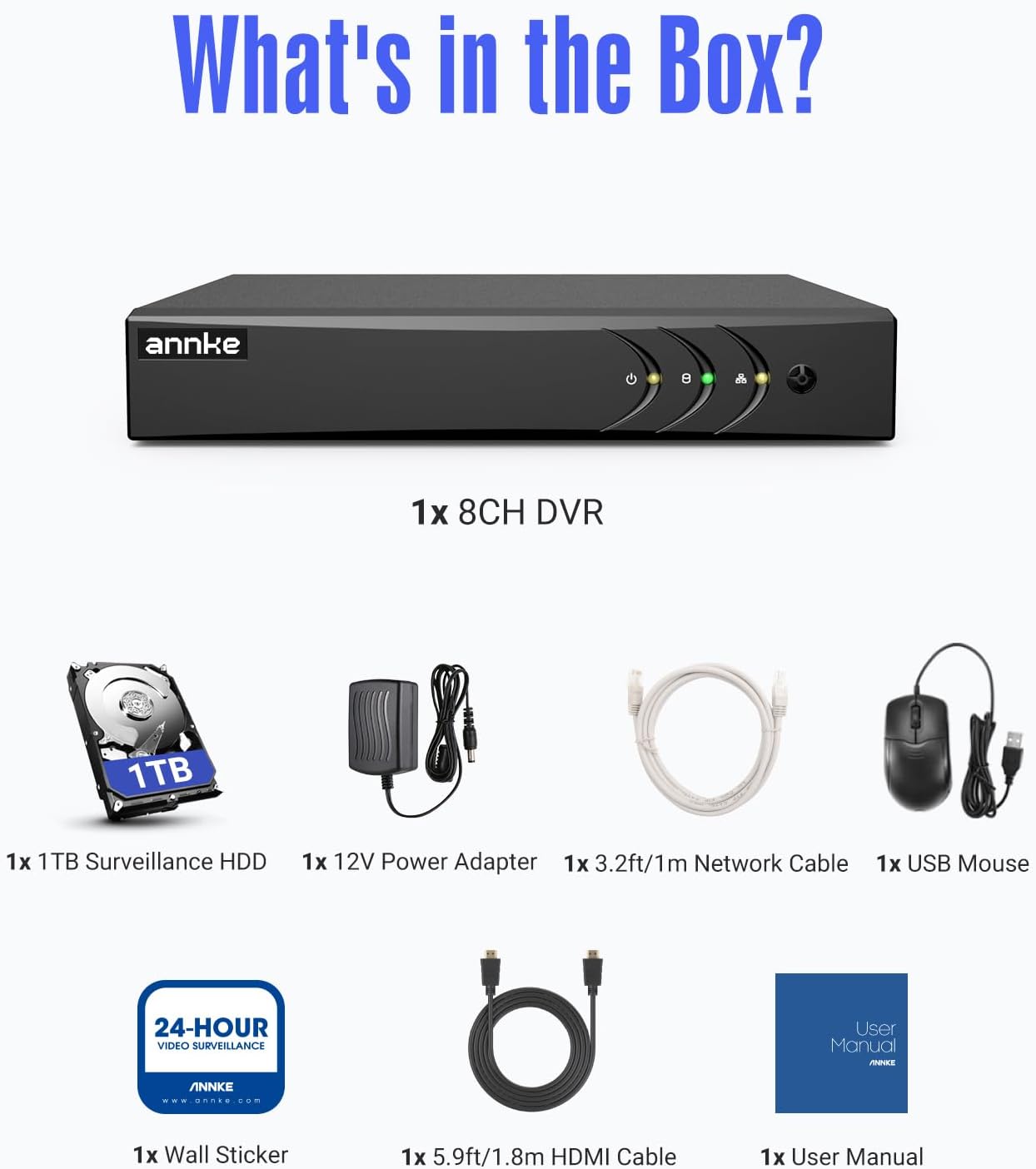
Image: A visual representation of all items included in the ANNKE 3K Lite DVR package.
For a visual guide on unboxing, please refer to the video below:
Video: An unboxing video demonstrating the contents of the ANNKE 3K Lite 8CH DVR package.
3. Setup Guide
Follow these steps to set up your ANNKE DVR system:
- Power Connection: Connect the provided power adapter to the 12V DC Power Input port on the back of the DVR. Plug the adapter into a power outlet.
- Monitor Connection: Connect the DVR to your monitor using either the VGA cable or the HDMI cable. Ensure the monitor is powered on and set to the correct input source.
- Mouse Connection: Plug the USB mouse into one of the USB input ports on the DVR.
- Network Connection: For remote access and online features, connect the DVR to your router using the Ethernet cable.
- Camera Connections: Connect your surveillance cameras to the DVR's video input ports. The DVR supports various camera types (TVI, AHD, CVI, CVBS, and IP cameras).

Image: Detailed view of the ANNKE DVR's rear panel, highlighting video inputs, HDMI, VGA, Ethernet, and USB ports for connection guidance.
For detailed instructions on connecting cameras, please watch the following videos:
Video: A guide on how to connect an analog camera to your ANNKE DVR system.
Video: Instructions on how to connect an IP camera to your ANNKE DVR system.
4. Operating Instructions
4.1. Remote Access
The ANNKE DVR allows for remote access to your surveillance feed via the ANNKE Vision App. Connect your DVR to a router and download the app on your smartphone or tablet. You can access the DVR via 3G/4G/5G or WiFi, and also through web browsers on computers.

Image: A smartphone screen showing the ANNKE Vision app interface for remote viewing of security camera feeds.
4.2. Motion Detection & AI Human/Vehicle Detection
Customize motion detection zones to receive instant app pushes and email alerts with snapshots only when events occur in specified areas. The AI human and vehicle detection feature reduces false alarms by distinguishing between human and vehicle movement from other objects.

Image: An illustration demonstrating flexible motion detection zones and the AI human and vehicle detection capabilities of the DVR.

Image: A security camera's view showing detected human and vehicle outlines, indicating the AI detection feature in action.
4.3. Privacy Mask
To protect sensitive areas from being recorded, you can set up privacy masks. This feature allows you to block out specific regions within the camera's view.
Video: A tutorial on how to set up privacy masks for your ANNKE 3K Lite DVR.
4.4. Channel Management
The DVR supports both analog and IP cameras. You can switch analog channels to IP channels as needed, expanding your system's capabilities. The DVR can operate in different modes, supporting various combinations of BNC and IP cameras.

Image: An infographic showing the two main operational modes of the DVR: supporting 8 BNC cameras plus 2 IP cameras, or up to 10 IP cameras.

Image: A circular diagram illustrating the 5-in-1 hybrid capability of the DVR, supporting IP, AHD, CVI, CVBS, and TVI camera types.
Learn how to switch analog channels to IP channels:
Video: A step-by-step guide on how to change analog channels to IP channels on your ANNKE DVR.
For managing window division on your DVR, refer to this video:
Video: A demonstration of how to switch window divisions on the ANNKE 3K Lite DVR.
4.5. Smart Playback
The DVR offers smart playback features, allowing you to quickly find specific events. With AI detection, you can perform human or vehicle searches to pinpoint relevant footage efficiently.

Image: A person using a laptop to access the DVR's smart playback feature, with options for 'Smart Search', 'Human Search', and 'Vehicle Search' visible.
5. Maintenance
To ensure optimal performance and longevity of your ANNKE DVR system, consider the following maintenance tips:
- Regular Cleaning: Keep the DVR unit and cameras free from dust and debris. Use a soft, dry cloth for cleaning.
- Firmware Updates: Periodically check the ANNKE official website for firmware updates. Keeping your firmware up-to-date ensures the latest features and security patches.
- Data Backup: Regularly back up important footage to an external storage device to prevent data loss.
- Environmental Conditions: Ensure the DVR is placed in a well-ventilated area, away from direct sunlight, heat sources, and excessive moisture.
6. Troubleshooting Common Issues
If you encounter issues with your ANNKE DVR, try the following troubleshooting steps:
- No Video Output:
- Check all cable connections (HDMI/VGA, power).
- Ensure the monitor is powered on and set to the correct input.
- Restart the DVR.
- Network Connection Issues:
- Verify the Ethernet cable is securely connected to both the DVR and the router.
- Check your router's internet connection.
- Ensure the DVR's network settings (IP address, DNS) are correctly configured.
- No Recording/Playback:
- Check if the hard drive is properly installed and recognized by the DVR.
- Ensure recording schedules are set up correctly.
- Verify sufficient storage space is available on the hard drive.
- False Motion Detection Alarms:
- Adjust motion detection sensitivity settings.
- Refine motion detection zones to exclude areas with frequent irrelevant movement (e.g., trees swaying).
- Ensure AI human/vehicle detection is enabled if available.
If issues persist, please contact ANNKE customer support for further assistance.
7. Technical Specifications
| Feature | Specification |
|---|---|
| Product Dimensions | 11.02 x 3.15 x 14.17 inches (11.02"L x 3.15"W x 14.17"H) |
| Item Weight | 3.5 pounds |
| ASIN | B0749F32T1 |
| Item Model Number | AU-DW81KD000-V6-OP |
| Connectivity Technology | Wired |
| Compatible Devices | Camera, Smartphone, Tablet, Computer |
| Memory Storage Capacity | 1 TB |
| Manufacturer | ANNKE |
| Date First Available | July 26, 2017 |
8. Warranty and Support
ANNKE is committed to providing reliable security solutions and excellent customer service.
- Protection Plans: Extended protection plans are available for purchase to cover your device beyond the standard warranty. Options include 2-Year and 3-Year Protection Plans.
- Technical Support: ANNKE offers lifetime technical help for its products. For any inquiries or assistance, please contact Security ANNKE Technology, the third-party seller.
- Return Policy: A 30-day return policy for refund or replacement is typically available from the seller. Please refer to your purchase details for specific terms.