
Bose 774373-0020
Bose SoundSport Free True Wireless Earbuds
Model: 774373-0020
Introduction
The Bose SoundSport Free True Wireless Earbuds offer complete freedom of movement with no wires. Designed for clear and powerful sound, they are ideal for workouts and sports. Featuring Bluetooth technology for reliable music streaming, these earbuds are built to stay comfortably in place even during intense training. Water-repellent materials ensure durability against sweat and weather. With up to 5 hours of playtime per charge and an additional 10 hours from the charging case, your music is always ready. The Bose Connect app allows you to track lost earbuds and provides firmware updates for optimal performance. You can also manage calls and access voice assistants directly from the right earbud.
What's in the Box
- Bose SoundSport Free wireless headphones
- Portable charging case
- 3 sizes of StayHear+ Sport tips (S/M/L)
- USB charging cable
Setup
Charging the Earbuds and Case
Before first use, fully charge your SoundSport Free earbuds and the charging case. The earbuds provide up to 5 hours of playtime on a single charge, and the fully charged case offers an additional 10 hours. A full charge for the earbuds takes approximately 2 hours.

Image: Bose SoundSport Free earbuds resting in their open charging case. The case has LED indicators showing its charge level. The earbuds are securely held by built-in magnets.
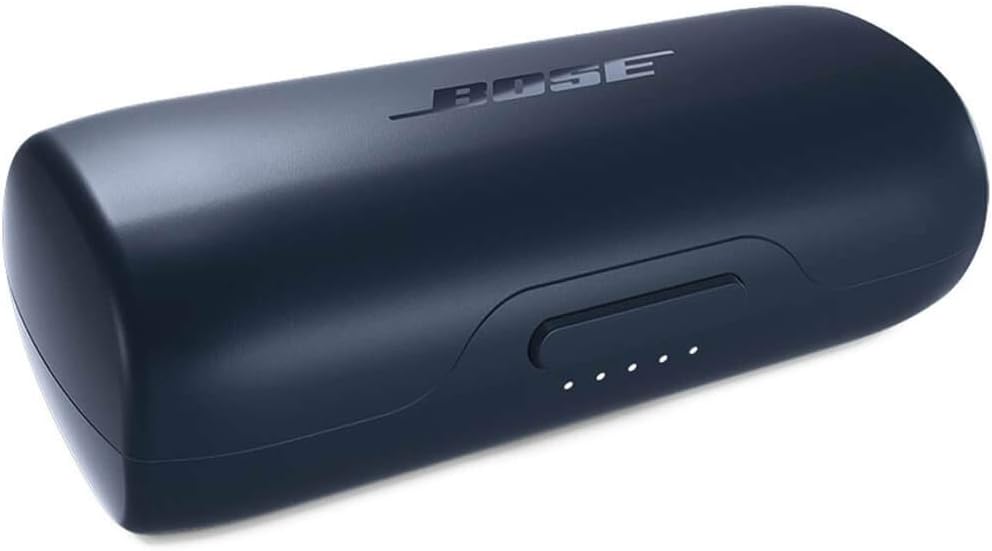
Image: The compact, closed charging case for the Bose SoundSport Free earbuds, featuring the Bose logo on top.
Pairing with Your Device
The earbuds utilize Bluetooth technology for wireless connection. To pair, ensure your device's Bluetooth is enabled. Open the charging case, and the earbuds will enter pairing mode. Select "Bose SoundSport Free" from your device's Bluetooth settings. For detailed pairing instructions, refer to the Bose Connect app.

Image: A close-up view of one Bose SoundSport Free earbud, highlighting its design and the Bose logo.
Operating
Wearing the Earbuds
The StayHear+ Sport tips are designed for a comfortable and secure fit, ensuring the earbuds remain in place during vigorous activities. Choose the tip size that best fits your ears for optimal sound and stability.

Image: A person wearing a Bose SoundSport Free earbud, demonstrating its secure and comfortable fit during physical activity.
Controls and Calls
You can play or pause tracks and access your phone's Siri or Google Assistant directly from the earbud. For phone calls, the integrated dual microphone array on the right earbud allows you to use them for conversations. Call audio will be heard only in the right earbud.
Bose Connect App Features
The Bose Connect app enhances your earbud experience. Use the "Find My Buds" feature to locate lost earbuds by showing their last connected location or by emitting an audio signal. The app also provides firmware updates to improve audio-video synchronization for compatible Bluetooth devices (AVDTP version 1.3 or later).
Maintenance
The SoundSport Free earbuds are designed to be sweat and weather resistant with an IPX4 rating. Water-repellent materials inside the earbuds help protect them from moisture. After workouts or exposure to moisture, it is recommended to wipe the earbuds clean with a dry cloth before placing them back in the charging case.
Troubleshooting
Lost Earbuds
If you misplace an earbud, use the "Find My Buds" feature within the Bose Connect app. This feature can show you the last known location where the earbuds were connected to your phone. If they are nearby and connected, you can also trigger an audio signal from the earbuds to help you locate them.
Connectivity Issues
If you experience connectivity issues, ensure your device's Bluetooth is on and the earbuds are charged. Try restarting both your device and the earbuds. If problems persist, consult the full user manual or Bose support for advanced troubleshooting steps.
Specifications
| Feature | Detail |
|---|---|
| Model Name | SoundSport Free |
| Connectivity Technology | Wireless |
| Wireless Communication Technology | Bluetooth |
| Bluetooth Version | 5.0 |
| Bluetooth Range | 10 Meters |
| Battery Life (Earbuds) | Up to 5 hours |
| Charging Case Playtime | Additional 10 hours |
| Charging Time (Earbuds) | 2 Hours |
| Water Resistance Level | IPX4 (Sweat and Weather Resistant) |
| Item Weight | 0.634 ounces |
| Product Dimensions | 1.2 x 1 x 1.25 inches |
| Material | Plastic |
| Color | Midnight Blue / Citron |
| Ear Placement | In Ear |
| Control Type | Call Control, App |
| Audio Driver Type | Dynamic Driver |
| Impedance | 32 Ohm |
| Manufacturer | Bose Corporation |
| UPC | 017817748025 |
Warranty and Support
For detailed warranty information and comprehensive support, please refer to the official Bose website or the full user manual.
- Official User Guide (PDF): Download PDF
- Visit the Bose Store: Bose Store on Amazon
Related documents774373-0020


Ask a question about this manual
Ask about setup, troubleshooting, compatibility, parts, safety, or missing instructions. Manuals+ will review the question and use this page’s manual context to help answer it.