
Infinity Orb WB-46-3
Infinity Orb Magnetic Levitating Speaker User Manual
Model: WB-46-3
1. Introduction
The Infinity Orb Levitating Speaker is a unique Bluetooth speaker designed to levitate above its magnetic base, offering an immersive audio and visual experience. The base features continuously changing LED lights, enhancing the aesthetic appeal. This manual provides essential information for setting up, operating, and maintaining your speaker.
Key Features:
- Amazing LED Visual Effect: The base illuminates with continuously changing colored LED lights.
- Standalone Speaker Functionality: The orb can be used as a portable speaker independently of the magnetic base.
- 3D Surround Effect: A specially designed sound guide cone provides a distinctive timbre and immersive audio.
- Bluetooth 4.0 Connectivity: Connects stably and easily with all Bluetooth-enabled devices, including smartphones, iPods, and tablets, within a 10-meter wireless range.
- Hands-Free Calling: Integrated microphone allows for convenient hands-free phone calls.
- Touch Controls: The top section of the orb features a touch panel for volume and song control.
2. Package Contents
Please ensure all items are present in the package:
- 1x Levitating Orb Speaker
- 1x Magnetic Base
- 1x USB Cable
- 1x Power Charger
- 1x User Manual (this document)
3. Setup Instructions
3.1 Power Connection
- Place the magnetic base on a completely flat and horizontal surface. A non-flat surface will prevent proper levitation.
- Connect the power adapter to the base's power port and then plug it into a wall outlet.
3.2 Levitation Guide
Achieving levitation requires a bit of practice. Follow these steps carefully:
- Hold the orb with both hands. Position your fingers underneath the orb to hold it firmly.
- Slowly move the orb vertically downwards towards the center of the base.
- As you approach the center, gently move the orb slightly left and right, or front and back, to locate the levitation point.
- When you feel a strong, invisible force holding the orb in place, this indicates you have found the levitation point. Gently release the orb.
- If the orb falls or attaches to the base, lift it and try again. Practice will make it easier.
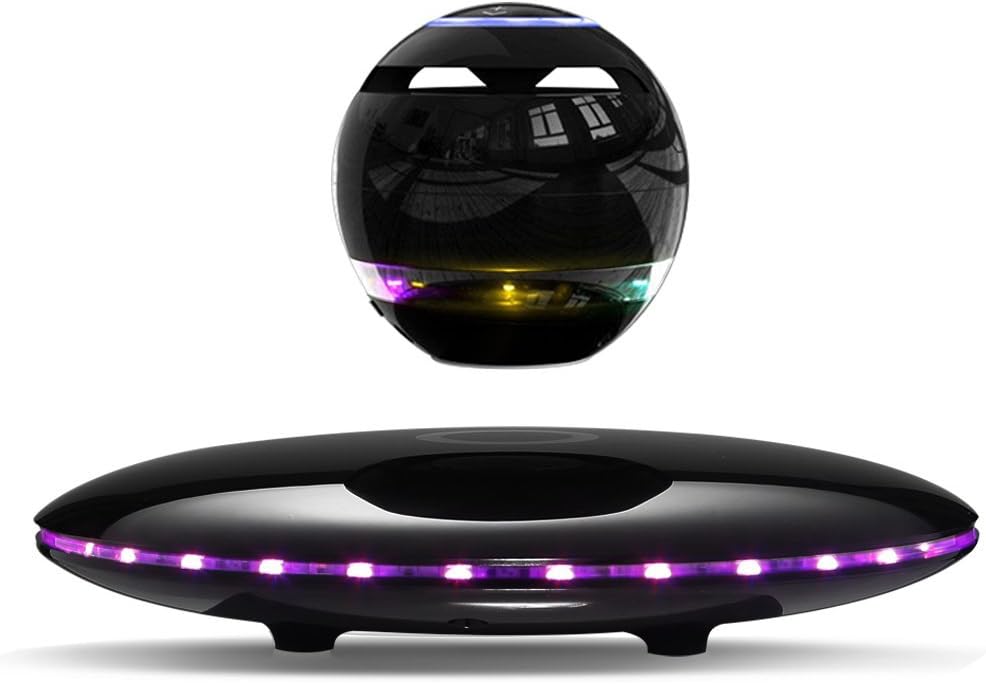
Figure 3.2.1: The Infinity Orb Levitating Speaker and its magnetic base. The orb floats above the base, which emits colorful LED lights.

Figure 3.2.2: The speaker orb levitates approximately 14mm (0.55 inches) above the base, allowing for 360-degree rotation and sound dispersion.
3.3 Bluetooth Pairing
- Turn on the speaker orb. It will enter pairing mode automatically.
- On your smartphone, tablet, or other Bluetooth-enabled device, go to the Bluetooth settings.
- Search for available devices and select "Infinity Orb" (or similar name) from the list.
- Once connected, the speaker will indicate successful pairing (e.g., with an audible tone or LED change).
4. Operating Instructions
4.1 Playing Music
- After successful Bluetooth pairing, you can play audio from your connected device.
- The speaker can play music for more than 8 hours continuously at 70% volume on a full charge.
- The orb can be used as a standalone portable speaker without being levitated on the base.
4.2 LED Lighting
The magnetic base features dynamic LED lighting that continuously changes colors, adding to the product's visual appeal.

Figure 4.2.1: The base cycles through various LED colors, creating a vibrant display.
4.3 Touch Controls
The top surface of the levitating orb speaker is equipped with touch-sensitive controls for easy operation.

Figure 4.3.1: The top panel allows you to control volume and switch between songs with a simple touch.
4.4 Hands-Free Calling
The built-in microphone enables hands-free phone calls when connected via Bluetooth.

Figure 4.4.1: Make and receive calls conveniently without needing to hold your phone.
5. Maintenance
- Keep the speaker and base clean by wiping them with a soft, dry cloth.
- Avoid exposing the device to extreme temperatures, direct sunlight, or moisture.
- Do not attempt to disassemble the unit, as this will void the warranty and may cause damage.
- Store the speaker and base in a safe place when not in use to prevent accidental drops or damage.
6. Troubleshooting
| Problem | Possible Cause | Solution |
|---|---|---|
| Orb does not levitate. | Base is not on a flat surface; incorrect positioning; power issue. | Ensure the base is on a perfectly flat, stable surface. Re-attempt levitation following the guide in Section 3.2. Check power connection. |
| No sound from speaker. | Not paired; volume too low; low battery. | Ensure Bluetooth is connected. Increase volume on both the speaker and your device. Charge the speaker. |
| Cannot pair via Bluetooth. | Speaker not in pairing mode; device Bluetooth off; too far from speaker. | Ensure speaker is on and in pairing mode. Turn Bluetooth off and on again on your device. Move device closer to the speaker (within 10 meters). |
| LED lights not working. | Power issue; internal malfunction. | Check power connection to the base. If problem persists, contact customer support. |
7. Specifications
| Feature | Detail |
|---|---|
| Brand | Infinity Orb |
| Model Name | WB-46 |
| Item Model Number | WB-46-3 |
| Bluetooth Version | 4.0 |
| Wireless Range | Up to 10 meters (33 feet) |
| Speaker Output | 3W x 1 |
| Battery Capacity | 500mAh |
| Playing Time | More than 8 hours continuous (at 70% volume) |
| Frequency Range | 100Hz - 18kHz |
| Material | Plastic |
| Color | Black |
| Product Dimensions | 3.1"D x 3.1"W x 3.1"H (Orb) |
| Item Weight | 2.59 pounds |
| Power Source | Battery Powered |
| Number of Microphones | 1 |
| Control Method | Touch |
8. Warranty and Support
The Infinity Orb Magnetic Levitating Speaker comes with a Limited Warranty provided by the manufacturer, Infinity Orb.
For warranty claims, technical support, or any inquiries regarding your product, please contact Infinity Orb customer service through their official channels or the retailer from whom you purchased the product.
Please retain your proof of purchase for warranty validation.
Ask a question about this manual
Ask about setup, troubleshooting, compatibility, parts, safety, or missing instructions. Manuals+ will review the question and use this page’s manual context to help answer it.