Introduction
The Orno WAT-419(GS) Electricity Meter is designed to monitor and calculate the energy consumption and associated costs of electrical appliances connected to it. This device helps users understand and manage their electricity usage, contributing to energy and cost savings.
Safety Information
- Read all instructions before use.
- Do not exceed the maximum load of 3680W or 16A.
- This device is for indoor use only (IP20 protection class).
- Do not disassemble or attempt to repair the device.
- Ensure the meter is securely plugged into a properly grounded wall socket.
- Do not connect multiple power strips or extension cords in series.
- Keep out of reach of children.
- Do not immerse in water or expose to excessive moisture.
Product Overview
The Orno WAT-419(GS) features a large LCD screen for clear display of information and two control buttons: 'MODE' and 'UP'. It also includes a recessed 'RESET' button.
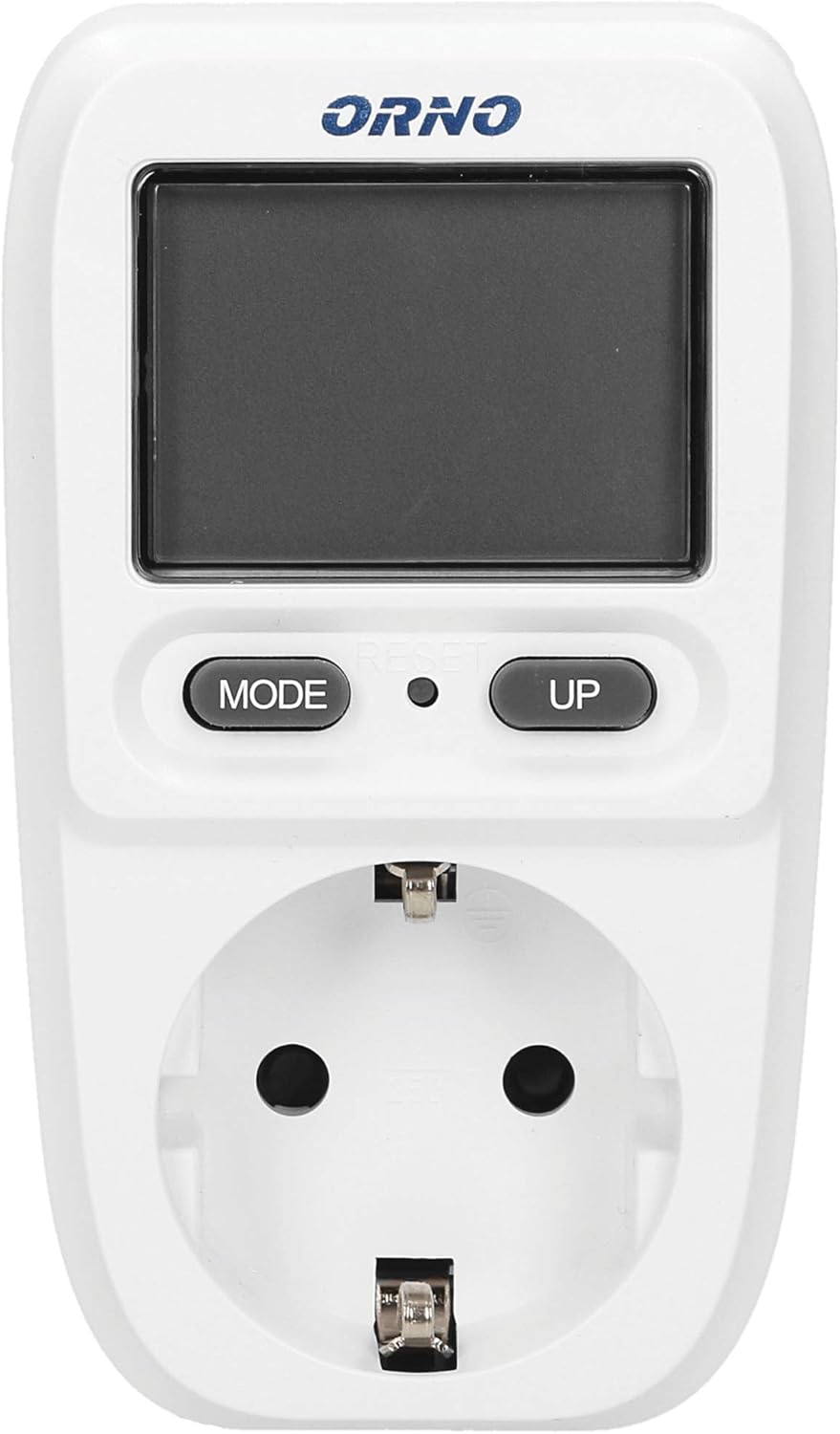
Image shows the front of the Orno WAT-419(GS) electricity meter, highlighting the LCD display, 'MODE' button, 'UP' button, and the integrated Schuko (Type F) socket.
Setup
- Plug the Orno WAT-419(GS) electricity meter directly into a standard 230V~, 50Hz wall socket.
- Ensure the meter is firmly seated in the wall socket.
- Plug the appliance you wish to monitor into the socket on the front of the electricity meter.

Image shows the Orno WAT-419(GS) electricity meter plugged into a wall socket, ready for an appliance to be connected.
Operating Instructions
Understanding Display Modes
The meter cycles through various display modes to show different electrical parameters. Use the 'MODE' button to switch between these displays.
Available display modes include:
- Power (W): Instantaneous power consumption in Watts (0.1 - 3680 W).
- Voltage (V): Mains voltage in Volts (200 - 276 V).
- Cumulative Energy (kWh): Total energy consumed in kilowatt-hours (0.00 - 9999.9 kWh).
- Cumulative Cost (€): Total calculated cost based on energy consumption (0.00 - 99.99 €).
- Cost Rate (€/kWh): The set cost per kilowatt-hour.

Diagram illustrating the five different display modes of the Orno WAT-419(GS) meter: Power (W), Voltage (V), Cumulative Energy (kWh), Cumulative Cost (€), and Cost Rate (€/kWh).
Setting Cost Rate
To set the cost per kilowatt-hour (€/kWh):
- Press the 'MODE' button repeatedly until the 'Cost Rate (€/kWh)' display appears.
- Press and hold the 'MODE' button for approximately 3 seconds until the digit starts flashing.
- Use the 'UP' button to adjust the flashing digit. Press 'MODE' to move to the next digit.
- Once all digits are set, press and hold 'MODE' again to save the setting and exit.
Resetting Data
To reset all accumulated data (Cumulative Energy and Cumulative Cost), locate the small 'RESET' button (often a recessed pinhole) between the 'MODE' and 'UP' buttons. Use a thin, non-metallic object (like a paperclip) to press and hold this button for a few seconds until the display resets to zero.
Specifications
| Parameter | Value |
| Power Supply | 230V~, 50Hz |
| Max. Load | 3680W |
| Current | 16A |
| Voltage Measurement Range | 200V~ 276V~ |
| Energy Consumption Range | 0.00 - 9999.9 kWh |
| Active Power Range | 0.1 - 3680 W |
| Cost Measurement Range | 0.00 - 99.99 € |
| Socket Type | Schuko (Type F), 2P+Z |
| Protection Class | IP20 |
| Dimensions (W/H/D) | 63 x 107 x 75 mm |
| Weight | 120 g |
| Display | Digital LCD |
| Certification | CE |
| Material | Plastic |

Image showing the back of the Orno WAT-419(GS) electricity meter, displaying the technical specifications label including model number, voltage, load, and certification.

Diagram illustrating the dimensions of the Orno WAT-419(GS) electricity meter in millimeters: 63mm width, 107mm height, and 75mm depth.
Maintenance
- Clean the device with a dry, soft cloth. Do not use abrasive cleaners or solvents.
- Do not soak the device in water.
- Store in a dry place when not in use.
Troubleshooting
- Display is blank: Ensure the meter is securely plugged into a live wall socket. Check the wall socket with another appliance.
- Incorrect readings: Verify the cost rate setting. Ensure the appliance is fully plugged into the meter.
- Meter not responding to buttons: Try resetting the device using the recessed 'RESET' button.
- Overload warning: If the meter displays an overload warning or shuts off, disconnect the appliance immediately. The connected appliance exceeds the meter's maximum load capacity (3680W / 16A).
Warranty and Support
Information regarding warranty and customer support for the Orno WAT-419(GS) electricity meter is not provided in this manual. Please refer to your purchase documentation or contact the retailer for details.


