
Introduction
This manual provides detailed instructions for the safe and effective use of your Unbranded XM-L T6 10000 Lumens Zoomable Tactical LED Flashlight, Model S2. Designed for durability and high performance, this flashlight features a powerful LED, zoomable optics, and multiple lighting modes. Please read this manual thoroughly before operating the device.

Image: Two XM-L T6 flashlights, highlighting their robust design and zoom feature.
Product Features
- Durable Construction: Built with top-grade aluminum casing, offering impact resistance and lightweight design.
- High Brightness LED: Features an ultra-strong LED light with up to 10000 lumens, providing a transmission distance of up to 500 meters.
- Zoomable Optic System: An outstanding focusing optic system allows for seamless transition from a spot beam to a flood beam, enhancing versatility.
- Multiple Lighting Modes: Equipped with a quick-click switch to cycle through 5 distinct lighting modes.
- Portability: Compact size and includes a convenient carrying strap for easy transport.
- Efficient Power Consumption: Designed for low power consumption, ensuring a long running time.

Image: The flashlight's powerful beam illuminating distant objects and wide areas.
Specifications
| Brand | Unbranded |
| Model | S2 |
| Color | Black |
| Emitter BIN | T6 |
| Lumen Output | 10000 Lumens |
| Material | Aluminum alloy |
| Color BIN | White |
| Power | 10W |
| Battery Configurations | 1 x 18650 Battery (Not Included) or 3 x AAA Batteries (Not Included) |
| Lighting Distance | 500m |
| Switch Type | Click |
| Switch Location | Bottom |
| Modes | 5 |
| Mode Memory | No |
| Lens | Coated Glass Lens |
| Carrying Strap | Strap Included |
| Dimensions (L x Dia.) | (5.31 x 1.38)" / (13.5 x 3.5)cm |
| Weight | 5.29oz / 150g |
| Water Resistance Level | Not Water Resistant |
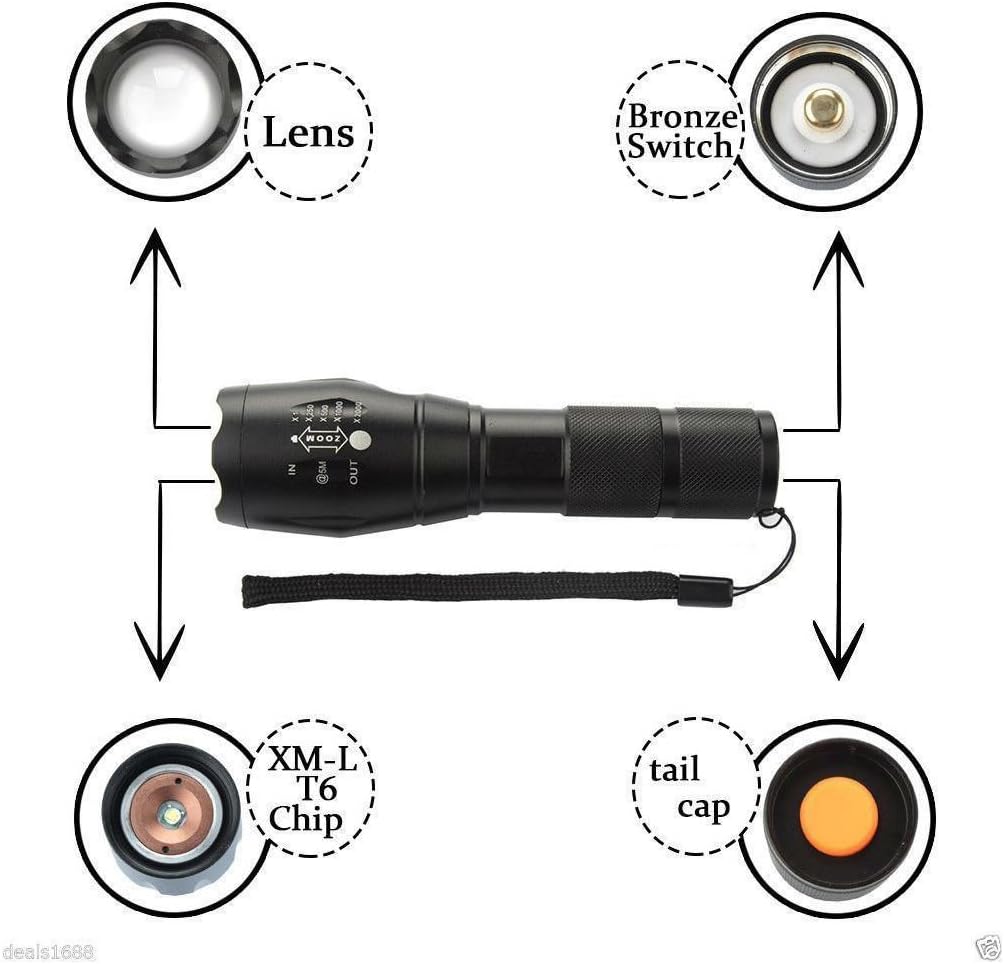
Image: Exploded view of the flashlight components, including the lens, switch, LED chip, and tail cap.
Setup
- Battery Installation:
- Unscrew the tail cap of the flashlight.
- Insert one 18650 battery or three AAA batteries (using an adapter, not included) into the battery compartment with the positive (+) end facing towards the head of the flashlight.
- Screw the tail cap back on securely.

Image: Illustration of battery insertion, showing compatibility with both 18650 and AAA batteries.
Operating Instructions
- Power On/Off: Press the quick-click switch located on the bottom (tail cap) of the flashlight to turn the light on or off.
- Cycle Modes: With the flashlight on, lightly press the quick-click switch (without fully clicking) to cycle through the 5 available lighting modes. The modes typically include High, Medium, Low, Strobe, and SOS.
- Zoom Function: To adjust the beam focus, slide the head of the flashlight forward or backward.
- Slide the head forward (IN) for a narrower, more focused beam (spotlight).
- Slide the head backward (OUT) for a wider, less focused beam (floodlight).

Image: Visual representation of the flashlight's zoom function, from narrow spot to wide flood.
Maintenance
- Cleaning: Wipe the flashlight body with a soft, damp cloth. Do not use abrasive cleaners or solvents.
- Lens Care: Keep the lens clean to ensure optimal light output. Use a lens cleaning cloth and solution if necessary.
- Battery Care: Remove batteries if the flashlight will not be used for an extended period to prevent leakage. Store batteries in a cool, dry place.
- Lubrication: Periodically apply silicone grease to the O-rings and threads to maintain water resistance and smooth operation.
Troubleshooting
| Problem | Possible Cause & Solution |
|---|---|
| Flashlight does not turn on. |
|
| Light is dim or flickers. |
|
| Zoom function is stiff. |
|
Warranty and Support
This product is subject to a 30-day return policy from the date of purchase. For any issues, questions, or support inquiries beyond this period, please contact the seller directly through your purchase platform. Keep your proof of purchase for any warranty claims.


