1. Product Overview
The CASIO G-SHOCK GAW-100B-1AJF is a robust and feature-rich timepiece designed for durability and precision. It combines the legendary G-SHOCK shock resistance with advanced Tough Solar power and Multi-Band 6 atomic timekeeping, ensuring reliable performance in various conditions. This model features both analog and digital displays, offering versatility and clear readability.


2. Setup and Initial Use
2.1 Initial Charging (Tough Solar)
Your G-SHOCK GAW-100B-1AJF is equipped with Tough Solar technology, which converts light into power. Before first use, or if the watch has been stored in darkness, ensure it receives sufficient light exposure to charge the internal battery. Place the watch in a location where it can receive direct sunlight or strong artificial light for several hours. The charge level indicator on the digital display will show the current battery status.
- Charging Guidelines: For optimal performance, expose the watch to light regularly. Avoid prolonged storage in dark places.
- Power Saving: The watch features a power-saving function that automatically enters a sleep state when left in darkness to conserve energy.
2.2 Time Setting (Multi-Band 6 Atomic Timekeeping)
The Multi-Band 6 feature allows your watch to automatically receive time calibration signals from six transmission stations around the world, ensuring accurate timekeeping. The watch will attempt to receive a signal automatically overnight.
- Automatic Reception: For best reception, place the watch near a window at night. Ensure the watch face is oriented towards the nearest signal transmission station if possible.
- Manual Reception: To manually initiate time signal reception, refer to the detailed instructions in the full user manual (Module 5067) available on the official CASIO website.
- Home City Setting: Ensure your Home City is correctly set. This is crucial for proper time calibration signal reception and World Time functionality.

3. Operating Modes
The GAW-100B-1AJF offers several modes accessible via the 'MODE' button (bottom left). Pressing the 'MODE' button cycles through the different functions.
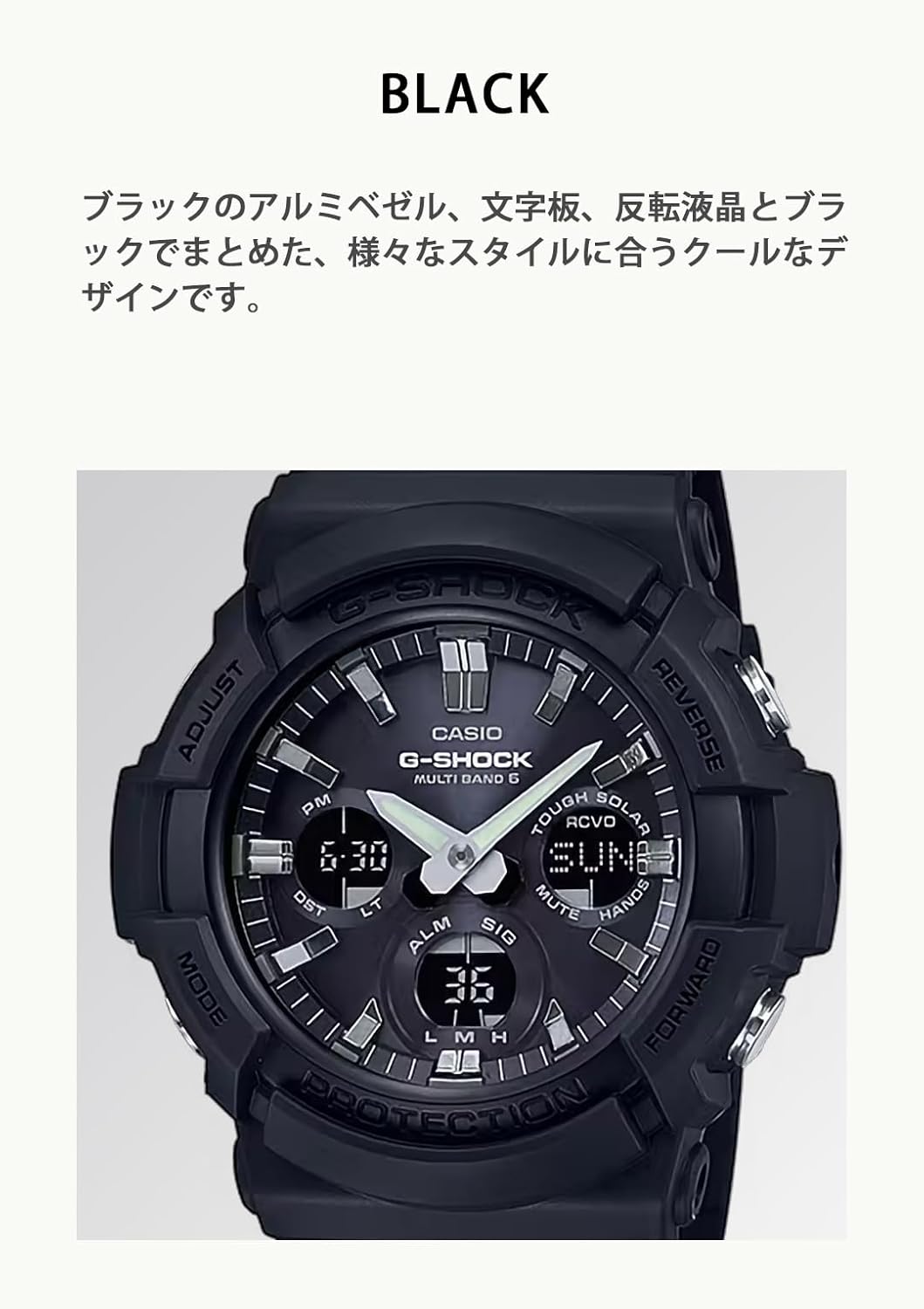
- Timekeeping Mode: Displays the current time, day of the week, and date. This is the default mode.
- World Time Mode: Allows you to view the current time in 48 cities (31 time zones) around the world. Use the 'FORWARD' and 'REVERSE' buttons to navigate cities.
- Stopwatch Mode: Measures elapsed time with 1/100-second accuracy. Features include split times and 1st-2nd place times.
- Countdown Timer Mode: A countdown timer that can be set up to 100 minutes. An alarm sounds when the countdown reaches zero.
- Alarm Mode: Set up to 5 daily alarms and an hourly time signal.
- Illumination (LED Light): Press the 'LIGHT' button (top right) to illuminate the digital display and watch face. The watch features a Full Auto LED Light, which can be configured to activate automatically in low light conditions when the watch is tilted towards your face.
- Hand Shift Feature: Temporarily moves the analog hands away from the digital display for unobstructed viewing of digital information. Activate by pressing the 'MODE' and 'LIGHT' buttons simultaneously.
4. Maintenance
- Charging: Regularly expose the watch to light to maintain optimal battery charge. Avoid covering the watch face for extended periods.
- Water Resistance (20 Bar): The watch is water resistant to 20 Bar (200 meters), suitable for swimming, showering, and snorkeling. Do not operate buttons underwater. After exposure to saltwater, rinse the watch with fresh water and wipe it dry.
- Cleaning: Wipe the watch with a soft, dry cloth to remove dirt and moisture. For stubborn dirt, use a soft brush with mild soap and water, then rinse thoroughly and dry.
- Band Care: The resin band can be cleaned with mild soap and water. Avoid using harsh chemicals or solvents, as these can damage the material.
5. Troubleshooting
- Time Not Syncing: Ensure the watch is placed in a location with good signal reception, especially overnight. Verify your Home City setting is correct. Check the battery charge level.
- Digital Display Blank: The watch may be in power-saving mode due to prolonged darkness or low battery. Expose it to light for charging.
- Hands Not Matching Digital Time: This can occur after strong impact or magnetic exposure. Use the Hand Home Position Correction function (refer to the full manual for Module 5067) to realign the hands.
- Buttons Unresponsive: Ensure the watch is not in a locked mode. If the issue persists, a full reset may be required (consult the full manual).
6. Specifications
| Feature | Description |
|---|---|
| Model Number | GAW-100B-1AJF |
| Power Source | Tough Solar (Solar Powered) with secondary CR2 battery (included) |
| Timekeeping | Multi-Band 6 Atomic Timekeeping (Auto time adjustment) |
| Water Resistance | 20 Bar (200 meters) |
| Shock Resistance | Yes (G-SHOCK structure) |
| Case/Bezel Material | Resin/Aluminum |
| Band Material | Resin |
| Glass | Mineral Glass |
| Light | Full Auto LED Light (Super Illuminator) |
| World Time | 31 time zones (48 cities + UTC) |
| Stopwatch | 1/100-second, measuring capacity: 59'59.99'' |
| Countdown Timer | Measuring unit: 1 second, countdown range: 100 minutes |
| Alarms | 5 daily alarms, hourly time signal |
| Dimensions | Approx. 55.1 x 52.5 x 16.7 mm |
| Weight | Approx. 72 g |
7. Warranty and Support
For warranty information, please refer to the warranty card included with your product or contact your point of purchase. For detailed operational guides and further support, please visit the official CASIO G-SHOCK website and search for Module Number 5067.
Online Resources: CASIO Official Manuals


