
Introduction
The Proster 0-225° Digital Angle Finder Protractor is a precision digital angle measuring device designed for various applications, including woodworking, carpentry, and home decoration. It provides accurate and easy-to-read angle measurements, functioning also as a spirit level for horizontal and vertical alignment. This manual provides instructions for proper setup, operation, and maintenance of your device.

Image: The Proster 0-225° Digital Angle Finder Protractor, showcasing its design and digital display.
Safety Information
- Do not attempt to disassemble or modify the device by moving screws or components randomly. This may damage the device and void the warranty.
- Handle the angle meter with care. Apply even strength when rotating the arm and avoid using excessive force.
- Avoid keeping the backlight open for extended periods to conserve battery life.
- When the low power alarm icon appears on the display, replace the 9V battery immediately to ensure continued accurate operation.
Package Contents
Verify that all items are present in the package:
- 1 x Digital Angle Finder
- 1 x Angle Finder Case
- 1 x Portable Bag
- 1 x User Manual (this document)
- 1 x 9V 6F22 Battery

Image: The complete package contents, including the digital angle finder, case, portable bag, user manual, and 9V battery.
Product Features
- Durable Construction: Made from aluminum alloy body and a 400mm stainless steel rule arm for consistent accuracy.
- Wide Measuring Range: 0-225° with a resolution of 0.1° and precision of ±0.5°.
- Backlit LCD Display: Large, clear display for easy reading in various lighting conditions.
- Data Hold Function: Freeze measurements on the display for convenient recording.
- Mechanical Lock Knob: Securely fix the arm at any desired angle for marking or transferring.
- Dual Spirit Levels: Integrated horizontal and vertical bubble vials for quick leveling tasks.
- Automatic Power-Off: Device automatically shuts off after 5 minutes of inactivity to save battery.
- Low Battery Alarm: Alerts when battery replacement is needed.
Parts Identification
Familiarize yourself with the components of your digital angle finder:

Image: Labeled diagram of the Proster Digital Angle Finder, indicating the Horizontal Level, Vertical Level, Hole to Hang up, Lock Knob, Backlight Button, LCD Display, Hold Button, and ON/OFF Button.
- Horizontal Level: Bubble vial for horizontal alignment.
- Vertical Level: Bubble vial for vertical alignment.
- Hole to Hang up: For convenient storage.
- Lock Knob: To secure the angle of the arm.
- LCD Display: Shows digital angle readings.
- Backlight Button: Activates/deactivates the display backlight.
- Hold Button: Freezes the current angle reading.
- ON/OFF Button: Powers the device on or off.
Setup
- Battery Installation:
Locate the battery compartment, usually on the back or side of the main body. Insert the provided 9V 6F22 battery, ensuring correct polarity. Close the compartment securely.
- Power On:
Press the ON/OFF button to power on the device. The LCD display will illuminate.
Operating Instructions
1. Measuring Angles
- Power On: Press the ON/OFF button to switch on the angle finder.
- Unfold the Arm: Gently unfold the arm of the device. The opening angle will be displayed on the LCD, increasing or decreasing as you adjust the arm.
- Position for Measurement: Place the angle finder against the surfaces you wish to measure. The device will automatically display the angle between the main body and the arm.
- Lock the Angle (Optional): To maintain a specific angle for marking or transfer, tighten the Lock Knob. This prevents the arm from moving.
- Use Backlight (Optional): If working in low-light conditions, press the Backlight Button to illuminate the LCD display.
- Hold Reading (Optional): Press the Hold Button to freeze the current angle reading on the display. Press again to release.
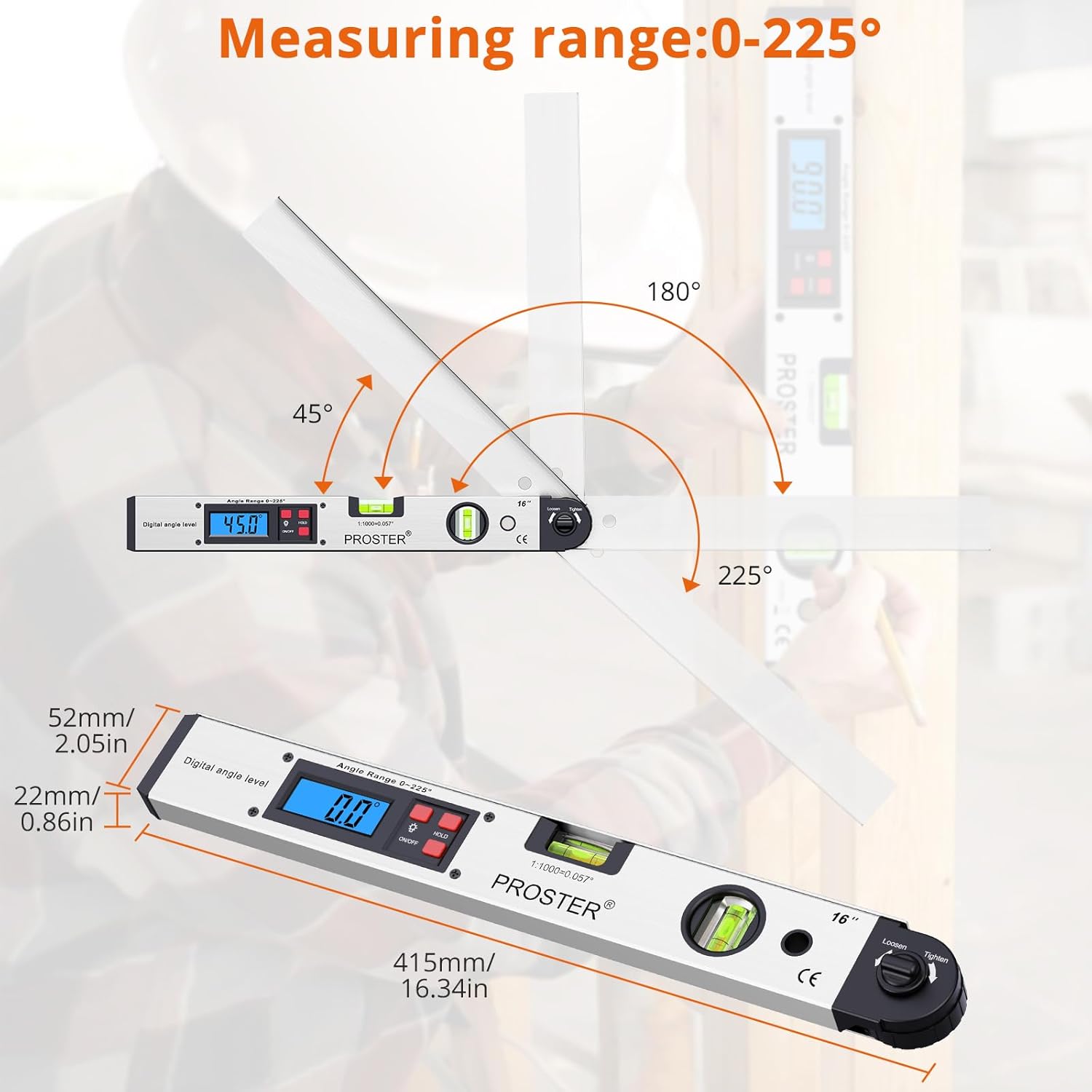
Image: The digital angle finder in use, demonstrating its 0-225° measuring range and how it displays angles on the LCD.

Image: A user operating the digital angle finder in dim light, highlighting the clear backlit LCD display showing an angle of 180.0°.
2. Spirit Level Function
The device can also be used as a quick reference spirit level:
- To measure horizontal alignment, place the main body of the angle finder on the surface. Observe the bubble in the Horizontal Level vial.
- To measure vertical alignment, place the main body against the vertical surface. Observe the bubble in the Vertical Level vial.
- Note: This is a reference level and not intended for precision digital leveling.

Image: A user utilizing the Proster Digital Angle Finder as a spirit level to check horizontal and vertical surfaces.
Maintenance
- Cleaning: Wipe the device with a soft, dry cloth. Do not use abrasive cleaners or solvents.
- Storage: Store the angle finder in its provided case or portable bag in a dry, cool place when not in use.
- Battery Replacement: Replace the 9V battery when the low power alarm appears on the display. Ensure proper disposal of old batteries.
Troubleshooting
| Problem | Possible Cause | Solution |
|---|---|---|
| Device does not power on. | Battery is dead or incorrectly installed. | Check battery polarity or replace with a new 9V battery. |
| Display is dim or flickering. | Low battery power. | Replace the 9V battery. |
| Angle reading is inaccurate. | Device not handled with care; internal components may be affected. | Ensure the device is handled gently. If inaccuracy persists, contact customer support. |
| Lock knob does not hold angle. | Knob not tightened sufficiently or internal mechanism issue. | Ensure the lock knob is fully tightened. If the issue persists, avoid forcing and contact customer support. |
Specifications
| Length | 400mm (16 inches) |
| Measuring Range | 0-225° |
| Angle Resolution | 0.1° |
| Measuring Precision | ±0.5° |
| Working Temperature | -10°C to +50°C |
| Battery Type | 9V 6F22 (included) |
| Automatic Shut-off | After 5 minutes of inactivity |
| Material | Aluminum Alloy, Stainless Steel |
Image: The digital angle finder displaying its dimensions and measuring capabilities.
Warranty and Support
For warranty information or technical support, please refer to the contact details provided with your purchase or visit the official Proster website. Keep your purchase receipt as proof of purchase for warranty claims.