
1. Introduction
The DigiTech FreqOut is a natural feedback creation guitar effects pedal designed to provide sweet, natural-sounding feedback at any volume level, with or without distortion. This pedal is ideal for studio environments, live performances with in-ear monitors, or low-volume practice where traditional amplifier feedback is not feasible or desirable. It can also be used at gig volumes to focus out-of-control feedback on a specific harmonic.
The FreqOut utilizes advanced pitch detection technology to continuously monitor your guitar signal's harmonic content. Users can select from seven distinct harmonic modes (Sub, 1st, 2nd, 3rd, 5th, Nat Low, and Nat Hi) to shape the character of the feedback effect.
Key Features:
- Generates natural-sounding amplifier feedback at various volume levels.
- User-selectable harmonic modes for diverse feedback characteristics.
- Independent Onset and Gain controls for precise feedback shaping.
- Selectable momentary or latching footswitch operation.
- Dry Kill function to remove the dry signal from the output.
- True Bypass circuitry for preserving signal integrity when the effect is off.
- Rugged, road-tough steel chassis for durability.
2. Getting Started: Setup
Follow these steps to connect your DigiTech FreqOut pedal to your guitar rig.
2.1 Power Connection
The FreqOut pedal requires a standard 9VDC power supply (not included). Connect the power supply to the 9VDC input jack on the pedal. Ensure the power supply meets the pedal's specifications (9VDC, 300mA minimum).
2.2 Audio Connections
- Connect your guitar to the INPUT jack on the FreqOut pedal using a standard 1/4-inch instrument cable.
- Connect the OUTPUT jack of the FreqOut pedal to your amplifier's input or the next pedal in your signal chain using another standard 1/4-inch instrument cable.
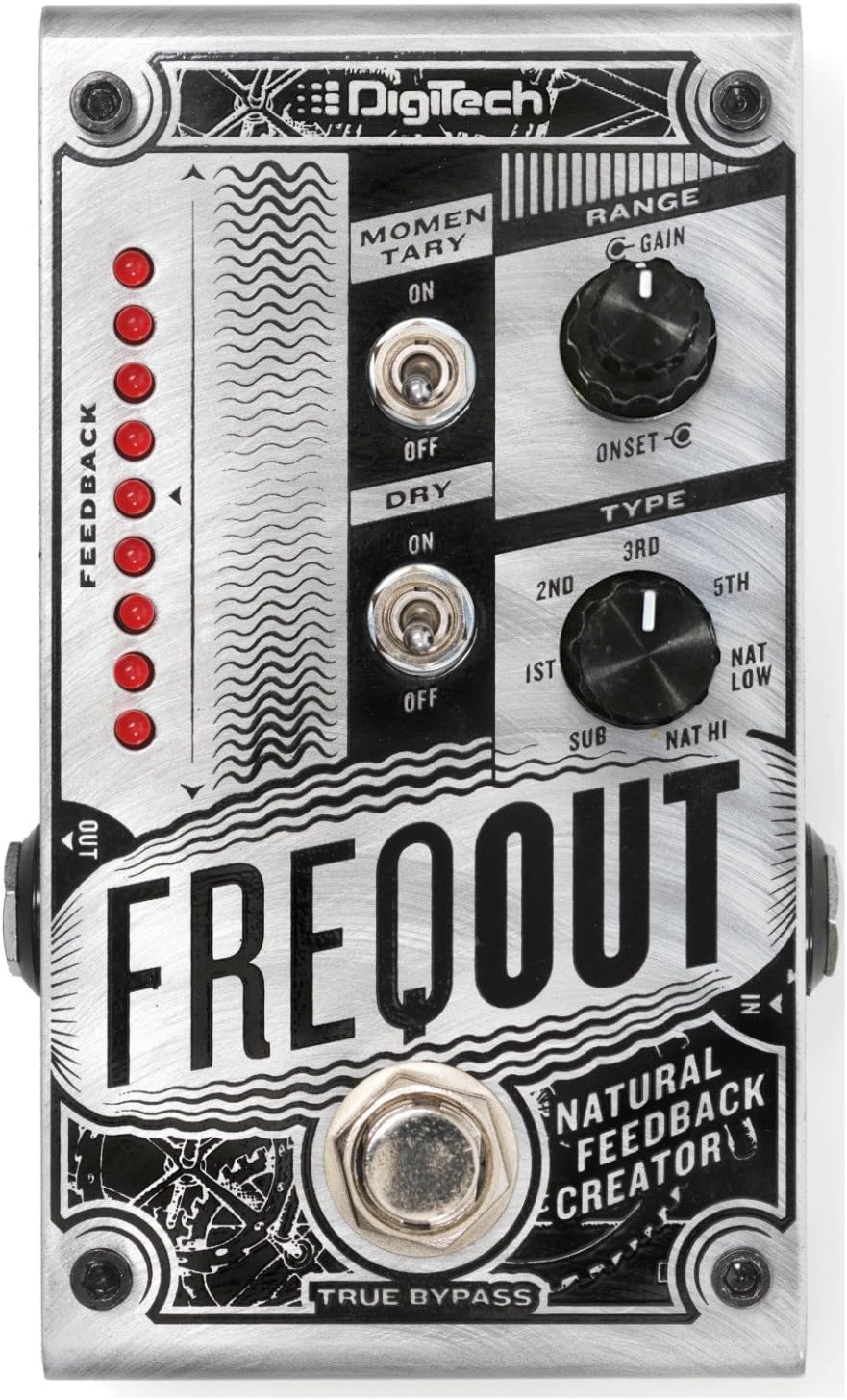
Figure 1: Top-down view of the DigiTech FreqOut pedal, showing the input and output jacks on the sides, along with control knobs and switches on the top panel.
3. Operation
Understanding the controls and modes of your FreqOut pedal is essential for achieving desired feedback effects.
3.1 Controls Overview

Figure 2: Angled view of the DigiTech FreqOut pedal, highlighting the control knobs (Onset, Gain, Type) and toggle switches (Momentary/Latching, Dry On/Off).
- ONSET Knob: Controls the delay before the feedback effect begins. Turning it clockwise increases the delay, making the feedback appear more gradually.
- GAIN Knob: Adjusts the level of the feedback effect relative to your dry signal. Use this to balance the feedback intensity.
- TYPE Knob: Selects the harmonic mode for the feedback.
- SUB: Generates feedback an octave below the fundamental.
- 1ST: Generates feedback at the fundamental frequency.
- 2ND: Generates feedback at the second harmonic (octave up).
- 3RD: Generates feedback at the third harmonic (octave and a fifth up).
- 5TH: Generates feedback at the fifth harmonic (two octaves up).
- NAT LOW: Natural low harmonic feedback.
- NAT HI: Natural high harmonic feedback.
- MOMENTARY/LATCHING Switch: Determines the footswitch behavior.
- MOMENTARY: The effect is active only while the footswitch is held down. Releasing the footswitch deactivates the effect.
- LATCHING: Pressing the footswitch activates the effect, and pressing it again deactivates it.
- DRY ON/OFF Switch: Controls whether your dry (unaffected) guitar signal is present in the output.
- ON: Both dry signal and feedback effect are present.
- OFF (Dry Kill): Only the feedback effect is present, removing the dry signal.
- FOOTSWITCH: Activates or deactivates the FreqOut effect based on the MOMENTARY/LATCHING switch setting.
- FEEDBACK LED Array: Indicates the intensity and presence of the feedback effect.
3.2 Basic Usage
- Set the MOMENTARY/LATCHING switch to your preferred mode.
- Set the DRY ON/OFF switch to ON if you want your dry signal mixed with the feedback, or OFF for feedback only.
- Choose a harmonic mode using the TYPE knob. Start with "1ST" for fundamental feedback.
- Adjust the ONSET knob to control how quickly the feedback appears. A lower setting means faster feedback.
- Adjust the GAIN knob to set the feedback volume.
- Engage the footswitch and play a note or chord. Experiment with different settings to find your desired feedback sound.
4. Maintenance
To ensure the longevity and optimal performance of your DigiTech FreqOut pedal, follow these general maintenance guidelines:
- Cleaning: Wipe the pedal with a soft, dry cloth. Avoid using abrasive cleaners or solvents, which can damage the finish and internal components.
- Storage: Store the pedal in a cool, dry place away from direct sunlight, extreme temperatures, and high humidity.
- Connections: Periodically check all cable connections for wear and tear. Ensure jacks are free of dust and debris.
- Power Supply: Always use a compatible 9VDC power supply with the correct polarity and current rating.
5. Troubleshooting
If you encounter issues with your FreqOut pedal, consult the following troubleshooting tips:
- No Sound:
- Ensure the power supply is correctly connected and functioning.
- Check all instrument cables for proper connection and integrity.
- Verify that your guitar and amplifier are working correctly.
- If the DRY ON/OFF switch is set to OFF, ensure the effect is engaged and the GAIN knob is not at minimum.
- No Feedback Effect:
- Confirm the pedal is engaged (footswitch activated).
- Check the GAIN knob setting; increase it to hear the effect.
- Adjust the ONSET knob; if set too high, the feedback may take too long to appear.
- Experiment with different TYPE settings.
- Unwanted Noise/Hum:
- Ensure you are using a regulated, isolated power supply.
- Check for faulty cables.
- Try moving the pedal away from other electronic devices that might cause interference.
6. Specifications
| Feature | Detail |
|---|---|
| Brand | DigiTech |
| Model Name | FreqOut |
| Model Number | FREQOUT-UK1 |
| Voltage | 9VDC |
| Amperage | 300mA (minimum) |
| Audio Output Effects | Feedback |
| Controls Type | Knob, Push Button (Toggle Switches) |
| Power Source | Corded Electric (External Power Supply) |
| Hardware Interface | 1/4-inch Audio Jacks |
| Signal Format | Analog |
| Sound Profile | Natural |
| Item Dimensions | Approximately 3 x 8 x 10 inches (L x W x H) |
| UPC | 607595975784 |
7. Warranty and Support
For warranty information, technical support, or further inquiries regarding your DigiTech FreqOut pedal, please contact DigiTech customer service or visit their official website.
You can find more information about DigiTech products and support on the DigiTech Store on Amazon.