
Introduction
This manual provides instructions for the ZdalaMit RMT-10 replacement remote control. This remote is designed to function as a direct replacement for original Westinghouse TV remote controls, offering immediate functionality without the need for programming or pairing. Simply insert batteries, and it is ready for use.
Compatible Westinghouse TV Models:
- SK-26H640G
- SK-26H735S
- SK-26H730S
- SK-32H640G
- SK26H640G
- SK26H735S
- SK26H730S
- SK32H640G
Setup: Battery Installation
The RMT-10 remote control requires two (2) AAA alkaline batteries for operation. Batteries are not included with the remote control.
- Locate the battery compartment on the back of the remote control.
- Slide the battery compartment cover downwards or outwards to open it.
- Insert two new 1.5V AAA alkaline batteries, ensuring the positive (+) and negative (-) terminals align correctly with the markings inside the compartment.
- Replace the battery compartment cover by sliding it back into place until it clicks securely.
Once batteries are installed, the remote control is ready for immediate use with compatible Westinghouse TV models. No programming or pairing is required.

Figure 1: Front view of the ZdalaMit RMT-10 replacement remote control. This image displays the layout of all buttons, including power, number keys, volume, channel, input, and navigation controls.
Operating Instructions
The RMT-10 remote control is designed for intuitive operation, mirroring the functions of your original Westinghouse TV remote. Point the remote directly at your television's infrared receiver for optimal performance.
Basic Functions:
- Power Button (⏻): Turns the television on or off.
- Number Buttons (0-9): Directly select TV channels.
- Volume Up/Down (Vol +/-): Adjusts the audio volume level.
- Channel Up/Down (Ch +/-): Changes the television channel sequentially.
- Input Button: Cycles through available input sources (e.g., HDMI, Video, PC).
- Navigation Pad (Up, Down, Left, Right, Enter): Used to navigate menus and confirm selections on the TV screen.
- Mute Button (🔇): Mutes or unmutes the television audio.
Advanced Functions:
- HDMI, YPbPr, Video, PC Buttons: Direct access buttons for specific input sources.
- CC (Closed Captioning): Toggles closed captions on or off.
- Sleep (zZz): Activates the TV's sleep timer function.
- Info (i): Displays information about the current program or input.
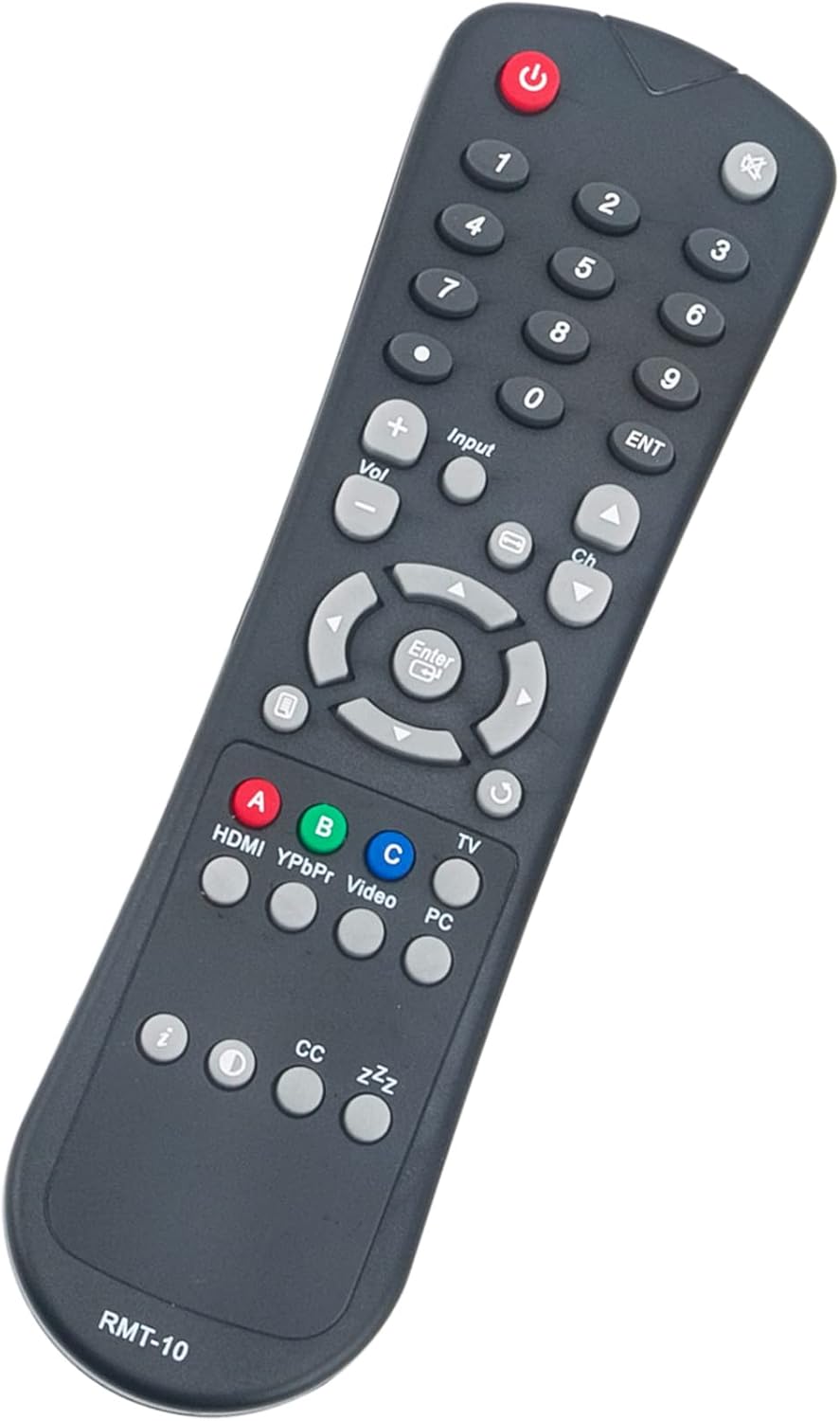
Figure 2: Angled view of the ZdalaMit RMT-10 remote control, highlighting the ergonomic design and button placement for easy access to common functions.
Maintenance
Proper care and maintenance will extend the life of your remote control.
- Battery Replacement: Replace batteries when the remote's performance degrades or stops working. Always replace both batteries simultaneously with new 1.5V AAA alkaline batteries. Do not mix old and new batteries, or different types of batteries.
- Cleaning: To clean the remote, gently wipe its surface with a soft, dry cloth. For stubborn dirt, slightly dampen the cloth with water or a mild, non-abrasive cleaner. Avoid using harsh chemicals or abrasive materials, as these can damage the remote's finish or internal components.
- Storage: Store the remote in a dry place, away from direct sunlight, extreme temperatures, and high humidity. If the remote will not be used for an extended period, it is advisable to remove the batteries to prevent leakage.
- Avoid Drops: Protect the remote from physical impact. Dropping the remote can damage internal circuitry or external casing.
Troubleshooting
If your ZdalaMit RMT-10 remote control is not functioning as expected, please refer to the following common issues and solutions:
- Remote is not responding:
- Ensure the batteries are inserted correctly with the correct polarity (+/-).
- Replace the batteries with new 1.5V AAA alkaline batteries.
- Check for any obstructions between the remote control and the TV's infrared sensor. Ensure you are pointing the remote directly at the TV.
- Verify that the TV is powered on.
- Some buttons are not working:
- This could indicate low battery power. Try replacing the batteries.
- Ensure there is no physical debris or stickiness preventing the button from making contact.
- Remote works intermittently:
- This often indicates weak batteries. Replace them.
- Ensure there are no strong light sources (like direct sunlight or fluorescent lights) interfering with the infrared signal.
If the issue persists after following these steps, please refer to the Support section for further assistance.
Specifications
| Model Number | RMT-10-ZDLMT |
| Brand | ZdalaMit |
| Compatible Devices | Westinghouse LCD HDTVs (SK-26H640G, SK-26H735S, SK-26H730S, SK-32H640G, etc.) |
| Power Supply | 2 x 1.5V AAA Alkaline Batteries (Not Included) |
| Product Dimensions | 7.15 x 1.99 x 0.55 inches |
| Item Weight | 2 ounces |
| Special Feature | Pre-Programmed (No setup required) |
| Color | Black |
Warranty and Support
Warranty Information:
Specific warranty details for this replacement remote control are not provided in this manual. Please refer to the product packaging or the retailer's purchase terms for any applicable warranty information.
Customer Support:
For any questions, concerns, or issues not covered in this manual, please contact the seller or manufacturer directly. They can provide further assistance and support for your ZdalaMit RMT-10 remote control.
"Please feel free to contact us if you have any query, thanks!"