
1. Important Safety Instructions
Read all safety warnings and instructions carefully before operating this device. Failure to follow these instructions may result in electric shock, fire, or serious injury.
- Power Supply: The Sunkko 788H requires a robust power supply. The rated current of the leakage protection switch should be over 60A. Use of this device with standard household circuits (typically 20A maximum) is not recommended and may cause circuit breakers to trip or damage to the electrical system.
- Ventilation: Operate the welder in a well-ventilated area to prevent overheating and accumulation of fumes.
- Eye Protection: Always wear appropriate eye protection (e.g., welding goggles or face shield) to protect against sparks and intense light.
- Electrical Safety: Do not operate the device with wet hands or in damp conditions. Ensure all connections are secure before powering on.
- Electrode Handling: Electrodes can become hot during operation. Allow them to cool before handling or adjusting.
- Children and Pets: Keep the device out of reach of children and pets.
- Proper Use: Use the device only for its intended purpose of spot welding and battery charging/testing.
2. Package Contents
Verify that all items listed below are included in your package. If any items are missing or damaged, please contact your supplier.
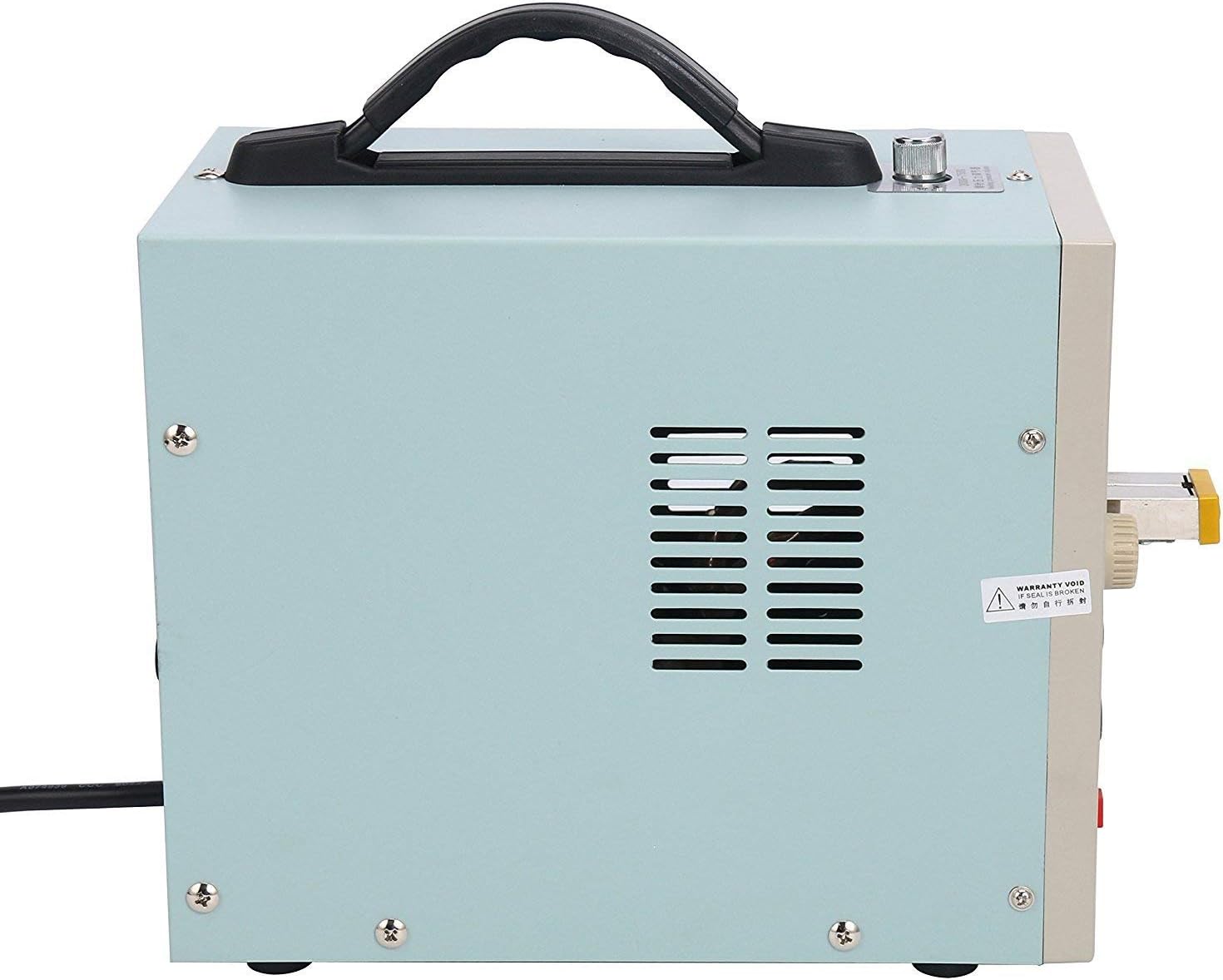
Image: Overview of the Sunkko 788H spot welder and its standard included parts.
- Sunkko 788H Spot Welder Unit (1 set)
- User Manual (1 pc)
- Hex Wrench (1 pc)
- Fuse Tube (2 pcs)
- Welding Pins (2 pairs)
- Charging Wires (2 pcs)
- Fixture for 6 Batteries (1 pc)
- Nickel Sample Strips (100 pcs)
- Foot Pedal Switch (1 pc)
- Power Cable (1 pc)
3. Product Overview
The Sunkko 788H is a versatile dual-pulse spot welder and battery charger designed for assembling battery packs, particularly 18650 cells, and for general spot welding applications. It features precise microcomputer control for welding parameters and an adjustable charging function.
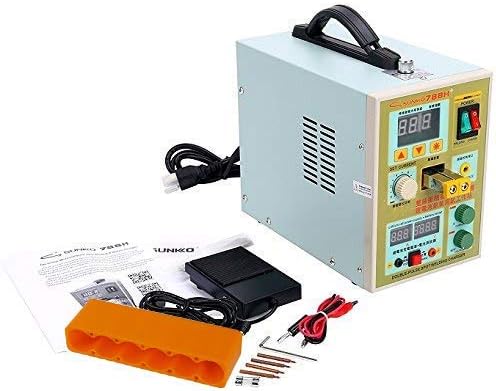
Image: The Sunkko 788H LED Dual Pulse Spot Welder and its accessories.

Image: Close-up of the Sunkko 788H front control panel, showing displays and adjustment knobs.
Key Features:
- Microcomputer controlled dual-pulse spot welding.
- Adjustable welding current (50-800A) and pulse time (1ms-19ms).
- Integrated battery charger with adjustable voltage (4.2-36V) and current (0-3A).
- Battery testing function to measure voltage.
- Foot pedal for precise welding control.
- Adjustable welding pressure knob for consistent welds.
4. Setup
Follow these steps to set up your Sunkko 788H unit before first use.
- Unpacking: Carefully remove all components from the packaging. Retain packaging for future storage or transport.
- Placement: Place the unit on a stable, flat, and non-flammable surface in a well-ventilated area. Ensure there is adequate space around the unit for air circulation.
- Power Connection: Connect the power cable to the unit and then to a suitable 110V AC, 60Hz power outlet. Ensure the circuit can handle the required current (over 60A recommended).
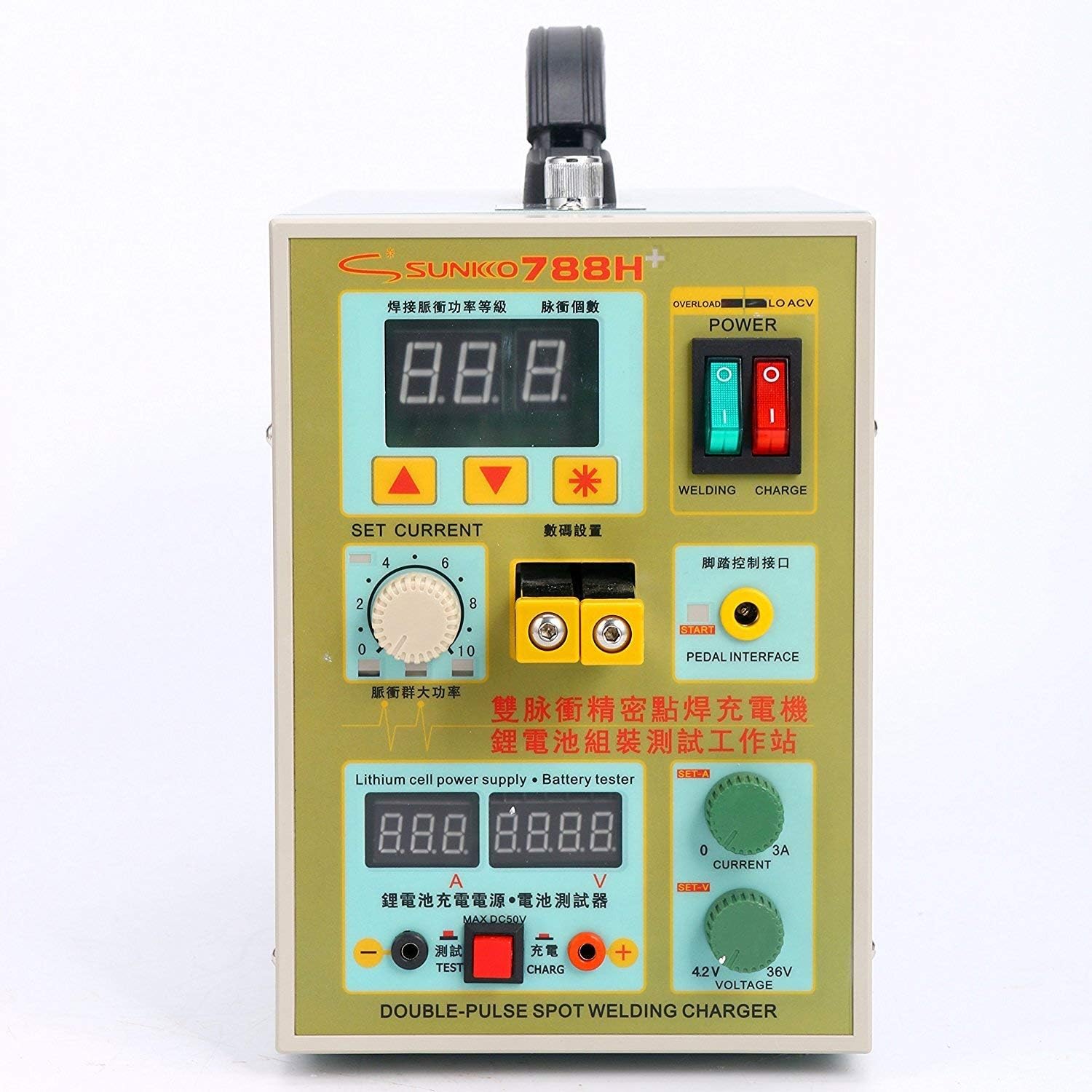
Image: Side view of the Sunkko 788H, showing ventilation and power input location.
- Install Welding Pins: Insert the welding pins into the designated slots on the front of the unit. Secure them firmly using the provided hex wrench. Ensure the tips are aligned and clean.

Image: Close-up of the welding terminals on the Sunkko 788H, where welding pins are inserted.
- Connect Foot Pedal: Plug the foot pedal switch into the 'PEDAL INTERFACE' port on the front panel.
- Adjust Welding Pressure: Use the knob on top of the unit to adjust the welding pressure. This knob controls the force applied by the welding pins. A typical range is 300g-750g. Adjust based on material thickness and desired weld quality.

Image: Close-up of the welding pressure adjustment knob located on the top of the Sunkko 788H unit.
5. Operating Instructions
5.1 Spot Welding Function
The 788H offers precise control over welding parameters for various materials, primarily nickel strips for battery pack assembly.
- Power On: Flip the 'POWER' switch to the ON position. The display will illuminate.
- Select Welding Mode: Ensure the 'WELDING / CHARGE' switch is set to 'WELDING'.
- Set Current: Use the 'SET CURRENT' knob to adjust the welding current. The display shows the current level (e.g., 0-99). Start with lower settings and increase gradually. For 0.1-0.2mm nickel strips, typical settings range from 50-800A.
- Set Pulse Mode: The unit supports single or dual pulse welding. Adjust the pulse setting based on the material thickness and desired weld strength. Dual pulse is generally recommended for stronger, more consistent welds.
- Prepare Materials: Clean the surfaces to be welded. Place the nickel strip over the battery terminal or other material.
- Position Electrodes: Carefully position the welding pins onto the nickel strip, ensuring both pins make firm contact with the strip and the underlying material.
- Initiate Weld: Press the foot pedal to initiate the weld. The unit will deliver the set pulse(s).
- Inspect Weld: After welding, inspect the joint for strength and appearance. Adjust current and pulse settings as needed. For pure nickel strips, 0.1-0.15mm thickness is typically supported effectively.
5.2 Battery Charging Function
The 788H can also function as an adjustable battery charger.
- Select Charging Mode: Flip the 'WELDING / CHARGE' switch to 'CHARGE'.
- Connect Battery: Use the provided charging wires to connect the battery to the 'CHARGE' terminals (red for positive, black for negative).
- Set Voltage: Use the 'VOLTAGE' knob to set the desired charging voltage (4.2V - 36V). Ensure this matches the battery's nominal voltage.
- Set Current: Use the 'CURRENT' knob to set the desired charging current (0A - 3A). A common charging rate is 0.5C to 1C of the battery's capacity.
- Monitor Charging: The display will show the current voltage and current. Monitor the charging process and disconnect the battery once fully charged to prevent overcharging.

Image: Close-up of the battery charging and testing terminals on the Sunkko 788H.
5.3 Battery Testing Function
The unit can also test the voltage of connected batteries.
- Select Test Mode: Ensure the 'WELDING / CHARGE' switch is set to 'CHARGE'.
- Connect Battery: Connect the battery to the 'TEST' terminals using the charging wires.
- Read Voltage: The display will show the current voltage of the connected battery. This can be used to check the battery's state of charge or identify faulty cells.
6. Maintenance
Regular maintenance ensures the longevity and optimal performance of your Sunkko 788H.
- Cleaning: Keep the unit clean and free from dust and debris. Use a dry, soft cloth for cleaning. Do not use liquid cleaners.
- Electrode Care: Regularly inspect the welding pins for wear or carbon buildup. Clean or sharpen the tips as needed to ensure good contact and consistent welds. Replace worn-out pins promptly.
- Ventilation: Ensure the ventilation slots on the unit are not blocked to prevent overheating.
- Storage: When not in use, store the unit in a dry, cool place away from direct sunlight and moisture.
7. Troubleshooting
This section addresses common issues you might encounter with the Sunkko 788H.
| Problem | Possible Cause | Solution |
|---|---|---|
| Unit does not power on. | No power supply; Power switch off; Blown fuse. | Check power cable connection; Ensure power switch is ON; Check and replace fuse (20A). |
| Weak or no weld. | Insufficient current setting; Dirty/worn electrodes; Poor contact; Incorrect material. | Increase 'SET CURRENT'; Clean or sharpen electrode tips; Ensure firm contact with material; Use pure nickel strips for best results. |
| Circuit breaker trips during welding. | Power supply circuit is insufficient (less than 60A); Overload. | Ensure the power circuit has a rated current of over 60A; Reduce welding current setting. |
| Battery not charging. | Incorrect charging mode; Loose connections; Voltage/current set too low. | Ensure 'CHARGE' mode is selected; Check charging wire connections; Adjust 'VOLTAGE' and 'CURRENT' knobs. |
8. Technical Specifications
| Specification | Value |
|---|---|
| Model | 788H |
| Power Supply | 110V AC, 60Hz |
| Primary Current | 2 - 15 A |
| Welding Current | 50 - 800 A |
| Pulse Time | 1 ms - 19 ms (adjustable) |
| Charging Voltage | 4.2 - 36 V (adjustable) |
| Charging Current | 0 - 3 A (adjustable) |
| Welding Thickness | 0.1 - 0.2 mm (for nickel-plated steel); 0.1 - 0.15 mm (for pure nickel) |
| Weight | 4.3 kg (unit only); 4.97 kg (packaged) |
| Dimensions (L x W x H) | 140 x 245 x 200 mm (unit only); 33.78 x 26.67 x 18.54 cm (packaged) |
9. Warranty and Support
Specific warranty information for the Sunkko 788H is not provided in the product details. For any warranty claims, technical support, or service inquiries, please contact the original seller or manufacturer directly. Retain your proof of purchase for any potential claims.