
Introduction
This manual provides essential information for the safe and efficient use of your Gikfun Mini DC R385 Water Pump. Please read these instructions carefully before operating the pump and retain this manual for future reference.
Safety Information
- Do not run continuously: This diaphragm pump is designed for experimental and intermittent use, not for continuous industrial operation. Prolonged continuous use may lead to overheating and damage.
- Voltage Range: Operate the pump within the specified DC 6-12V voltage range. Exceeding this range can cause damage to the motor.
- Liquid Compatibility: Ensure the liquid being pumped is compatible with the pump's materials (silicone). Avoid corrosive or highly viscous liquids unless specifically designed for them.
- Electrical Connections: Ensure all electrical connections are secure and correctly polarized (red wire for positive, white/gray for negative). Incorrect wiring can damage the pump or power source.
- Mounting: Use the provided mounting brackets to secure the pump, reducing vibration and noise.
- Supervision: Always supervise the pump during operation, especially during initial setup or when used in experimental models.
Product Overview
The Gikfun Mini DC R385 Water Pump is a compact diaphragm pump suitable for various small-scale liquid transfer applications. Its design incorporates a black silicone case for shock absorption and noise reduction.

Image: Overview of the Gikfun Mini DC R385 Water Pump, showing its compact design and mounting points.
Key Features:
- DC 6-12V operation.
- Maximum flow rate of 1.5-1.8 L/Min.
- Compact size: 95mm(L) x 47mm(W) x 36mm(H).
- Inlet pipe diameter: 5mm.
- Black silicone case for shockproof and silent operation.
- Suitable for experimental models, car washing, watering, and mineral water filling.

Image: The Gikfun Mini DC R385 Water Pump shown with its detachable black mounting brackets, which help secure the pump and reduce vibration.

Image: Close-up view of the motor end of the Gikfun Mini DC R385 Water Pump, highlighting the heat dissipation holes for optimal performance.
Specifications
| Parameter | Value |
|---|---|
| Working Voltage | DC 6-12V |
| Maximum Flow Rate | 1.5-1.8 L/Min (0.04 Gallons Per Minute) |
| Maximum Lifting Height | 5 Meters |
| Pump Size (L x W x H) | 95mm x 47mm x 36mm (Approx. 3.74"L x 1.85"W x 1.42"H) |
| Inlet Pipe Diameter | 5mm (Inner Diameter) |
| Outer Diameter of Nozzles | 8.5mm |
| Material | Silicone (for casing) |
| Item Weight | 110 Grams (3.88 ounces) |
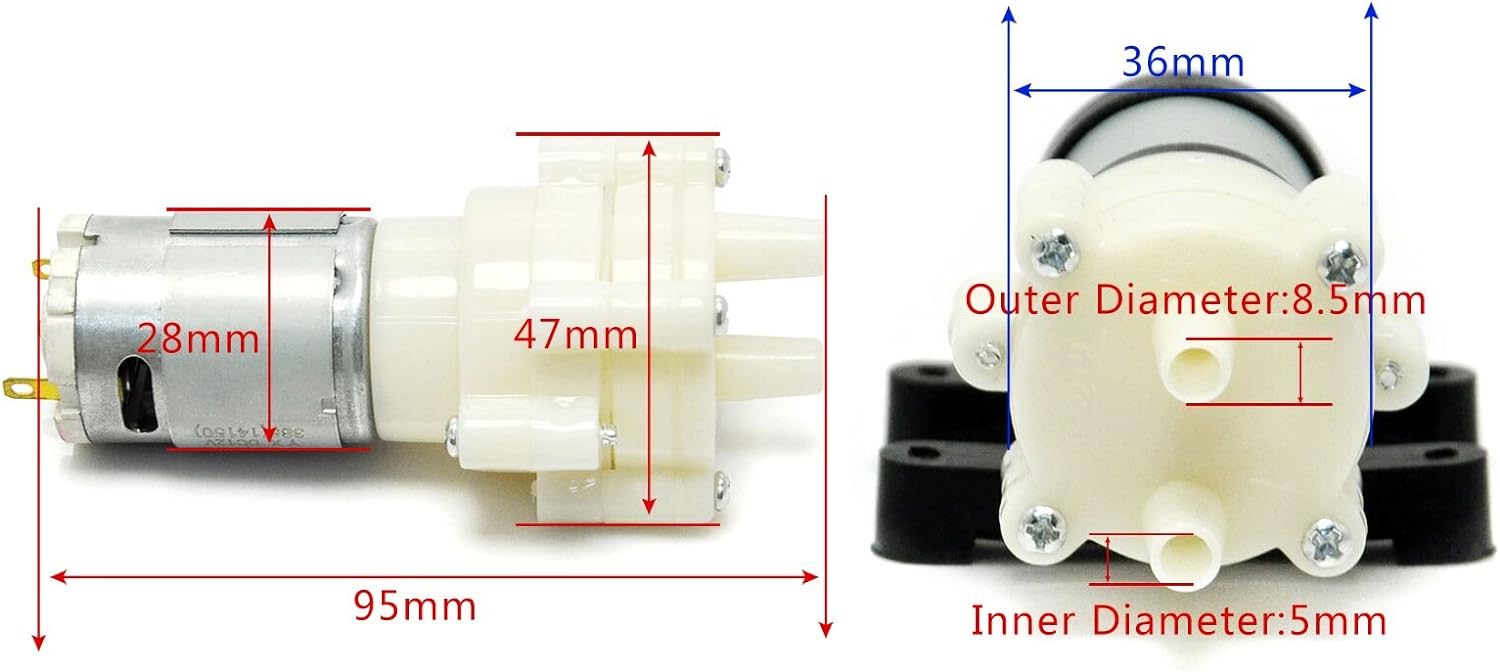
Image: Detailed dimensions of the Gikfun Mini DC R385 Water Pump, showing length, width, height, and inlet/outlet diameters.
Setup
- Unpack: Carefully remove the pump and any accessories from the packaging.
- Attach Tubing: Connect appropriate tubing (with an inner diameter of 5mm) to the inlet and outlet nozzles of the pump. Ensure a snug fit to prevent leaks.
- Position Pump: Place the pump in a stable location. The black silicone case provides shock absorption, but securing it with the mounting brackets is recommended for long-term use.
- Connect Power: Connect the red wire to the positive (+) terminal of your DC power supply (6-12V) and the white/gray wire to the negative (-) terminal. Ensure the power supply is off before connecting.
- Submerge Inlet: Place the inlet tube into the liquid source.
- Prepare Outlet: Direct the outlet tube to the desired destination for the liquid.
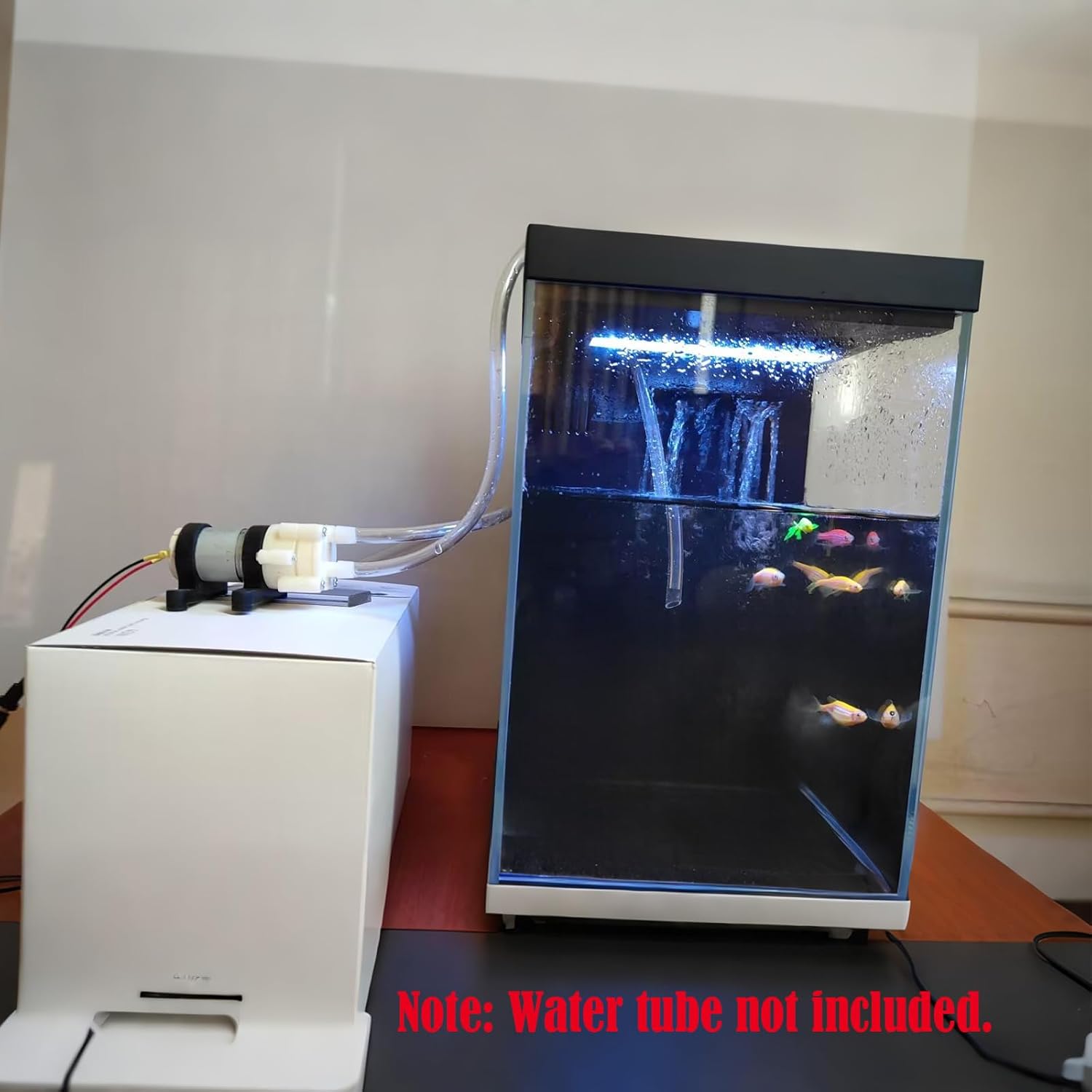
Image: The Gikfun Mini DC R385 Water Pump connected with clear tubing, demonstrating a typical setup for liquid transfer between containers.
Setup Demonstration Video:
Video: A demonstration of connecting the Gikfun R385 Water Pump to tubing and a power source for liquid transfer. This video illustrates the basic setup process.
Operating Instructions
- Power On: Once all connections are secure and tubing is in place, turn on the DC power supply. The pump should begin to operate.
- Priming: This pump is generally self-priming. If it does not start pumping immediately, ensure the inlet tube is fully submerged and there are no significant air pockets in the tubing. A slight tilt or gentle shaking of the pump may help dislodge air.
- Monitor Flow: Observe the liquid flow. The pump is designed for a maximum flow of 1.5-1.8 L/Min.
- Power Off: When liquid transfer is complete or if you need to stop the pump, turn off the DC power supply.
Operation Demonstration Video:
Video: A demonstration of the Gikfun R385 Water Pump in operation, showing liquid being transferred. This video highlights the pump's functionality and flow.
Maintenance
- Cleaning: After use, especially with non-water liquids, flush the pump with clean water to prevent residue buildup.
- Inspection: Periodically inspect the tubing for kinks, cracks, or blockages. Check electrical connections for corrosion or looseness.
- Storage: Store the pump in a dry, cool place away from direct sunlight and extreme temperatures.
- Avoid Continuous Operation: As noted in safety, avoid running the pump continuously for extended periods to prolong its lifespan.
Troubleshooting
| Problem | Possible Cause | Solution |
|---|---|---|
| Pump does not start | No power, incorrect wiring, faulty power supply. | Check power connections, ensure correct polarity, test power supply. |
| No liquid flow or weak flow | Air in system, clogged tubing, inlet not submerged, incorrect voltage. | Ensure inlet is submerged, check for and remove air bubbles, clear any blockages in tubing, verify voltage is within 6-12V. |
| Excessive noise or vibration | Loose mounting, air in pump, pump running dry. | Securely mount the pump, ensure liquid is flowing, avoid dry running. |
| Leaking from connections | Loose tubing, incorrect tubing size, damaged nozzle. | Ensure tubing is securely attached, use tubing with 5mm inner diameter, inspect nozzles for damage. |
Warranty and Support
For warranty information or technical support, please contact Gikfun customer service through the retailer where the product was purchased or visit the official Gikfun website. Please have your model number (EK1856) and purchase details ready when contacting support.