1. Introduction
Thank you for choosing the TN TONNY TE1-0175 6-inch Clip-on/Table Fan. This fan is designed to provide personal cooling with its dual-use functionality, allowing it to be used as a clip-on fan or a desk fan. It features two adjustable speeds (LOW and HIGH) and an adjustable tilt fan head for optimal airflow direction. Please read this manual thoroughly before use to ensure proper operation and safety.

Image 1.1: The TN TONNY 6-inch Clip-on/Table Fan, showcasing its compact design and versatility.
2. Safety Instructions
To reduce the risk of fire, electric shock, or injury, please observe the following safety precautions:
- Always unplug the fan from the power outlet before cleaning, servicing, or when not in use.
- Do not operate the fan with a damaged cord or plug. If the cord or plug is damaged, contact qualified service personnel.
- Do not run the power cord under carpeting or cover it with throw rugs, runners, or similar coverings. Arrange the cord away from traffic areas where it will not be tripped over.
- Avoid inserting fingers or any objects into the fan grill when the fan is operating.
- Do not use the fan in wet or damp locations, such as bathrooms or laundry areas.
- This fan is for indoor use only. Do not use outdoors.
- Keep the fan away from curtains, drapes, or any objects that may be drawn into the fan blades.
- Ensure the fan is placed on a stable, level surface or securely clipped to a stable object to prevent it from tipping over.
- This appliance is not intended for use by persons (including children) with reduced physical, sensory or mental capabilities, or lack of experience and knowledge, unless they have been given supervision or instruction concerning use of the appliance by a person responsible for their safety.
3. Package Contents
Verify that all components are present in the package:
- 1 x TN TONNY 6-inch Fan Unit
- 1 x Clip Base
- 1 x Stand Base
- 1 x Mounting Screw and Nut
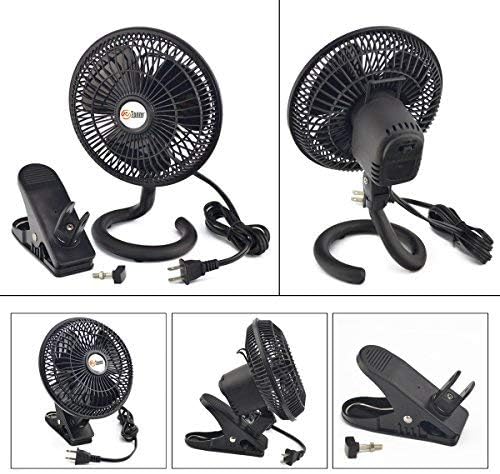
Image 3.1: All components included with the TN TONNY fan: the fan head, the clip base, the stand base, and the small screw and nut for attachment.
4. Setup and Assembly
The TN TONNY fan offers two methods of use: as a clip-on fan or a table fan. Assembly is required to attach the desired base.
4.1 Attaching the Base (Clip or Stand)
- Identify the fan head, the clip base, and the stand base.
- Select your preferred base (clip or stand).
- Align the chosen base with the mounting point on the back of the fan head.
- Insert the small screw through the fan head's mounting hole and into the corresponding hole on the base.
- On the other side, place the hexagon/round nut into its designated groove within the base.
- Screw in the screw by hand until it is securely tightened. No tools are required. Ensure the nut is properly seated in its groove to prevent loosening.
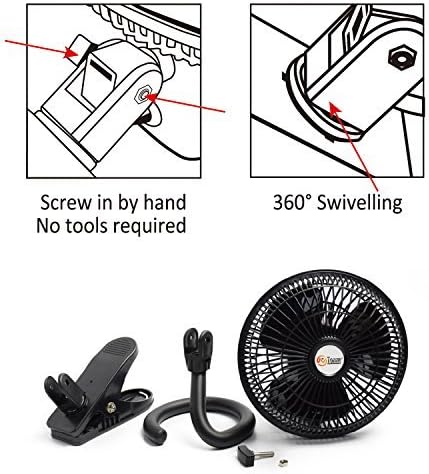
Image 4.1: Visual guide for attaching the base by hand-tightening the screw and illustrating the 360-degree swiveling capability of the fan head.
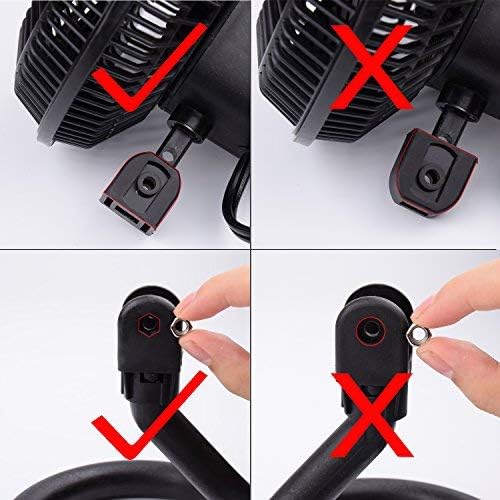
Image 4.2: Detailed view of the correct placement of the hexagon nut into its groove during assembly (bottom left) versus incorrect placement (bottom right), and correct screw insertion (top left) versus incorrect (top right).
4.2 Placement
- For Clip-on Use: Securely attach the clip to a stable surface such as a desk edge, shelf, or headboard. Ensure the clip has a firm grip and the fan is stable before operation.
- For Table Use: Place the fan with the stand base on a flat, stable surface.

Image 4.3: The TN TONNY fan securely clipped to the edge of a desk, demonstrating its clip-on functionality.
5. Operating Instructions
Follow these steps to operate your TN TONNY fan:
- Connect to Power: Plug the fan's 6-foot power cord into a standard AC 110V electrical outlet.
- Adjust Speed: Locate the speed control switch on the back of the fan unit. This fan has two speed settings: LOW and HIGH. Press the button to cycle through the speeds.
- Adjust Direction: The fan head can be tilted vertically and swiveled horizontally (360 degrees) to direct airflow precisely where needed. Gently adjust the fan head to your desired angle.
- Turn Off: Press the speed control button until the fan turns off. Unplug the fan when not in use for extended periods.
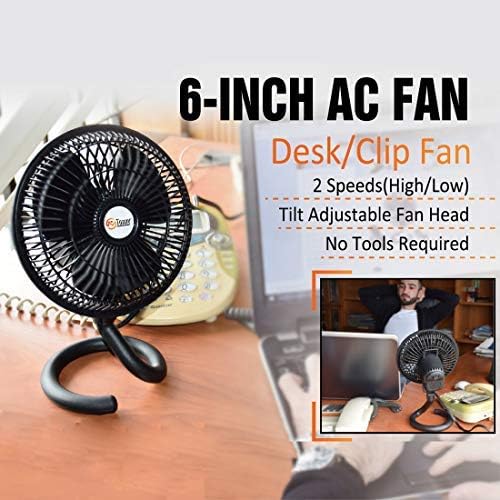
Image 5.1: The TN TONNY fan in desk mode, highlighting its 2-speed settings, tilt-adjustable fan head, and no-tools-required assembly.
6. Maintenance
Regular cleaning will help maintain the fan's performance and extend its lifespan.
- Before Cleaning: Always unplug the fan from the power outlet.
- Cleaning the Exterior: Use a soft, damp cloth to wipe down the exterior surfaces of the fan. Do not use abrasive cleaners or solvents, as these may damage the finish.
- Cleaning the Blades: The front grill can be carefully removed (refer to assembly instructions in reverse if necessary) to access the fan blades. Use a soft cloth or a vacuum cleaner with a brush attachment to remove dust and debris from the blades. Ensure the grill is securely reattached before operating the fan.
- Storage: When not in use, store the fan in a cool, dry place, preferably in its original packaging or covered to protect it from dust.
7. Troubleshooting
If you encounter issues with your fan, refer to the following common problems and solutions:
- Fan does not turn on:
- Ensure the power cord is securely plugged into a working AC 110V outlet.
- Check if the outlet is functional by plugging in another appliance.
- Verify that the speed control switch is set to either LOW or HIGH.
- Reduced airflow:
- Check for any obstructions around the fan grill or blades.
- Clean any dust or debris accumulated on the blades or grill (refer to Maintenance section).
- Unusual noise during operation:
- Ensure the fan is placed on a stable surface or securely clipped.
- Check for any loose parts or foreign objects inside the fan grill.
- Verify that the base is securely attached to the fan head as per assembly instructions.
If the problem persists after attempting these solutions, please contact customer support.
8. Specifications
| Feature | Specification |
|---|---|
| Brand | TN TONNY |
| Model Name | TE1-0175 |
| Color | Black |
| Electric Fan Design | Table Fan / Clip-on Fan |
| Power Source | AC |
| Product Dimensions | 7.3"D x 8.7"W x 7.7"H |
| Room Type | Bedroom, Office |
| Special Feature | Lightweight |
| Noise Level | 40 Decibels |
| Wattage | 30 watts |
| Number of Blades | 3 |
| Blade Length | 6 Inches |
| Voltage | 110V |
| Switch Type | Push Button |
| Item Weight | 1.98 Pounds |
| Included Components | Stand base and mounting clamp included |
| Indoor/Outdoor Usage | Indoor |
| Control Method | Touch (Push Button) |
| Number of Power Levels | 2 |
| UPC | 737353393045 |
9. Warranty and Support
For warranty information or technical support, please contact the seller or manufacturer directly. Keep your purchase receipt as proof of purchase.
Seller: TONNY TOOLS