
Introduction
This manual provides comprehensive instructions for the installation, operation, and maintenance of the CDC 7804DV Dishwasher Timer. This timer is designed for use with various professional dishwashers, including Kromo LUX-60, LUX-85, KP85-EL, Dihr tro500S, Electron500, Tekno6, and tro750Plus models. Please read this manual thoroughly before installation and use to ensure proper function and safety.
Product Overview
The CDC 7804DV is a robust timer unit essential for controlling wash cycles in compatible commercial dishwashers. It features a durable design and precise timing mechanisms.
- Model: CDC 7804DV
- Application: Professional Dishwashers
- Compatible Models: Kromo LUX-60, LUX-85, KP85-EL; Dihr tro500S, Electron500, Tekno6, tro750Plus
- Number of Chambers: 4
- Autonomy: 6 seconds / 3 minutes (cycle duration)
- Motor Type: M37LN/M37RN
- Voltage: 230 V
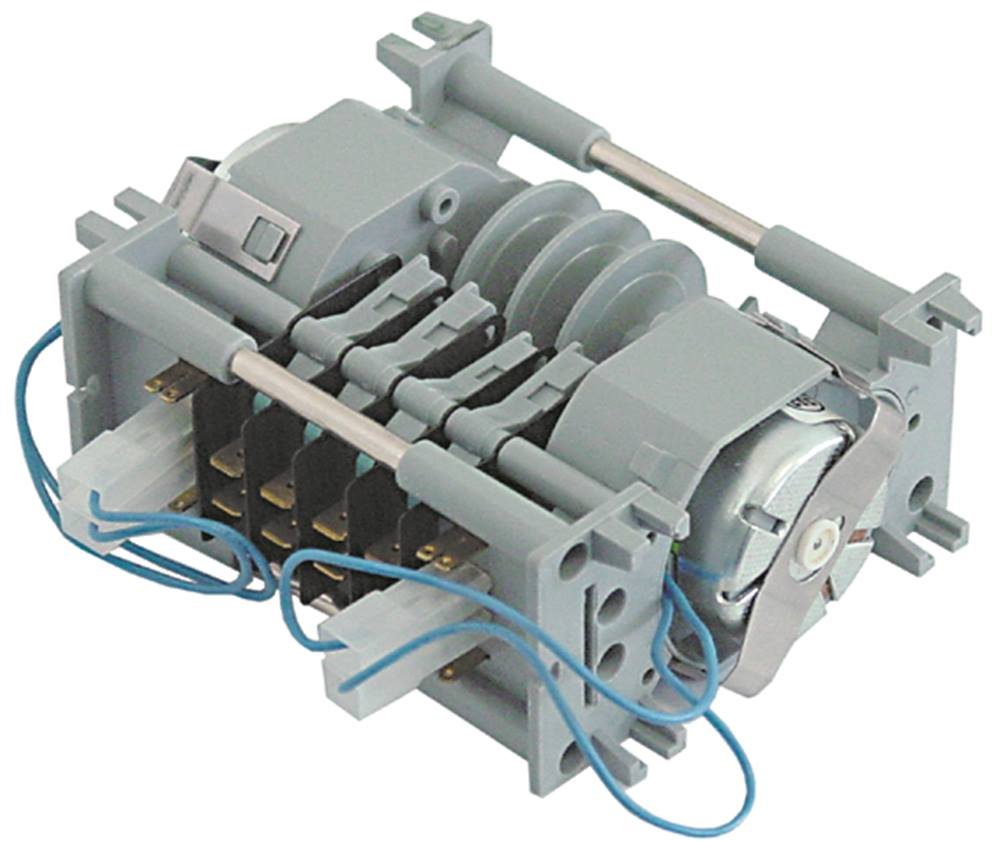
Figure 1: Front view of the CDC 7804DV Dishwasher Timer. This image shows the timer unit with its electrical connections and housing.
Safety Information
Always observe the following safety precautions during installation, operation, and maintenance:
- Disconnect power to the dishwasher before attempting any installation or maintenance.
- Installation should only be performed by qualified personnel.
- Ensure all electrical connections are secure and comply with local regulations.
- Do not operate the dishwasher if the timer or any other component is damaged.
- Keep hands and tools clear of moving parts during operation.
Installation
Follow these steps to correctly install the CDC 7804DV dishwasher timer:
- Power Disconnection: Turn off and unplug the dishwasher from the main power supply. Verify that no power is reaching the appliance.
- Access Timer Compartment: Locate and open the control panel or timer compartment of your dishwasher. Refer to your dishwasher's specific service manual for exact access procedures.
- Remove Old Timer (if applicable): Carefully disconnect all wires from the existing timer, noting their positions and connections. Take a photograph for reference if necessary. Remove the old timer from its mounting.
- Install New Timer: Mount the CDC 7804DV timer in the same position as the old unit. Ensure it is securely fastened.
- Connect Wiring: Reconnect the electrical wires to the new CDC 7804DV timer according to the wiring diagram provided with your dishwasher or the markings on the timer itself. Ensure all connections are tight and correct. The timer operates at 230V.
- Secure Compartment: Close and secure the timer compartment or control panel.
- Test Functionality: Reconnect the dishwasher to the main power supply. Initiate a wash cycle to confirm the timer functions correctly and controls the wash phases as expected.
Note: If you are unsure about any step, consult a qualified technician.
Operating Instructions
The CDC 7804DV timer is an internal component that controls the various stages of a dishwasher's wash cycle. Its operation is integrated with the dishwasher's main control system. There are no direct user controls on the timer itself.
To operate the dishwasher and, by extension, the timer:
- Load the dishwasher according to the manufacturer's instructions.
- Add appropriate detergent.
- Select the desired wash program on your dishwasher's control panel.
- Start the wash cycle. The CDC 7804DV timer will then automatically manage the timing of the wash, rinse, and drain phases, with an autonomy of 6 seconds for specific actions within a 3-minute cycle segment.
Maintenance
The CDC 7804DV timer is designed for durability and typically requires minimal maintenance. However, periodic checks can help ensure its longevity and reliable operation.
- Visual Inspection: Periodically inspect the timer and its connections for any signs of wear, corrosion, or loose wiring. Ensure the housing is intact.
- Cleaning: If accessible, gently clean any dust or debris from the timer's exterior using a soft, dry cloth. Do not use liquids or abrasive cleaners.
- Professional Check: During routine dishwasher maintenance by a qualified technician, request a check of the timer's functionality and electrical connections.
Caution: Always disconnect power before performing any inspection or cleaning.
Troubleshooting
If your dishwasher is experiencing issues related to cycle timing, the CDC 7804DV timer might be a factor. Here are some common symptoms and potential solutions:
| Symptom | Possible Cause | Solution |
|---|---|---|
| Dishwasher does not start cycle. | No power to the timer or dishwasher. Faulty timer motor. | Check power supply. Verify dishwasher door is closed properly. If power is present, the timer may need replacement by a technician. |
| Cycle gets stuck or does not advance. | Timer motor failure or internal mechanism fault. | This indicates a likely internal timer fault. Professional replacement is required. |
| Wash cycle is too short or too long. | Timer mechanism malfunction. | The timer's internal timing mechanism may be faulty. Consult a technician for diagnosis and replacement. |
| Unusual noises from timer area. | Worn timer motor or gears. | Discontinue use and have the timer inspected and replaced by a qualified technician. |
For issues not listed here or if troubleshooting steps do not resolve the problem, contact a certified service technician.
Specifications
| Feature | Detail |
|---|---|
| Model Number | 4251391390829 |
| Brand | CDC |
| Application | Dishwasher |
| Number of Chambers | 4 |
| Autonomy (Cycle Duration) | 6 seconds / 3 minutes |
| Motor Type | M37LN/M37RN |
| Voltage | 230 V |
| Compatible Dishwashers | Kromo LUX-60, LUX-85, KP85-EL; Dihr tro500S, Electron500, Tekno6, tro750Plus |
Warranty and Support
Information regarding the warranty for the CDC 7804DV timer is typically provided by the seller or the dishwasher manufacturer. Please refer to your purchase documentation or contact your supplier for specific warranty terms and conditions.
For technical support or service, please contact the authorized service center for your dishwasher model or the retailer from whom you purchased the timer. Ensure you have the product model number (4251391390829) and purchase details available when seeking support.