
Realspace Winsley
Realspace Modern Comfort Series Winsley Mid-Back Chair User Manual
Model: Winsley | Brand: Realspace
1. Product Overview
The Realspace Modern Comfort Series Winsley Mid-Back Chair is designed for comfort and style in any workspace. Featuring a sleek gray bonded leather upholstery and chic silver framing, this chair offers a modern aesthetic combined with ergonomic support.
Key Features:
- Bonded Leather Upholstery: Durable and easy-to-clean gray bonded leather.
- Built-in Lumbar Support: Designed to improve posture and provide comfort during extended use.
- Pneumatic Seat-Height Adjustment: Customize your seating position with ease.
- Adjustable Tilt Mechanism: Allows for adjustment of tilt angle, lock, and tension.
- Sturdy Metal Frame: Ensures durability and stability.
- Smooth-Rolling Casters: For effortless mobility across various floor surfaces.
- ANSI/BIFMA Compliant: Tested and verified for rigorous performance and safety standards.
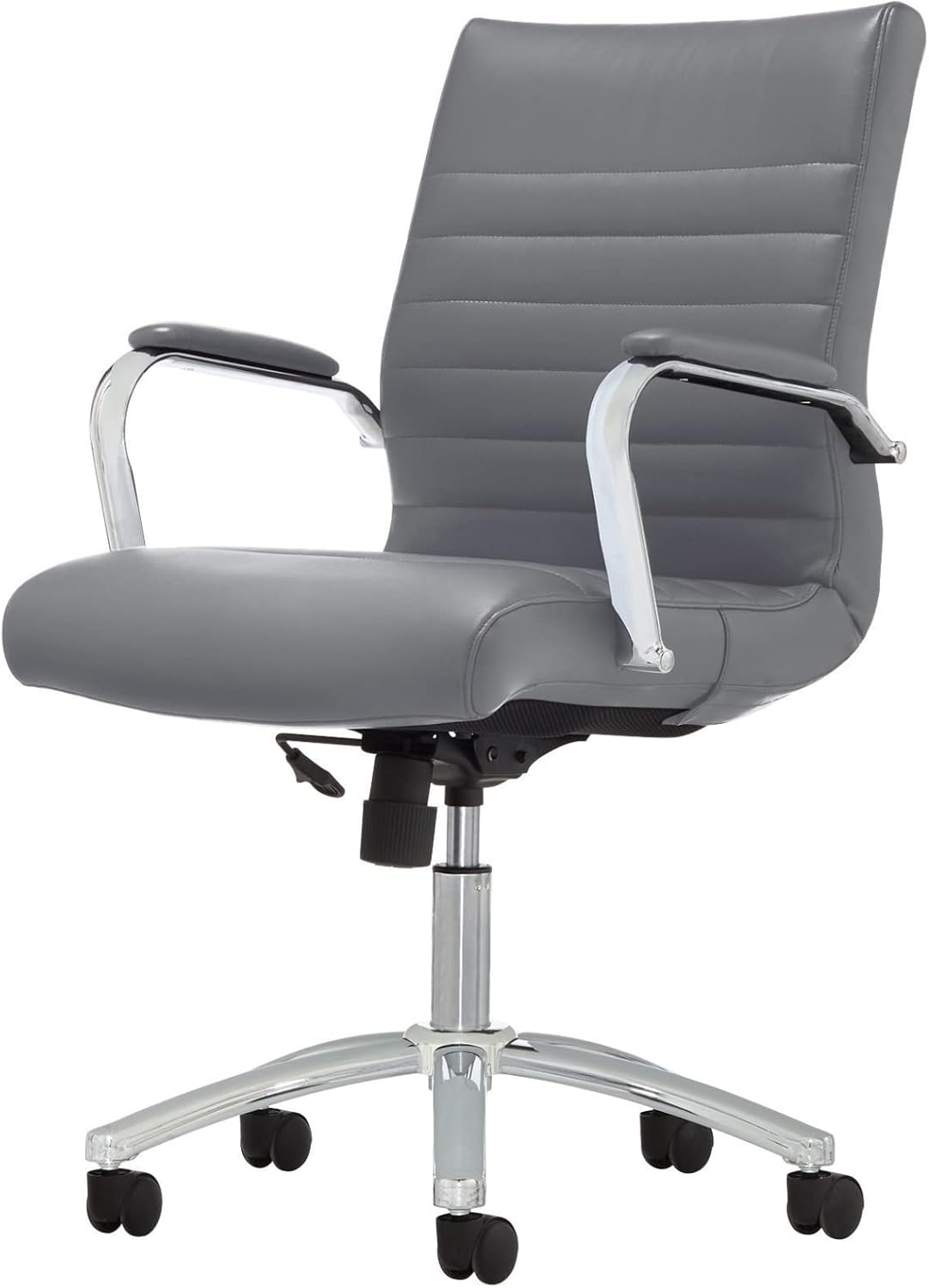
Figure 1: Realspace Winsley Mid-Back Chair, showcasing its sleek design and gray bonded leather.
2. Setup and Assembly
This chair is designed for DIY assembly. Please follow these steps carefully to ensure proper setup and stability. It is recommended to assemble the chair on a soft, clean surface to prevent damage.
Assembly Steps:
- Attach Casters to Base: Insert each caster into the holes at the end of each leg of the chair base until securely fitted.
- Insert Gas Lift Cylinder: Place the large end of the gas lift cylinder into the center hole of the assembled base.
- Attach Seat Mechanism: Secure the seat mechanism to the underside of the seat cushion using the provided screws. Ensure the front of the mechanism aligns with the front of the seat.
- Attach Arms: Fasten the armrests to both the seat cushion and the backrest using the appropriate screws. Do not overtighten initially.
- Connect Seat Assembly to Cylinder: Carefully place the assembled seat and backrest onto the top of the gas lift cylinder. Apply downward pressure to secure.
- Final Tightening: Once all components are in place, tighten all screws firmly.

Figure 2: View of the chair's base and adjustment lever, crucial for assembly and operation.
3. Operating Instructions
Familiarize yourself with the chair's adjustment features to optimize your comfort and ergonomic support.
Adjustments:
- Seat Height Adjustment: To raise the seat, lift the lever located under the right side of the seat while taking your weight off the chair. To lower the seat, lift the lever while seated. Release the lever at your desired height.
- Tilt Mechanism: The chair features an adjustable tilt.
- Tilt Lock: Push the lever inwards to lock the chair in an upright position. Pull the lever outwards to allow the chair to recline.
- Tilt Tension: Rotate the round knob located under the front-center of the seat to adjust the resistance of the tilt. Turn clockwise to increase tension (stiffer tilt) and counter-clockwise to decrease tension (looser tilt).
- Swivel and Mobility: The chair offers 360-degree swivel and smooth-rolling casters for easy movement around your workspace.

Figure 3: Detail of the chair's adjustable tilt mechanism and height adjustment lever.
4. Care and Maintenance
Proper care will extend the life and appearance of your Realspace Winsley chair.
- Cleaning Upholstery: For general cleaning, spot clean the bonded leather with a damp cloth and a mild soap solution. Avoid harsh chemicals or abrasive cleaners, as these can damage the material.
- Frame and Base: Wipe metal parts with a soft, dry cloth. For stubborn marks, a slightly damp cloth can be used, followed by immediate drying.
- Casters: Periodically check casters for accumulated dust, hair, or debris. Clean them to ensure smooth rolling and prevent floor damage.
- Fasteners: Regularly inspect all screws and bolts to ensure they are tight. Retighten as necessary to maintain stability and safety.
5. Troubleshooting
If you encounter any issues with your chair, refer to the following common problems and solutions:
| Problem | Possible Cause | Solution |
|---|---|---|
| Chair does not adjust height. | Gas lift cylinder malfunction or lever not engaged. | Ensure the height adjustment lever is fully engaged. If the issue persists, the gas lift cylinder may need replacement. |
| Chair wobbles or feels unstable. | Loose screws or improper assembly. | Check and tighten all assembly screws, especially those connecting the seat, back, and arms to the mechanism and base. |
| Casters do not roll smoothly. | Debris caught in casters or damaged casters. | Turn the chair over and remove any hair, dust, or debris from the casters. If damaged, casters may need replacement. |
| Chair squeaks when moving. | Friction between moving parts or loose connections. | Apply a small amount of silicone lubricant to moving parts, especially where metal components meet. Check and tighten all screws. |
6. Specifications
| Feature | Detail |
|---|---|
| Brand | Realspace |
| Model Name | Winsley |
| Product Dimensions | 27.76"D x 23.82"W x 39.37"H |
| Maximum Weight Recommendation | 250 Pounds |
| Material | Bonded Leather (Upholstery), Metal (Frame) |
| Color | Gray |
| Special Features | Built-in Lumbar Support, Pneumatic Seat-Height Adjustment, Adjustable Tilt Mechanism, Swivel, Casters |
| Compliance | ANSI/BIFMA Compliant |

Figure 4: Product dimensions for the Realspace Winsley Mid-Back Chair.
7. Warranty Information
For detailed warranty information regarding your Realspace Modern Comfort Series Winsley Mid-Back Chair, please refer to the documentation included with your purchase or contact Realspace customer support directly. Warranty terms and conditions may vary.
8. Customer Support
If you require further assistance, have questions about assembly, operation, or maintenance, please contact Realspace customer support. Contact details can typically be found on the manufacturer's website or on your purchase receipt.
You can also visit the Realspace Store on Amazon for more product information.
Related documentsWinsley

Ask a question about this manual
Ask about setup, troubleshooting, compatibility, parts, safety, or missing instructions. Manuals+ will review the question and use this page’s manual context to help answer it.